Hi everyone,
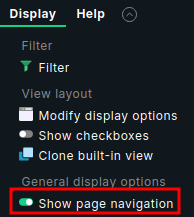
As working daily with Checkmk, there’s one minor UI behavior that has always slowed me down: opening a host, service, or dashboard in a new tab often results in a “naked” page, the content loads, but the sidebar and top navigation disappear.
To solve this, I’ve developed a lightweight browser extension for Edge (and Chrome) that ensures you always have your navigation context.
What it does:
Whenever you open a standalone Checkmk page (like view.py, dashboard.py, or wato.py) in a new tab, the extension automatically detects the missing navigation and redirects the URL to load inside the standard index.py framework. It preserves all your filters and query parameters, so you land exactly where you intended, just with the sidebar included.
Installation:
- Open Edge/Chrome and go to edge://extensions or chrome://extensions
- Enable Developer Mode.
- Click Load unpacked and select your folder.
GitHub: GitHub - withakedo/addon_checkmk_nav: Browser Extension: Checkmk Always-Navigation
Note: This is a community-made tool and not an official Checkmk product. Use it to streamline your workflow and let me know if you have any suggestions or improvements!
Happy monitoring,
Fynn