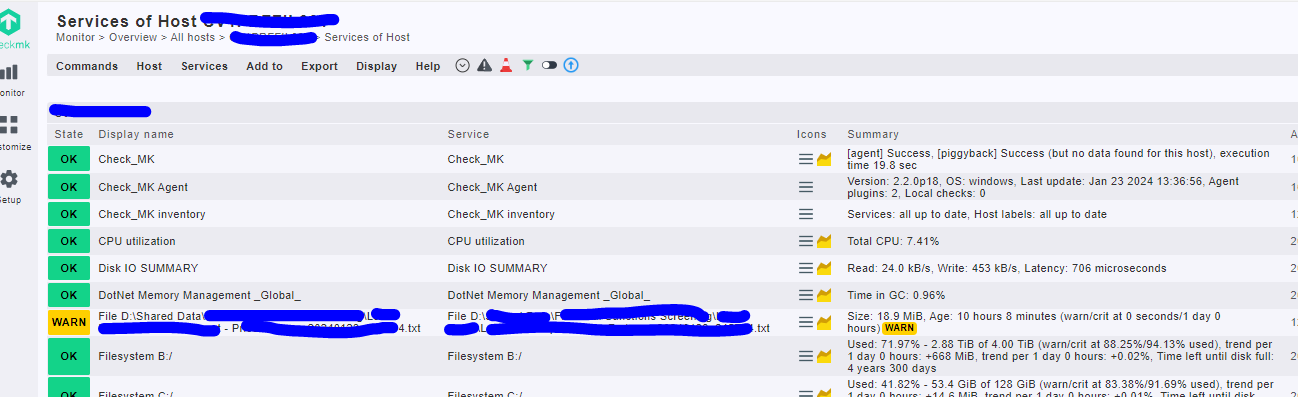
Hi,
Is it possible to edit the default ‘Host & Service Problems’ view/dashboard?
I want to add in the display name. I was able to do this from the hosts view as per below.
Hi,
Is it possible to edit the default ‘Host & Service Problems’ view/dashboard?
I want to add in the display name. I was able to do this from the hosts view as per below.
Hi Marc,
yes - you can clone the built-in view and then customize that clone. Read more here: Host and service views
Hi,
go to Customize → Dashboards, make a copy from “simple_problems”, edit then the layout from the new dashboard and add the colum alternative service name.
I was able to clone it and add this column in but how do I make this the default one then that all users see?
You can manage the visibility
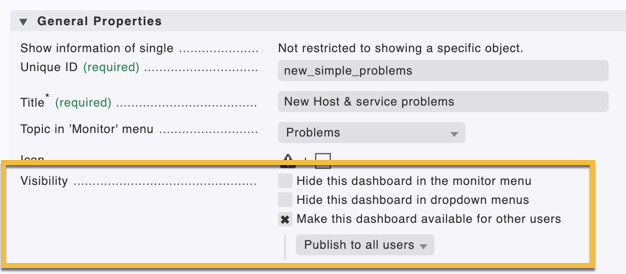
(Then every User can sie the Dashboard at the Dashboard List and can set it as Startdashboard)
You can set the Dashboard as Start Dashboard for all in the Global Settings.
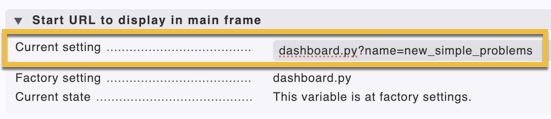
I can’t see this ‘Start URL…’ setting in my Global Settings?
I’m on the latest version 2.2.018p.
Can you be more specific where this is? I’ve gone into ‘Setup > General > Global Settings’.
Setup > General > Global Settings > User Interface > Start URL to display in main frame
I found it by typing in start url.
Thanks for your help.
How do you hide the default one?
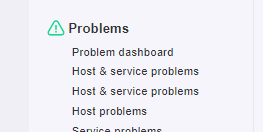
I guess I want the built in one removed from under ‘Problems’ and to only show me new one.
If the ID and the Title have the same name like the buildIn Dashboard, the “New” Dashboard is only shown in the List.
This topic was automatically closed 365 days after the last reply. New replies are no longer allowed. Contact an admin if you think this should be re-opened.