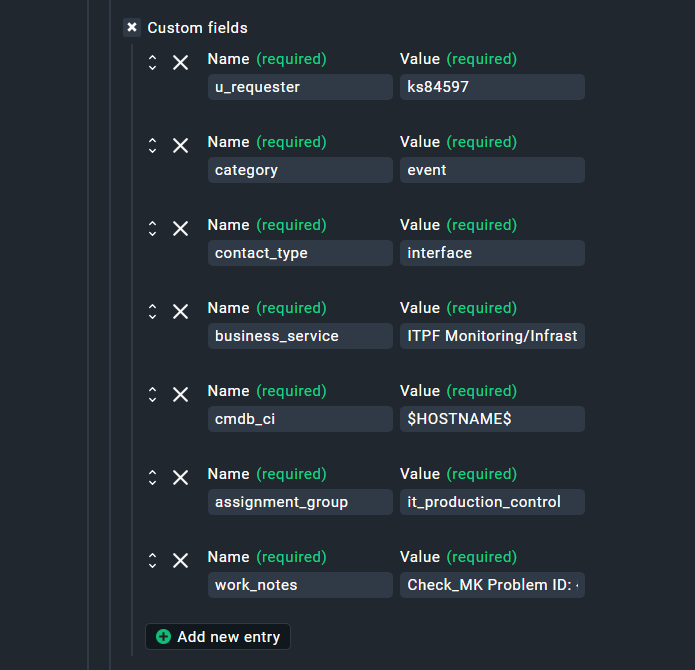
so also Punkt 1 ist ja schon im neuen SNOW Plugin mittels der custom_fields erledigt:
inwiefern dort Makros wie $HOSTNAME$, .. bzw.
Variablen aus dem Notification Script wie z. B.
@dataclass
class NotificationContext:
    hostname: str
    servicename: str
    problem_id: str
    ack_author: str
    ack_comment: str
    short_desc: str
    desc: str
verarbeitet werden
"work_notes" - "Check_MK Problem ID: {notification_context.problem_id}"
werde ich dann mal ausgiebig testen …
Verwendung im API-Request
Die Custom Fields werden in den JSON-Body gemerged:
python
# In _get_endpoint_specific_context():
custom_fields = _get_custom_fields(raw_context, "PARAMETER_MGMT_TYPE_2_CUSTOM_FIELDS")

# In process_notifications():
response = requests.post(
    url=context.url_for_update(),
    json=context.json_for_problems | context.custom_fields,  # ← MERGE!
    #    ^^^^^^^^^^^^^^^^^^^^^^^^   ^^^^^^^^^^^^^^^^^^^^^
    #    Standard-Felder            Custom Fields
)
Resultierender JSON-Body an ServiceNow:
json
{
  "short_description": "Check_MK: server01 - DOWN",
  "description": "Host: server01\nOutput: Connection refused",
  "urgency": "3",
  "impact": "3",
  "caller_id": "monitoring",
  "work_notes": "Check_MK Problem ID: 12345",

  // ← AB HIER: Custom Fields aus WATO
  "u_requester": "monitoring",
  "cmdb_ci": "server01.example.com",
  "category": "event",
  "contact_type": "interface",
  "business_service": "ITPF Monitoring/Infrastructure",
  "assignment_group": "it_production_control"
}
python
# Code
payload = base_payload | context.custom_fields
#                        ^^^^^^^^^^^^^^^^^^^^^^
#                        Aus WATO geladen!

# WATO-GUI:
Custom Fields:
  [+] u_requester        = $PARAMETER_MGMT_TYPE_2_CALLER$
  [+] category           = event
  [+] contact_type       = interface
  [+] business_service   = ITPF Monitoring/Infrastructure
  [+] cmdb_ci            = $HOSTNAME$
  [+] assignment_group   = it_production_control
zu Punkt 2
Ticket Nr. als Comment an den HOST anhängen
GIT diff
diff
--git a/cmk/notification_plugins/servicenow.py b/cmk/notification_plugins/servicenow.py
index abc123..def456 100644
--- a/cmk/notification_plugins/servicenow.py
+++ b/cmk/notification_plugins/servicenow.py
@@ -6,9 +6,12 @@

 import sys
+import os
+import time
 from collections.abc import MutableMapping
 from dataclasses import dataclass
 from typing import Literal

 import requests
+import livestatus

 from cmk.utils.http_proxy_config import deserialize_http_proxy_config
@@ -300,6 +303,30 @@ def _transform_case_state(raw_spec: str) -> str:
     return CASE_STATES.get(raw_spec, "0")


+def _add_host_comment(
+    hostname: str,
+    caller: str,
+    incident_nr: str,
+) -> None:
+    """Add a host comment in Checkmk via Livestatus after creating an incident."""
+    try:
+        omd_root = os.getenv("OMD_ROOT", "")
+        socket_path = f"unix:{omd_root}/tmp/run/live"
+        conn = livestatus.SingleSiteConnection(socket_path)
+        conn.command(
+            f"[{int(time.time())}] ADD_HOST_COMMENT;{hostname};1;{caller};"
+            f"Ticket created with IncidentNr: {incident_nr}\n"
+        )
+        sys.stdout.write(f"Host comment added for {hostname}: {incident_nr}\n")
+    except Exception as e:
+        sys.stderr.write(f"WARNING: Failed to add host comment: {e}\n")
+
+
 def _is_valid_status_code(response: requests.models.Response, expected: int | None = None) -> bool:
     """Check response code of request and log error details in case of failure"""
     expected_code = expected if expected else 200
@@ -360,6 +387,19 @@ def process_notifications(
                 timeout=timeout,
                 json=context.json_for_problems | context.custom_fields,
             )
+
+            # Add host comment after successful incident creation
+            if (
+                not isinstance(response, Errors)
+                and _is_valid_status_code(response, 201)
+                and isinstance(context.incident, Incident)
+            ):
+                try:
+                    incident_nr = response.json()["result"]["number"]
+                    _add_host_comment(
+                        hostname=context.notification_context.hostname,
+                        caller=context.incident.caller,
+                        incident_nr=incident_nr,
+                    )
+                except (KeyError, ValueError) as e:
+                    sys.stderr.write(f"WARNING: Could not extract incident number: {e}\n")
         else:
             sys.stdout.write(
1. Imports erweitern (nach Zeile 10)
Imports erweitern
# Bestehende Imports:
import sys
from collections.abc import MutableMapping
from dataclasses import dataclass
from typing import Literal

import requests

# ►►► NEU HINZUFÜGEN: ◄◄◄
import os           # NEU
import time         # NEU
import livestatus   # NEU

from cmk.utils.http_proxy_config import deserialize_http_proxy_config
# ... (Rest der Imports)
2. Neue Funktion _add_host_comment() einfügen
Position: Nach den Helper-Funktionen (nach _transform_case_state), vor process_notifications()
Neue Funktion
python
def _transform_case_state(raw_spec: str) -> str:
    if raw_spec.isnumeric():
        return raw_spec
    return CASE_STATES.get(raw_spec, "0")


# ═══════════════════════════════════════════════════════════════════════════
# ►►► NEU: Host-Kommentar-Feature ◄◄◄
# ═══════════════════════════════════════════════════════════════════════════

def _add_host_comment(
    hostname: str,
    caller: str,
    incident_nr: str,
) -> None:
    """
    Add a host comment in Checkmk via Livestatus after creating an incident.

    Only logs a warning if it fails - the incident was already created successfully.

    Args:
        hostname: Name of the host
        caller: User who created the incident
        incident_nr: ServiceNow incident number (e.g., "INC0012345")
    """
    try:
        omd_root = os.getenv("OMD_ROOT", "")
        socket_path = f"unix:{omd_root}/tmp/run/live"
        conn = livestatus.SingleSiteConnection(socket_path)
        conn.command(
            f"[{int(time.time())}] ADD_HOST_COMMENT;{hostname};1;{caller};"
            f"Ticket created with IncidentNr: {incident_nr}\n"
        )
        sys.stdout.write(f"Host comment added for {hostname}: {incident_nr}\n")
    except Exception as e:
        # Only warning - the incident was created successfully
        sys.stderr.write(f"WARNING: Failed to add host comment: {e}\n")


# ═══════════════════════════════════════════════════════════════════════════

def process_notifications(
    context: Context,
) -> int:
    """Main processing of notifications for this API endpoint."""
    # ... (bestehender Code)
3. Host-Kommentar nach Ticket-Erstellung aufrufen
Position: In process_notifications(), nach dem erfolgreichen CREATE-Request
process_notifications
Suche nach:
python
    if issue is None:
        if notification_type == "PROBLEM":
            # Create new Issue
            expected_response_code = 201
            response, rc = _do_request(
                method="POST",
                url=context.url_for_update(),
                proxies=proxies,
                auth=auth,
                headers=headers,
                timeout=timeout,
                json=context.json_for_problems | context.custom_fields,
            )
Ersetze mit:
python
    if issue is None:
        if notification_type == "PROBLEM":
            # Create new Issue
            expected_response_code = 201
            response, rc = _do_request(
                method="POST",
                url=context.url_for_update(),
                proxies=proxies,
                auth=auth,
                headers=headers,
                timeout=timeout,
                json=context.json_for_problems | context.custom_fields,
            )

            # ►►► NEU: Add host comment after successful incident creation ◄◄◄
            if (
                not isinstance(response, Errors)
                and _is_valid_status_code(response, 201)
                and isinstance(context.incident, Incident)  # Only for incidents, not cases
            ):
                try:
                    incident_nr = response.json()["result"]["number"]
                    _add_host_comment(
                        hostname=context.notification_context.hostname,
                        caller=context.incident.caller,
                        incident_nr=incident_nr,
                    )
                except (KeyError, ValueError) as e:
                    sys.stderr.write(f"WARNING: Could not extract incident number: {e}\n"
Warum isinstance(context.incident, Incident)?
Details
Das offizielle Plugin unterstützt zwei Arten von Issues:
- Incidents (haben einen
caller)
- Cases (haben KEINEN
caller)
Die Context-Dataclass enthält:
python
@dataclass
class Context:
    incident: Incident | Case  # ← Union-Type!
    notification_context: NotificationContext
    # ...
Der Type-Check stellt sicher dass wir nur bei Incidents den Kommentar setzen:
python
if isinstance(context.incident, Incident):
    # context.incident.caller existiert garantiert
    _add_host_comment(..., caller=context.incident.caller, ...)
Warum das try/except um incident_nr?
Details
python
try:
    incident_nr = response.json()["result"]["number"]
    _add_host_comment(...)
except (KeyError, ValueError) as e:
    sys.stderr.write(f"WARNING: Could not extract incident number: {e}\n")
Falls ServiceNow ein unerwartetes Response-Format zurückgibt, crasht das Script nicht.
4. unterschiedliche Teams
 Was ist das Problem?
Bei uns gibt es zwei verschiedene Teams:
| Phase |
Team |
Assignment Group |
| PROBLEM erstellen |
Team auf |
team_auf |
| RECOVERY schließen |
Team zu |
team_zu |
Warum?
- Team auf erstellt Tickets bei Problemen
- Team zu schließt Tickets nach Recovery
1. WATO Rules
1. In den WATO-Rules (_servicenow.py)
python
# In _incident_fs():
"recovery_assignment_group": DictElement(
    parameter_form=String(
        title=Title("Assignment group for recovery"),
        help_text=Help(
            "Optional: Set a different assignment group when resolving incidents. "
            "If not set, the assignment group remains unchanged."
        ),
        field_size=FieldSize.MEDIUM,
    ),
    required=False,
),
2. Im Script (servicenow.py):
2. Im Script
python
# In Incident-Dataclass erweitern:
@dataclass
class Incident:
    caller: str
    urgency: str
    impact: str
    recovery_state: str
    ack_state: str
    dtstart_state: str
    dtend_state: str
    recovery_assignment_group: str | None = None  # ← NEU


# In _get_json_for_recoveries() erweitern:
def _get_json_for_recoveries(
    endpoint_context: EndpointContext,
    notification_context: NotificationContext,
) -> JSONObject:
    if isinstance(endpoint_context, Incident):
        payload = {
            "close_code": "Closed/Resolved by Check_MK",
            "state": endpoint_context.recovery_state,
            "caller_id": endpoint_context.caller,
            "close_notes": notification_context.desc,
        }

        # ►►► NEU: Optional assignment_group bei Recovery ◄◄◄
        if endpoint_context.recovery_assignment_group:
            payload["assignment_group"] = endpoint_context.recovery_assignment_group

        return payload
… nun nur noch das Snapin anpassen