I recently upgraded from Checkmk 2.2 to 2.3 and I needed to upgrade my plugin of EMC to monitor my different storage systems.
I installed the new version and it seems to work most of the time (I installed this version: Checkmk Exchange)
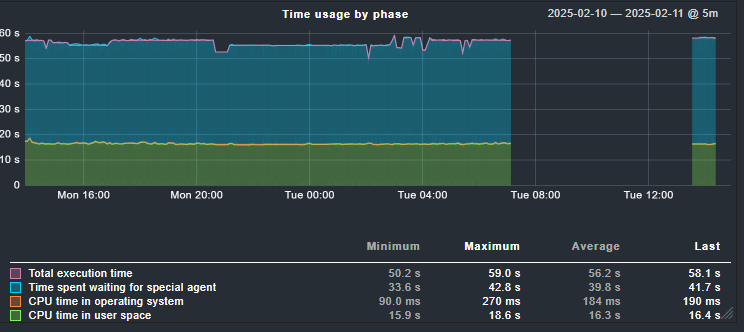
Now I see regular timeouts occurring that I didn’t see before the upgrade:
Is there a way to increase the wait time for an answer or is there anything else I can do to resolve this? @lbuhleie wrote the plugin itself.
Thanks for the suggestions already!
Hi Steven,
from the graph it seems like the query is stopped by the standard timeout for the Check_MK service after 60 seconds.
Depending on which edition of Checkmk you use, this timeout can be changed differently.
In the free Raw Edition / when using the Nagios Core:
Edit the file ~/etc/nagios/nagios.cfg in your Site-directory and add a line with “service_check_timeout=90” where the number represents the amount of seconds:
After this a cmk -R is needed to reload the Nagios core.
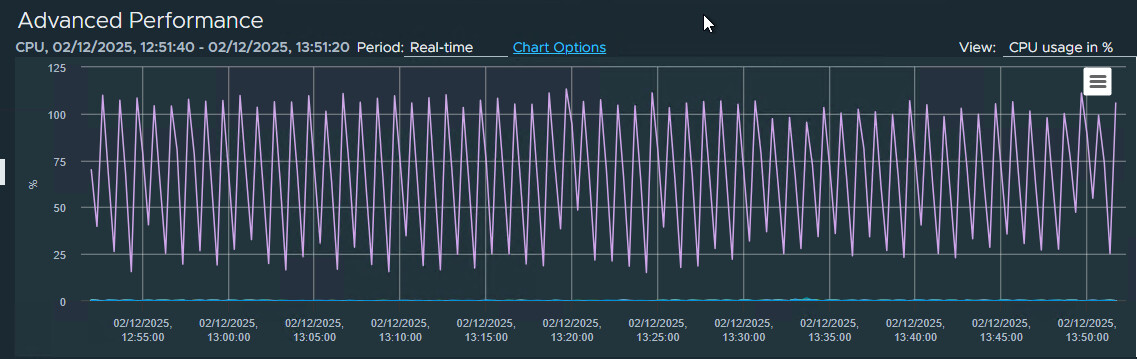
Be aware that this is then applicable for every Active Check on your site. This can increase the CPU load of your Checkmk Server.
In the other editions / when using the Checkmk Micro Core:
There is a rule “Service check timeout (Micro Core)”, with it you can increase the timeout for specific Hosts and Active Checks like the Check_MK Service.
Hi Steven,
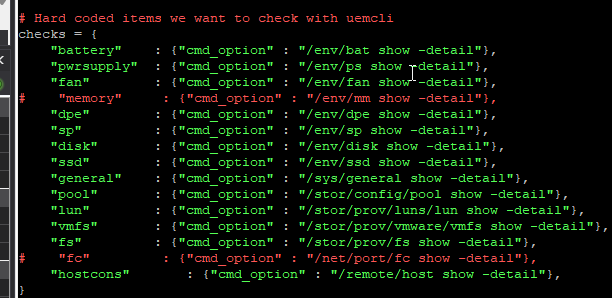
at the moment it is not possible to thin out the query of the special agent via rule. But you can of course look at the agent_emcunity script yourself and remove some of the checks.
This should be relatively easy as you only need to put a # in front of the checks you don’t want to happen in lines 104 - 118. The script should be located at ~/local/python3/cmk_addons/plugins/emcunity/libexec/agent_emcunity
Thanks for the suggestions;
I adjusted the check like this:
I also removed the 90 seconds rule that I added according to your first suggestion
CPU usage seems about the same as before now.
and for now, the timeouts seem to have disappeared
This topic was automatically closed 365 days after the last reply. New replies are no longer allowed. Contact an admin if you think this should be re-opened.
 Be aware that this is then applicable for every Active Check on your site. This can increase the CPU load of your Checkmk Server.