CMK version: 2.1.0p31.cee
OS version: SLES 15.1, Ubuntu 20.04
Error message: [Wed Aug 30 13:36:43.609688 2023] [wsgi:error] [pid 496314] [client 127.0.0.1:34340] werkzeug.exceptions.RequestEntityTooLarge: 413 Request Entity Too Large: The data value transmitted exceeds the capacity limit., referer: http://***/t31/check_mk/wato.py?ident=connection_1&mode=edit_dcd_connection
Recently I updated from 2.1.0p24 to p31 and observed the following new and very annoying behaviour:
When I configure the DCD with one element and add more than 10 attributes, the GUI crashes. When I add the 11th attribute it is no longer possible to save the changes.
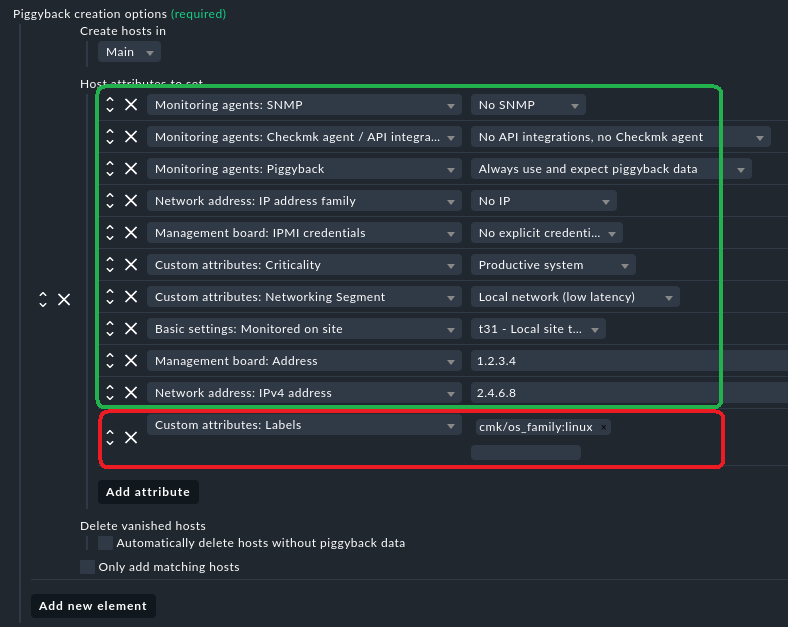
The 10 green attributes work but adding the 11th attribute (in red) results in the following error when saving the changes:

It doesn’t matter which attributes I use, it’s just the number that is too big.
If I configure the DCD with two “elements” and whithin these two elements I configure a total of more than nine attributes, then the GUI crashes as well. Since 4 attributes are already added by default for each element, I can actually not add a 5th attribute, for example, a different label for the different elements.
The logfile ~/var/log/apache/error_log lists a lot of errors, the last of which is werkzeug.exceptions.RequestEntityTooLarge: 413 Request Entity Too Large: The data value transmitted exceeds the capacity limit.
I’ve seen this post about the error message and werk 15939 which allegedly fixes it, but I am not sure if that will also be fixed for the enterprise edition. The werk only talks about the raw edition.
My question is: will this be fixed for the EE? The DCD is rather unusable as it is.
