CMK version: 2.4.0p17 CEE
OS version: Appliance 1.7.12
Error message: [agent] Success, [piggyback] Successfully processed from source ‘xxxvca01’, Parsing of section winperf_if_get_netadapter failedWARN, execution time 3.6 sec
Output of “cmk --debug -vvn hostname”:
OMD[prod]:~$ cmk --debug -vvn xxxfs001
value store: loading from disk
Checkmk version 2.4.0p17

FETCHING DATA
Source: SourceInfo(hostname=‘xxfs001’, ipaddress=‘10.xx.xx.xx’, ident=‘agent’, fetcher_type=<FetcherType.TCP: 8>, source_type=<SourceType.HOST: 1>)
[cpu_tracking] Start [7f9e64d94080]
Read from cache: AgentFileCache(path_template=/omd/sites/prod/tmp/check_mk/cache/xxxfs001, max_age=MaxAge(checking=0, discovery=90.0, inventory=90.0), simulation=False, use_only_cache=False, file_cache_mode=6)
Not using cache (Too old. Age is 46 sec, allowed is 0 sec)
Connecting via TCP to 10.xx.xx.xx:6556 (5.0s timeout)
Detected transport protocol: TransportProtocol.TLS
Reading data from agent via TLS socket
Reading data from agent
Detected transport protocol: TransportProtocol.PLAIN
Closing TCP connection to 10.xx.xx.xx:6556
Write data to cache file /omd/sites/prod/tmp/check_mk/cache/xxxfs001
Trying to acquire lock on /omd/sites/prod/tmp/check_mk/cache/xxxfs001
Got lock on /omd/sites/prod/tmp/check_mk/cache/xxxfs001
Releasing lock on /omd/sites/prod/tmp/check_mk/cache/xxxfs001
Released lock on /omd/sites/prod/tmp/check_mk/cache/xxxfs001
[cpu_tracking] Stop [7f9e64d94080 - Snapshot(process=posix.times_result(user=0.029999999999999805, system=0.0, children_user=0.0, children_system=0.0, elapsed=3.4599999971687794))]
Source: SourceInfo(hostname=‘xxxfs001’, ipaddress=‘10.xx.xx.xx’, ident=‘piggyback’, fetcher_type=<FetcherType.PIGGYBACK: 4>, source_type=<SourceType.HOST: 1>)
[cpu_tracking] Start [7f9e65bbe060]
Read from cache: NoCache(path_template=/dev/null, max_age=MaxAge(checking=0.0, discovery=0.0, inventory=0.0), simulation=False, use_only_cache=False, file_cache_mode=1)
1 piggyback files for ‘xxxfs001’.
Read piggyback file ‘/omd/sites/prod/tmp/check_mk/piggyback/xxxfs001/xxxvca01’
0 piggyback files for ‘10.xx.xx.xx’.
Get piggybacked data
[cpu_tracking] Stop [7f9e65bbe060 - Snapshot(process=posix.times_result(user=0.010000000000000231, system=0.0, children_user=0.0, children_system=0.0, elapsed=0.0))]
[cpu_tracking] Start [7f9e65a41130]

PARSE FETCHER RESULTS
<<<check_mk>>> / Transition NOOPParser → HostSectionParser
<<<cmk_agent_ctl_status:sep(0)>>> / Transition HostSectionParser → HostSectionParser
<<<wmi_cpuload:sep(124)>>> / Transition HostSectionParser → HostSectionParser
<<>> / Transition HostSectionParser → HostSectionParser
<<>> / Transition HostSectionParser → HostSectionParser
<<df:sep(9)>> / Transition HostSectionParser → HostSectionParser
<<fileinfo:sep(124)>> / Transition HostSectionParser → HostSectionParser
<<>> / Transition HostSectionParser → HostSectionParser
<<>> / Transition HostSectionParser → HostSectionParser
<<<winperf_phydisk>>> / Transition HostSectionParser → HostSectionParser
<<<winperf_if>>> / Transition HostSectionParser → HostSectionParser
<<<winperf_processor>>> / Transition HostSectionParser → HostSectionParser
<<<dotnet_clrmemory:sep(124)>>> / Transition HostSectionParser → HostSectionParser
<<<wmi_webservices:sep(124)>>> / Transition HostSectionParser → HostSectionParser
<<ps:sep(9)>> / Transition HostSectionParser → HostSectionParser
Transition HostSectionParser → NOOPParser
<<<iis_app_pool_state:sep(124)>>> / Transition NOOPParser → HostSectionParser
<<<winperf_if_teaming:sep(9)>>> / Transition HostSectionParser → HostSectionParser
<<<winperf_if_get_netadapter:sep(124)>>> / Transition HostSectionParser → HostSectionParser
<<<cmk_update_agent_status:cached(1765744495,3600):sep(0)>>> / Transition HostSectionParser → HostSectionParser
Transition HostSectionParser → NOOPParser
<<>> / Transition NOOPParser → HostSectionParser
Using persisted section SectionName(‘win_cpuinfo’)
Using persisted section SectionName(‘win_os’)
Using persisted section SectionName(‘win_bios’)
Using persisted section SectionName(‘win_system’)
Using persisted section SectionName(‘win_computersystem’)
Using persisted section SectionName(‘win_computersystemproduct’)
Using persisted section SectionName(‘win_disks’)
Using persisted section SectionName(‘win_video’)
Using persisted section SectionName(‘win_networkadapter’)
Using persisted section SectionName(‘win_ip_r’)
Using persisted section SectionName(‘win_wmi_software’)
Using persisted section SectionName(‘win_wmi_updates’)
Using persisted section SectionName(‘win_reg_uninstall’)
Using persisted section SectionName(‘win_exefiles’)
<<<esx_vsphere_vm:cached(1765746107,90)>>> / Transition NOOPParser → HostSectionParser
<<<piggyback_source_summary:sep(0)>>> / Transition HostSectionParser → HostSectionParser
<<labels:sep(0)>> / Transition HostSectionParser → HostSectionParser
HostKey(hostname=‘xxxfs001’, source_type=<SourceType.HOST: 1>)  → Add sections: [‘check_mk’, ‘cmk_agent_ctl_status’, ‘cmk_update_agent_status’, ‘df’, ‘dotnet_clrmemory’, ‘fileinfo’, ‘iis_app_pool_state’, ‘logwatch’, ‘mem’, ‘ps’, ‘services’, ‘systemtime’, ‘uptime’, ‘win_bios’, ‘win_computersystem’, ‘win_computersystemproduct’, ‘win_cpuinfo’, ‘win_disks’, ‘win_exefiles’, ‘win_ip_r’, ‘win_networkadapter’, ‘win_os’, ‘win_reg_uninstall’, ‘win_system’, ‘win_video’, ‘win_wmi_software’, ‘win_wmi_updates’, ‘winperf_if’, ‘winperf_if_get_netadapter’, ‘winperf_if_teaming’, ‘winperf_phydisk’, ‘winperf_processor’, ‘wmi_cpuload’, ‘wmi_webservices’]
HostKey(hostname=‘xxxfs001’, source_type=<SourceType.HOST: 1>)  → Add sections: [‘esx_vsphere_vm’, ‘labels’, ‘piggyback_source_summary’]
Received no piggyback data
[cpu_tracking] Stop [7f9e65a41130 - Snapshot(process=posix.times_result(user=0.07999999999999963, system=0.0, children_user=0.0, children_system=0.0, elapsed=0.08999999985098839))]
Trying to acquire lock on /omd/sites/prod/var/check_mk/crashes/base/3e2c4fb8-d930-11f0-9431-4e618eaae809/crash.info
Got lock on /omd/sites/prod/var/check_mk/crashes/base/3e2c4fb8-d930-11f0-9431-4e618eaae809/crash.info
Releasing lock on /omd/sites/prod/var/check_mk/crashes/base/3e2c4fb8-d930-11f0-9431-4e618eaae809/crash.info
Released lock on /omd/sites/prod/var/check_mk/crashes/base/3e2c4fb8-d930-11f0-9431-4e618eaae809/crash.info
Traceback (most recent call last):
File “/omd/sites/prod/bin/cmk”, line 157, in
exit_status = modes.call(“–check”, None, opts, args, trace_context)
^^^^^^^^^^^^^^^^^^^^^^^^^^^^^^^^^^^^^^^^^^^^^^^^^^^^^^
File “/omd/sites/prod/lib/python3/cmk/base/modes/init.py”, line 91, in call
return handler(*handler_args)
^^^^^^^^^^^^^^^^^^^^^^
File “/omd/sites/prod/lib/python3/cmk/base/modes/check_mk.py”, line 2356, in mode_check
error_handler,
^^^^^^^^^^^^^
File “/omd/sites/prod/lib/python3/cmk/base/errorhandling/_handler.py”, line 66, in exit
*_handle_failure(
^^^^^^^^^^^^^^^^
File “/omd/sites/prod/lib/python3/cmk/base/errorhandling/_handler.py”, line 103, in _handle_failure
raise exc
File “/omd/sites/prod/lib/python3/cmk/base/modes/check_mk.py”, line 2374, in mode_check
checks_result = execute_checkmk_checks(
^^^^^^^^^^^^^^^^^^^^^^^
File “/omd/sites/prod/lib/python3/cmk/checkengine/checking/_checking.py”, line 84, in execute_checkmk_checks
service_results = list(
^^^^^
File “/omd/sites/prod/lib/python3/cmk/checkengine/checking/_checking.py”, line 219, in check_host_services
yield plugin.function(host_name, service, providers=providers)
^^^^^^^^^^^^^^^^^^^^^^^^^^^^^^^^^^^^^^^^^^^^^^^^^^^^^^^^
File “/omd/sites/prod/lib/python3/cmk/base/checkers.py”, line 566, in check_function
return get_aggregated_result(
^^^^^^^^^^^^^^^^^^^^^^
File “/omd/sites/prod/lib/python3/cmk/base/checkers.py”, line 891, in get_aggregated_result
section_kws, error_result = _get_monitoring_data_kwargs(
^^^^^^^^^^^^^^^^^^^^^^^^^^^^
File “/omd/sites/prod/lib/python3/cmk/base/checkers.py”, line 812, in _get_monitoring_data_kwargs
get_section_kwargs(
File “/omd/sites/prod/lib/python3/cmk/checkengine/sectionparserutils.py”, line 42, in get_section_kwargs
if (resolved := resolver.resolve(name)) is not None
^^^^^^^^^^^^^^^^^^^^^^
File “/omd/sites/prod/lib/python3/cmk/checkengine/sectionparser.py”, line 189, in resolve
parsing_result := self._parser.parse(producer_name, producer.parse_function)
^^^^^^^^^^^^^^^^^^^^^^^^^^^^^^^^^^^^^^^^^^^^^^^^^^^^^^^^^^
File “/omd/sites/prod/lib/python3/cmk/checkengine/sectionparser.py”, line 100, in parse
if (parsed := self._parse_raw_data(section_name, parse_function)) is None
^^^^^^^^^^^^^^^^^^^^^^^^^^^^^^^^^^^^^^^^^^^^^^^^^^
File “/omd/sites/prod/lib/python3/cmk/checkengine/sectionparser.py”, line 121, in _parse_raw_data
return parse_function(list(raw_data))
^^^^^^^^^^^^^^^^^^^^^^^^^^^^^^
File “/omd/sites/prod/lib/python3/cmk/plugins/collection/agent_based/winperf_if.py”, line 379, in parse_winperf_if_get_netadapter
alias=line[1],
~~~~^^^
IndexError: list index out of range
Local Agent Output:
<<<win_exefiles:sep(124):persist(1765759545)>>>
<<<winperf_if_teaming:sep(9)>>>
<<<winperf_if_get_netadapter:sep(124)>>>
WAN Miniport (SSTP)|LAN-Verbindung* 1||2|Disconnected||{DDC76B7D-9201-4C0F-91B9-26D52FB9FCFC}
WAN Miniport (PPPOE)|LAN-Verbindung* 5||2|Disconnected||{C0EC1CF0-ABAD-43BB-88EF-EB99F379F828}
WAN Miniport (PPTP)|LAN-Verbindung* 4||2|Disconnected||{B8AD4519-B801-40DD-B963-40AA6B2C71C0}
WAN Miniport (GRE)|LAN-Verbindung* 6||2|Disconnected||{9E956E53-7FBD-49EF-91D9-42523F5C82C0}
|Teredo Tunneling Pseudo-Interface|0|6|Not Present||{93123211-9629-4E04-82F0-EA2E4F221468}
WAN Miniport (L2TP)|LAN-Verbindung* 3||2|Disconnected||{7BE588FD-9840-4E3A-A471-F404893548FC}
Microsoft Kernel Debug Network Adapter|Ethernet (Kerneldebugger)|0|6|Not Present||{7547B92D-0E7F-40F8-B3BA-F241AFC88AEB}
WAN Miniport (IKEv2)|LAN-Verbindung* 2||2|Disconnected||{72318B93-94EC-4D88-AE82-71A681F8C772}
vmxnet3 Ethernet Adapter|Ethernet0|10000000000|1|Up|00-50-56-B0-4F-D1|{55365416-0686-4B4D-AB05-7F44F334F634}
|Microsoft IP-HTTPS Platform Interface|0|6|Not Present||{2EE2C70C-A092-4D88-A654-98C8D7645CD5}
WAN Miniport (Network Monitor)|LAN-Verbindung* 9||1|Up||{21BDCC5E-3B51-444F-B06A-AA1A04D85895}
WAN Miniport (IPv6)|LAN-Verbindung* 8||1|Up||{1C3F4BF0-8DA6-411A-B5EF-0BA56AD2C7C4}
WAN Miniport (IP)|LAN-Verbindung* 7||1|Up||{1B6C84C1-D40E-41BD-A2D3-4FB30C7A4480}
|6to4 Adapter|0|6|Not Present||{07374750-E68B-490E-9330-9FD785CD71B6}
<<<windows_os_info:sep(44)>>>
Microsoft Windows Server 2019 Standard,N/A,00429-70000-00000-AA087
<<<>>>
<<<systemtime>>>
1765744856
I replaced agent 1.6.0p28 with 2.4.0p17. Since then, I have had several hosts with this error.
When I disable the piggiback data, the error remains.
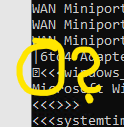
What confuses me is the question mark in the box in the agent output, which I only see in the console. Could that be the reason, and where does it come from?