Is there a way for CheckMK to identify VM’s that are turned off and automatically set them to “do not monitor”? Right now I have to go through each one and check to see if it is off and then manually set it to “do not monitor”.
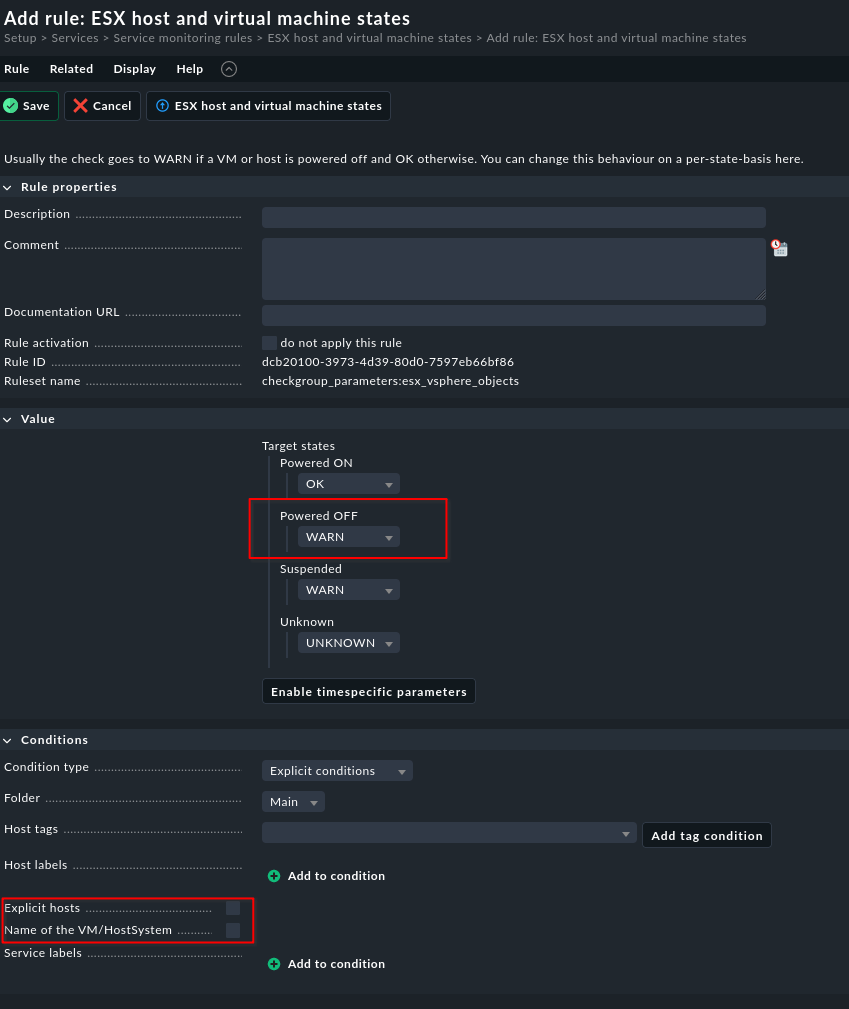
There is a rule called “ESX host and virtual machine states”. Per default,
any VM that is “powered off” raises a WARN alert. You could set it
to OK for all of them - if that is what you want to do - or you could
restrict it to a specific ESX host/vCenter resp. VMs:
Build in on what @openmindz said: You can for example rename powered off VMs with a prefix like # or _ and use regex both for not discovering VMs in the first place, or do exactly what @openmindz said and change the logic for the power state.
This topic was automatically closed 365 days after the last reply. New replies are no longer allowed. Contact an admin if you think this should be re-opened.