Hello @all,
we are about to setup checkmk, NEW, with the latest Version (2.2.0p9).
Is there a howto or setup installation guide for the above?
I wasn´t able to find anything to this, online or here at the forum…!?
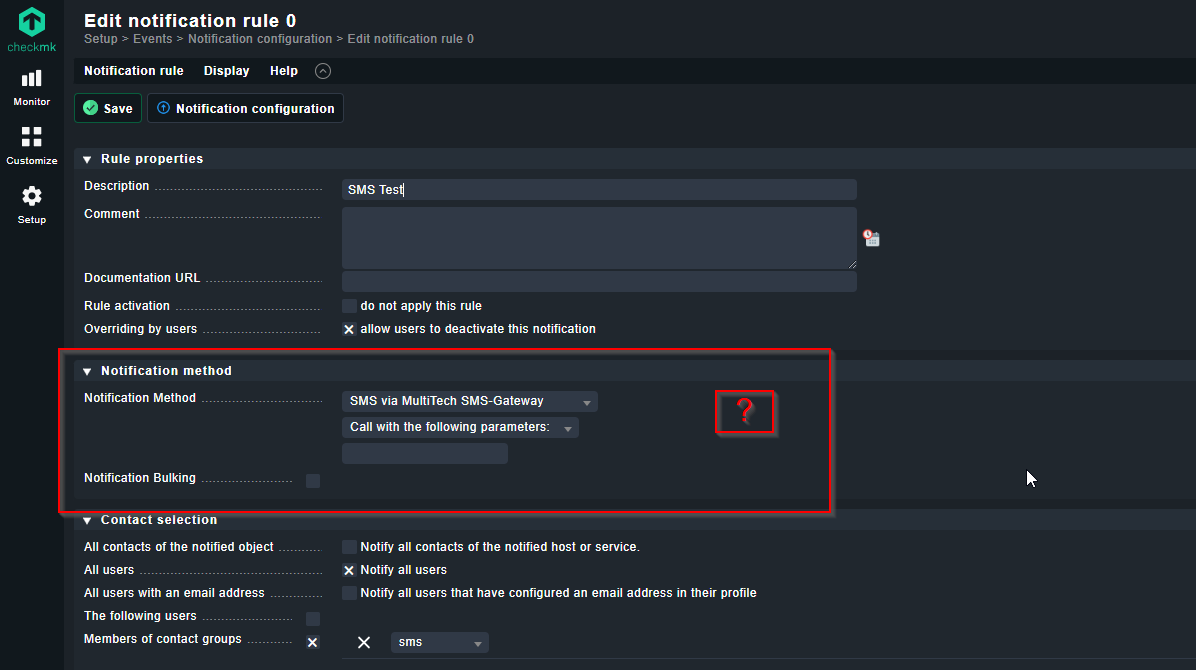
I managed to get the "SMS via MultitTech SMS-Gateway "-Plugin selectable but at the moment i am stuck because i don´t know how (syntax) i can input the necessary details/parameters (e.g. IP-Adress, Username + Passwort, etc.) for our physical modem (MultitTech MultiModem iSMS SF100-G) which i found here:
This is not a built-in check plugin. You might want to use the notification method “SMS (using smstools)”. That works without further configuration and uses the contacts and their phone numbers.
When i switch to your recommended notification method “SMS (using smstools)” (after installing smstools), than i get the following error in the eventlog in my testscenario:
When i switch to your recommended notification method “SMS (using smstools)” (after installing smstools), than i get the following error in the eventlog in my testscenario:
Hello, just a quick comment because I learned that many users use an SMS modem to be independent from network / internet failures when it comes to alerting.
The notification method SIGNL4 supports alerting via app push, SMS and voice call as a service. You can receive alerts even if the internet is not available (using heartbeat or website checks).
Although my site user is in the dialout group the notifications are stuck and get queued in the spool folder:
/var/spool/sms/outgoing
the Owner of the files is the site user, but there seems to be a further problem…
Thanks in advance for any further assistance!
Best regards
Are you sure that your modem is configured properly?
Are you able to send SMS manually?
Example:
echo -e "To: 43699123456789\n\nThis is a Test-SMS." > Test-SMS
sudo mv Test-SMS /var/spool/sms/outgoing/
You can also increase the log level in the config file: /etc/smsd.conf
loglevel = 7
The log will tell you pretty much everything you need to know. Otherwise, I think it is also possible to read the serial output of the modem, but I’m not 100% sure.
Please make sure to reload/restart your smstool services after config changes.
Can someone give me a short explanation where i can find the configuration files and some informations what i have to configure there (regarding to our Modem i writed in the initial post at the top)?
If you connect your modem to your Checkmk server, the modem creates multiple ttyACM devices.
Normally /dev/ttyACM0, but I think it counts up to ttyACM4 or ttyACM6. You can see all this in the Linux Kernel as well with sudo dmesg.
You configure your modem with the config file located in /etc/smsd.conf.
Normally, you use /dev/ttyACM0. Only one process at the time can talk to a device. That means the smstools daemon tries to talk to the modem on /dev/ttyACM0. If you want to read the serial output of the modem, you need to use a different /dev/ttyACM device. But that’s only necessary for debug purposes. I had some success with switching the device from /dev/ttyACM0 to /dev/ttyACM1. Sometimes I also encountered that the modem just hangs and had to be rebooted. If there were too many Spool files.
Take it slowly, and before you let Checkmk try to send stuff, you should try it manually.
My personal opinion nowadays is that it’s almost cheaper or the same price to just buy a fallback LTE Router/Modem and just use the backup internet to send notifications. And if you really want SMS notifications, you can simply use a cheap online SMS service with a API or Email Connector. (There are a lot out there). SIGNL4 is also an alternative, but can do way more than that.
I had to learn it the hard way as well, but it is possible to get it to work. It just takes troubleshooting, debugging and some time.
thanks for sharing your helpful details here! GREAT!
My problem is that i do not connect the modem via USB or something other “directly” to the checkmk server. Our modem is connected via IP and i have the luxury that i´m still able to look how it is configured at the actual operating and running (with SMS working) configuration (checkmk 1.2.8p16) on the working server, but i don´t know where i can find the correct details to get this SMS thing up and running on the new system!
I compared the /etc/smsd.conf files which are identical, there i can find the line:
device = /dev/ttyS0
But when i look into this file: “device = /dev/ttyS0” => the file has 0 kb and seems to be empty (on the running 1.2.8p16 system)???
This topic was automatically closed 365 days after the last reply. New replies are no longer allowed. Contact an admin if you think this should be re-opened.