I have configured to discover network interface on our switches using the description as appearance of the interface. Since we automate the discovery (adding/removing interfaces), our network guy place a tag in the alias of the interface which they don’t want to be monitored: “xADIx”. Because of this I set up a matching criteria in “Match interface alias (regex)” like this:
(?!(xADIx))
I double checked with python regex checker, if this would match (or in this this case, it should not match).
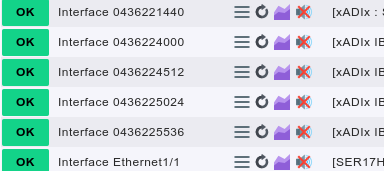
But the interfaces with the tag “xADIx” still appear on discovery and they don’t use the description in the service name, but the index, which is strange as well.
I tried this as well, with the same result. I figured, since the help says “match from beginning”, I could do it without the “^”. Either way the regex does not work, but it should, or am I completely on the wrong track?
We had a similar requirement lately. At our end, we wanted to not match any interface that had “access”, “client” or “phone” in its alias. We ended up with the following regex: (?!.*(access|client|phone))^.*
This is not exactly the same requirement as you have, though. Our regex matches on an interface that has one of the keywords anywhere in its alias. Nonetheless, maybe it helps
This topic was automatically closed 365 days after the last reply. New replies are no longer allowed. Contact @fayepal if you think this should be re-opened.

 ).
).