**CMK version:**Checkmk Pro 2.5.0p7OS version: Debian 12
Hi there,
I already posted this in the german section but I would like to post it here too.
If I should delete one of these posts, please let me know.
We got a Fast-LTA (Version 2.67.0.7) and I would like to monitor it via snmp.
The disks, general info, uptime etc are found but what is missing are the “special things” - like Silent Bricks, Volumes…
I´m not sure if the fastlta plugin gets triggered.
Is there a way to find out if this snmp query is done with the fastlta plugin enabled?
OMD[rmk]:~$ cmk -D wiarchivbrick2 | head -12
If I do a snmpwalk this is the output of sysDescr
SNMPv2-MIB::sysDescr.0 = STRING: Linux wiarchivbrick2 6.11.7-gentoo-FAST #2 SMP PREEMPT_DYNAMIC Thu Feb 26 14:11:11 UTC 2026 x86_64
Or am I missing something?
Any help is appreciated.
Thanks
Can you share the snmpwalk?
snmpwalk -v3 -l authPriv -u -a SHA -A -x DES -X -Onqet .1.3.6.1 >/tmp/snmpwalk.txt
If it has some sensitive information, you can mask it.
Humaer
July 2, 2026, 10:33am
3
Sure thing - thank you for looking into it
snmpwalkfastlta.txt (633.8 KB)
At the end this is the cli output
.1.3.6.1.4.1.8072.1.9.1.1.3.10.103.114.112.99.104.101.99.107.109.107.0.3.3.6.110.111.116.105.102.121 "none"
.1.3.6.1.4.1.8072.1.9.1.1.4.10.103.114.112.99.104.101.99.107.109.107.0.3.3.4.114.101.97.100 4
.1.3.6.1.4.1.8072.1.9.1.1.4.10.103.114.112.99.104.101.99.107.109.107.0.3.3.5.119.114.105.116.101 4
.1.3.6.1.4.1.8072.1.9.1.1.4.10.103.114.112.99.104.101.99.107.109.107.0.3.3.6.110.111.116.105.102.121 4
.1.3.6.1.4.1.8072.1.9.1.1.5.10.103.114.112.99.104.101.99.107.109.107.0.3.3.4.114.101.97.100 1
.1.3.6.1.4.1.8072.1.9.1.1.5.10.103.114.112.99.104.101.99.107.109.107.0.3.3.5.119.114.105.116.101 1
.1.3.6.1.4.1.8072.1.9.1.1.5.10.103.114.112.99.104.101.99.107.109.107.0.3.3.6.110.111.116.105.102.121 1
Error in packet.
Reason: noAccess
Did you used the command to generate the walk?
The walk should look like this:
1.3.6.1.4.1.8072.1.9.1.1.3.10.103.114.112.99.104.101.99.107.109.107.0.3.3.6.110.111.116.105.102.121 “none”
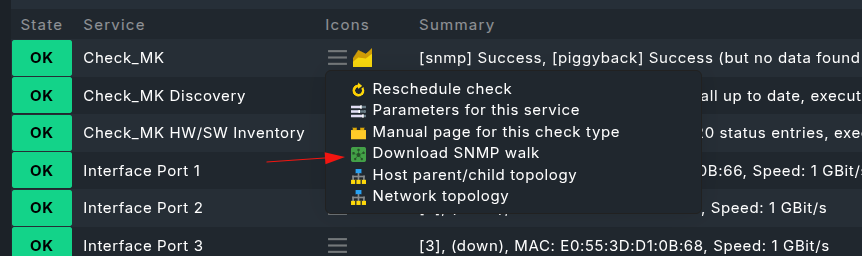
Maybe, if the device is already added in Checkmk, then you could also download the walk from the GUI?
Humaer
July 2, 2026, 11:58am
5
Sorry - here you go:
rmk-wiarchivbrick2-walk.txt (480.7 KB)
As you use SNMPv3 and the complete enterprise tree is missing inside the snmpwalk i would say that the used account has not the correct view assigned.
For a manual test you should query the OID .1.3.6.1.4.1.27417 with your SNMPv3 user.
First of all - thank you all. I really appreciate it.
If I query the given OID I get
.1.3.6.1.4.1.27417 No Such Object available on this agent at this OID
No matter the snmp version.
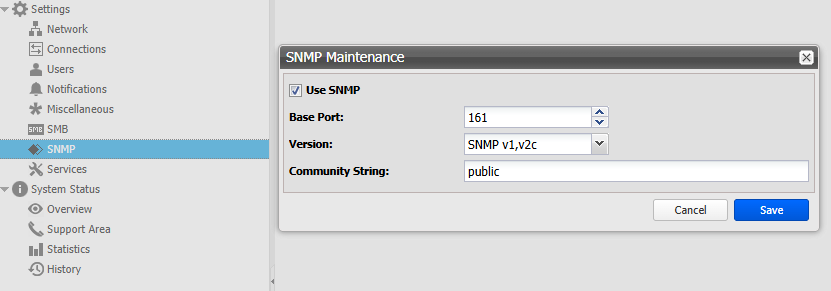
I´m not sure if I can configure anything inside the Fast-LTA.
Is SNMP is the way to go with this system? Or is there a better way I don´t know of (kind of like redfish for ilo).
Maybe check the Access Control / Views settings. The community string or user you are querying with is likely restricted to a generic view (often called systemview).
Have you checked if the view permissions are restricted ? or to add access specifically to the .1.3.6.1.4.1 (enterprises) subtree.If there is a toggle for “Enable Enterprise Storage MIB Extensions” or similar vendor specific options, ensure it is turned on.
That SNMP subtree is needed:
snmp_section_fast_lta_headunit = SNMPSection(
    name="fast_lta_headunit",
    detect=all_of(
        startswith(".1.3.6.1.2.1.1.2.0", ".1.3.6.1.4.1.8072.3.2.10"),
        any_of(exists(".1.3.6.1.4.1.27417.2.1"), exists(".1.3.6.1.4.1.27417.2.1.0")),
    ),
    fetch=[
        SNMPTree(
            base=".1.3.6.1.4.1.27417.2",
            oids=["1", "2", "5"],
        )
    ],
    parse_function=parse_fast_lta_headunit,
)