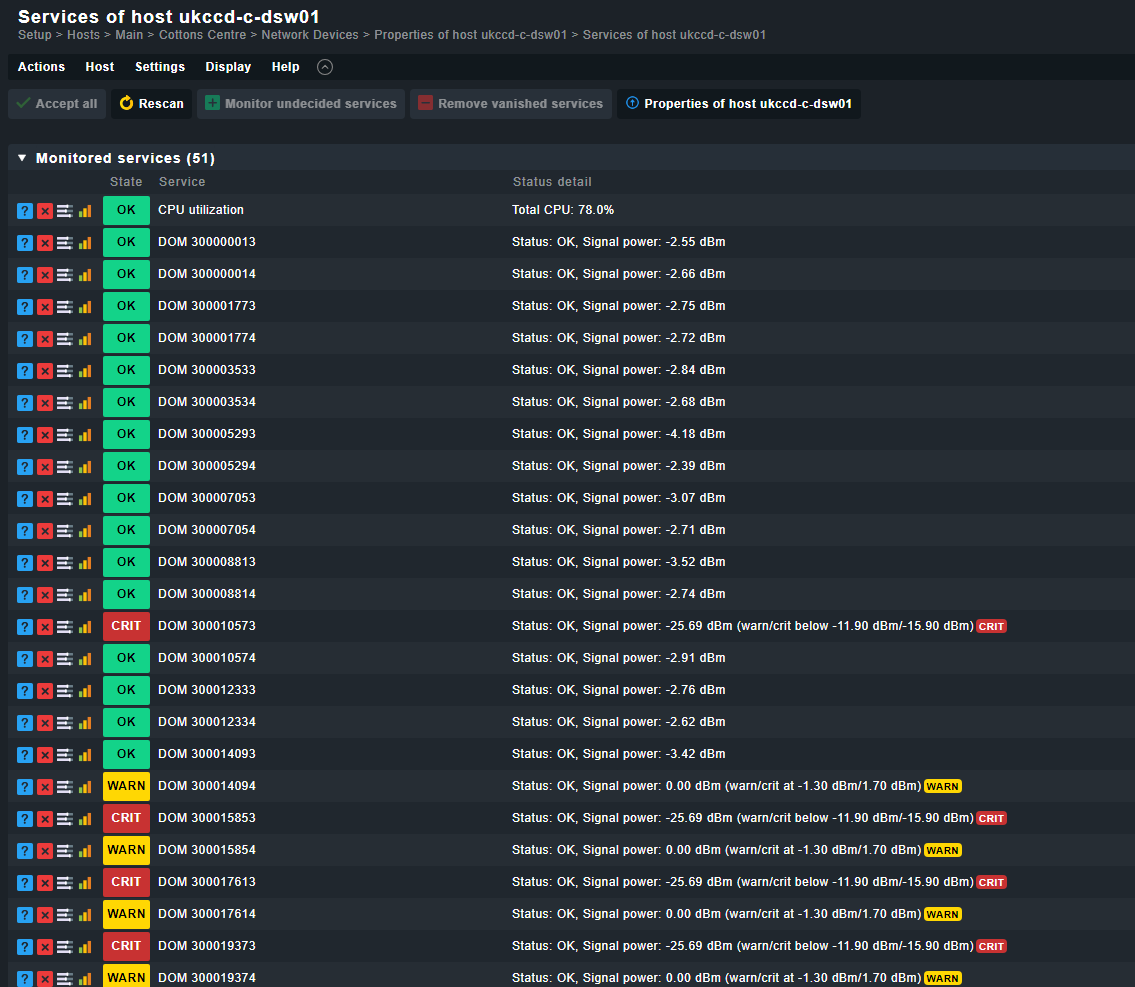
I am monitoring our Cisco MDS9100 FC switches in CheckMK, but noticed that the interfaces are not discovered in the way I was expecting. Rather than showing interfaces, with bitrates etc like it does all other SNMP switches, its showing a “Cisco Digital Optical Monitoring” (DOM) service instead, with some +/-dBm values attributed to them. The even weirder thing is that its showing crit/warn notices on the interfaces that are actually connected.
I say “werid” however its probably more to do with my lack of understanding with how SNMP works on NX-OS. These are the only NX-OS switches we have.
How can I get these to show up as normal switch interfaces instead and report up/down status as well as throughput?
You may want to configure a rule in “Network interface and switch port discovery” as FC ports (56 - fibreChannel) are not of type Ethernet (6 - ethernetCsmacd) and are by default not discovered by the interface check plugin.
This topic was automatically closed 365 days after the last reply. New replies are no longer allowed. Contact an admin if you think this should be re-opened.