I have similar problem related to "fileinfo"monitoring. Customer want to monitor folder on one of the hosts which we have in monitoring. In case that there will one or more file created in that path a ticket should be raised.
So far I create rule for enforced services " Size, age and count of file groups"
fileinfo_groups, Interface_Manager,
Group patterns: D:\testfolder*,
Maximal file count: 1, 1
New related service has been successfully created.
I insert a few test files (folders & also .txt files) in affected path but monitoring didn’t notice them (count is still zero)
After that, I try to adjust configuration file “check_mk.user.yml” manually
fileinfo:
# enabled: yes
# below are possible examples
path:
- ‘D:\testfolder*’
No change, count of files in that folder is still zero.
Output of the agent stays still the same (same as in josselin problem above)
<<fileinfo:sep(124)>>
1742313920
<<>>
Something i remembered regarding CMK being picky as to the indention of the .cfg file
from what it looks like (its hard to tell) there is no indention as you did not use the code-tag in your original post.
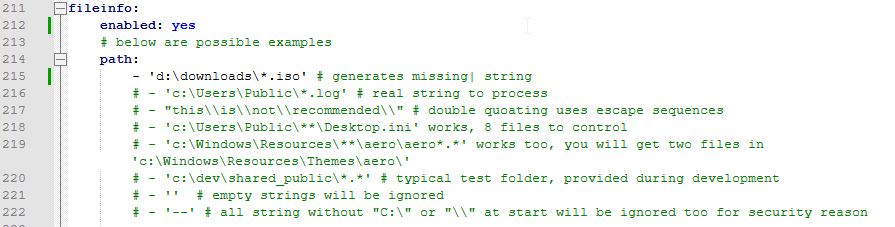
Could you test with below (each is indented with 2 spaces)
fileinfo:
  enabled: yes # dont know if when not explicitly set if it is enabled by default
  path:
    - ‘D:\testfolder\*.*’ # the path you were testing it on
Glowsome
PS,
I have no testing-grounds, as i do not run Windows machines, so all is done with best theoretical effort.
Results seen in agent (from monitored host) output when running command C:\Program Files (x86)\checkmk\service>cmk-agent-ctl.exe dump
<<<fileinfo:sep(124)>>>
1742429423
d:\Downloads\AM_42_AccessManagerAppliance_Eval-0930.iso|2011852800|1459533937
d:\Downloads\AM_44_AccessManagerAppliance_Eval-1130.iso|2387935232|1518628671
d:\Downloads\AM_45_AccessManagerAppliance.iso|2198202368|1558009714
d:\Downloads\AutoYastcd.iso|50669568|1563139131
d:\Downloads\CentOS-6.7-i386-netinstall.iso|196083712|1456691383
d:\Downloads\DUP_cciss_el7_x86_64.iso|636928|1465687268
d:\Downloads\Identity_Manager_4.5_Linux_Advanced.iso|5358112768|1497392649
d:\Downloads\Identity_Manager_4.5_Windows_Advanced.iso|4509186048|1442624236
d:\Downloads\Identity_Manager_4.6_Linux.iso|7634331648|1520828138
d:\Downloads\Identity_Manager_4.8.3_Linux.iso|1646661632|1629324796
d:\Downloads\Identity_Manager_4.8_Linux.iso|2254465024|1667342033
d:\Downloads\Identity_Manager_4.8_RL_Linux.iso|313317376|1667342057
d:\Downloads\Identity_Manager_4.8_RL_Windows.iso|637962240|1667342090
d:\Downloads\Identity_Manager_4.8_Windows.iso|3781138432|1667342237
d:\Downloads\OES2015-SP1-addon_with_SLES11-SP4-x86_64-DVD.iso|4406116352|1471544186
d:\Downloads\OES2018-DVD-x86_64-DVD1.iso|4678746112|1517022898
<truncated further, i have alot more iso's in there :)  >
So at this point i can validate a/the setting on the monitored host / the agent is picking up the config i set in C:\ProgramData\checkmk\agent\check_mk.user.yml.
when i run a service-discovery on this host now, it will yield a service for each iso found/listed (not what i had expected, but atleast the agent-section is now filled)
So next step would be to configure server-side of CheckMK ( i have not gone further on that part)
Hope this helps you in setting it up.
Glowsome
PS,
As this is a re-use of another user’s thread regarding your issue it might be wise to continue this as a separate ‘thread’. @Sara are you able to split this off to a new thread, so it keeps the individual issues separated ?
This topic was automatically closed 365 days after the last reply. New replies are no longer allowed. Contact an admin if you think this should be re-opened.



 ) check_mk refuses accept File-system name with capital letter