The filter tool used to be a manually activated tool when you needed to discard the noise when searching for problem services, hosts, notifications, etc., but now seems to be active by default. I has searched the global settings as well as the display options for various drill down pages and cannot find an option to disable this “new” behavior. Am I missing something or is there some other method to change this feature back to its old on demand setting?
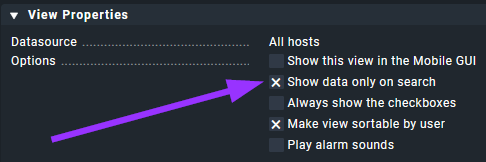
To turn filter on/off by default in a view, customize view and toggle checkbox Show data only on search in View Properties, then Save & go to view
Checkmk Cloud Edition 2.3.0p28
Running on firmware 1.7.9
License state: Free
Hello Yggy,
I am looking for a global setting and would hope not to customize each “search view” where this occurs. There has got to be a better way…
In my 2.1 raw edition I couldn’t find a global setting for this.
I don’t have the issue that all views are effected. Just incidentally, and then my suggested change helps out.
And with search views, I find it logical that filter for search is enabled and not all are shown by default. Actually also glad, I have Checkmk server running on an old machine. Not producing lists that need to be filtered anyway saves a bit of performance. (-;
Hello Yggy,
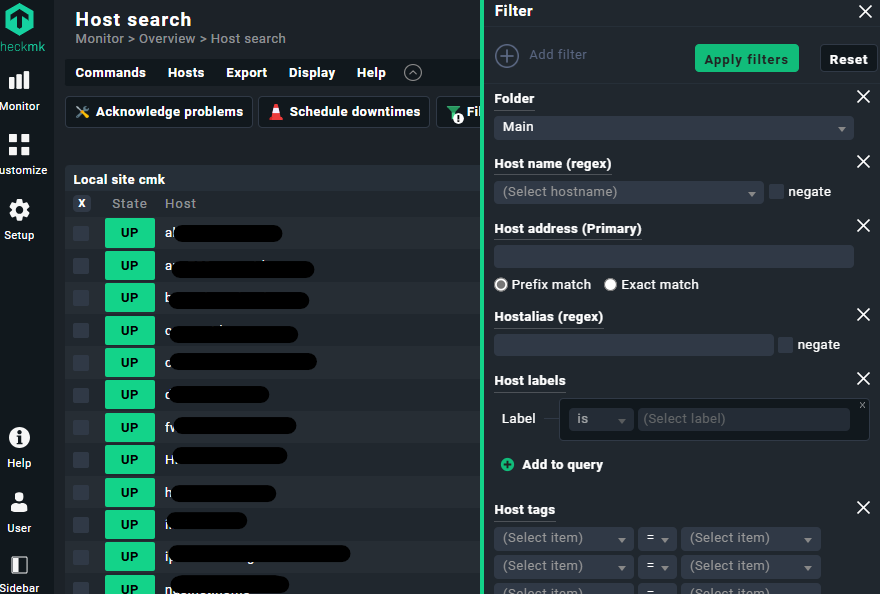
So just for giggles, I checked a few of my views in v2.3.0p28, and they all have the checkbox “Show data only on search” as enabled. I have toggled this off and back on and it does not resolve the automagically displayed filter panel (an example of this is in image 2 below). Still hoping / requesting that this can be resolved at a global level setting in a future version.
Image 1 - my current settings:
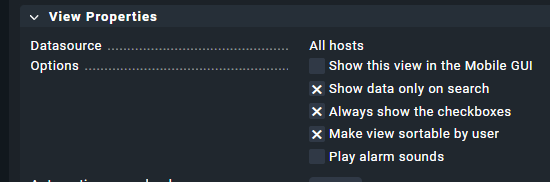
Image 2 - automatic filter panel
Just for giggles, cool that you use word “automagically” too. 
In 2.1.0p5:
When I toggle it off (and not back on) I get a list with no filter sidebar active.
When toggle it on, I get no list but filter sidebar to search.
Some of my views have in the view properties Context / Search Filters set, so they are sometimes ‘secretly’ filtered
So is no one else seeing this in versions 2.3.0p28 and above?
I am currently on version 2.3.0p30 and this issue persists.