I am moving over to checkmk after a poor experience with Sensu. My organization has a ton of bash scripts to check various aspects of our systems, and I have just finished porting them over to checkmk’s local check style.
Everything is working great so far, except for one huge issue. If I have a check that is expensive to run, I may only want to run it every hour so I’ll put it in the check_mk_agent/local/3600 directory. However if that check goes critical, I want someone from my support team to fix the issue ASAP. The problem is that once the issue is fixed, my server is going to remain in a critical state until the cache expires and the local check can run again.
I’ve seen that the usual advice is “just delete the cache file”, but I really don’t want my support staff SSHing into servers and running rm on anything
Is there any other way to address this? Maybe I could have some fake check that polls the upstream checkmk server to see if a re-run on a local check has been requested and have it then delete the cache file? That sounds terrible but I’m willing to make it happen if that’s what it takes.
Or maybe local checks just aren’t the right mechanism here. Is there another better way to run a directory full of legacy bash scripts on a big set of remote servers?
The answer of “just delete the cachefile” is the way regarding the forced refresh, but you already found out about the ‘how’.
However your question seems to be more "How can i give the Support-staff a tool in which they can accomplish this without directly giving them access to the machine and rm-ing freely around.
I use Ansible to - when i update packages do the update, but also (and only) remove a/the correct cachefile.
Running a mixed env of linux i have a playbook that executes the updates, and deletes the appropriate cachefile (apt, yum, zypper) as the checks are in a /3600 subdirectory.
So if you were to have Ansible , and created a playbook that would perform just that delete on the cachefile would imho give the support-staff a means to ‘remotely’ force the re-check without having them run around on the server.
Thanks for the reply @Glowsome ! Unfortunately our support staff only has access to front-end tools, and I’d really like them to be able to resolve things without having to escalate to someone who can do things on the backend. I suppose there are Ansible UIs that we could adopt, but that’s a whole new tech tree we’ll have to explore.
It sounds like you’re updating your local check scripts already with Ansible. I have built something kind of crazy - it’s a “meta-check” that does a git pull on our checks repo, and automatically installs any new checks (and removes old ones) every time it runs. This lets our dev team deploy new checks super easily by just committing/tagging a repo.
I’m wondering if there’s some way I can have my “meta-check” query the upstream checkmk server to see if re-runs have been requested on any local checks it manages. If I could get that info, it would then be trivial to just have it delete the cache file automatically.
I’m really just trying to avoid having to swap back and forth between different tools to monitor the checks, and then re-run them.
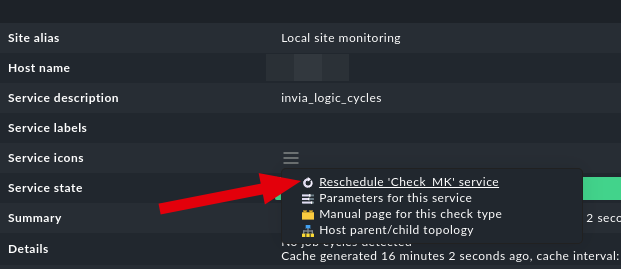
I guess a more fundamental question here is how the “Reschedule XYZ Check” feature actually works when you click it in the checkmk management UI. Looking through the docs for plugin development, I don’t see any mention of how to configure how often the agent side of the check runs.
Reading the agent source code, it looks like you can put the agent-side plugin code in a numbered directory just like the local checks, but there doesn’t seem to be any other mechanism for determining how often to run the agent side.
Is there any actual way to re-schedule any agent-side check code?
I have Ansible setup, and even deploy agents/plugins via a playbook (as i dont have CEE version) after updating the monitoring server to a newer version.
… that playbook should be somewhere floating around in the forum ( i think it was under How-To’s)
But back to the matter you are trying to deal with.
A/the nature of the timed subfolder will always result in the generation of a/the cachefile, which is then queried for aslong as its valid.
So one way or another to ‘force’ it that file will need to be manipulated(or deleted).
As you explained that those checks are ‘costly’ regarding a/the performance impact on the server it might be useful to look at the way, and in which language they are written.
Maybe some of those localchecks can be replaced by Datasource programs, or API-calls from the CheckMK -server itself, which should move the processing -load to the CheckMK-server.
But as to that i do not have insight in what exactly is being run on a/the monitored servers.
I just realized that the Reschedule option for local checks is just Reschedule 'Check MK' service rather than Reschedule 'My Local Check Name' service. I think that fundamentally means that checkmk doesn’t even store anything related to the schedules of local checks on the server anywhere.
Most of my checks can’t easily be converted to API calls that could be hit from the checkmk server unfortunately, so I’ll have to find some other option or just live with not being able to reschedule failed checks.
I’m very surprised that there’s no first-class way of dealing with this.
After digging into the agent code, it looks like this is just fundamentally not possible with agent-based checks. Cached checks are run via the check-mk-agent-async.service, which is just a free-running service that only updates cache files according to their cache times. That async service has no other communication other than those caches, and the main agent doesn’t even really receive anything from the checkmk server anyway (other than that $REMOTE variable that doesn’t seem to be used for anything).
I really wish that the checkmk server could send down some cache invalidations when it hits the agent socket, but that looks like a pretty big feature request.
Thinking outside of the box here, not having the actual knowledge to build it.
Maybe a ‘cheap’ local script in cron can use api to poll Checkmk server for the state of ‘expensive’ service. When okay nothing happens, if certain critical occurs, trigger the “just delete the cache file”?
Yeah @Yggy that’s exactly what I was thinking. I have all of the pieces put together with the “meta-check” that I described above to pull this off, but unfortunately I just don’t think it’s possible.
Checkmk doesn’t actually seem to store any schedule info related to the local checks on the server. All of the scheduling info appears to just be local to the agent. If someone can find me anywhere on the checkmk server where I could even indicate that I wanted a particular local check to be rescheduled, I’m sure I could pull the rest off.
Arn’t there any logs on the host that you could use to find out that the problem has been fixed (e.g restart of a service)? This could trigger your script to delete the cache file. With Rest API I think you could only use the acknowledgement or downtime attribute of a service to trigger it, but makes it complicate to trigger and maybe violates the normal usage of these attributes. Another way would be to add your own icon to a service that e.g. could open a specific url on the host that triggers your script.
Ok, so the checkmk server doesn’t store anywhere when a local check is “rescheduled”, so I can’t use that to invalidate the cache. However the server does store when a check is “acknowledged”. I think I’m going to try to co-opt the acknowledgement feature to ensure that the cache file is always newer than any acknowledged checks. This is actually pretty cool, because it’s pretty in line with my use case:
Some slow running check goes critical
Support staff notices the issue via checkmk, and fixes the issue
Support staff then acknowledges the issue in checkmk
My magic meta-check polls the API, sees that there’s an acknowledgement on a non-ok cached check with a timestamp newer than the cache file, and so deletes the cache file which forces the check to rerun.
I’ll have to play around with how this works operationally with my org, but it sounds like a good plan to me.
@uwoehler Our checks are looking for all sorts of weird application state that is rarely as simple as just restarting a service - e.g. does this transaction graph have a cycle in it, etc.
I actually like the idea of the using the acknowledgement. I’m fine with the complications, but I’d love to hear more about your concerns of violating the normal usage. My team is totally new to checkmk, so I have only the slightest idea what “normal usage” actually is
The normal usage of acknowledgements, as far as my customers use it, is to acknowledge a problem when someone starts working on fixing the problem. This moves it out of the “unhandled problems”. But you could of course use it otherwise if that fits better for you.
Write code in your local check to move itself to a different subfolder of local/ when it is giving a CRITICAL response.
Make it a normal synchronous check and implement your own caching which can take the previous status into account. I have done something like this in the past.