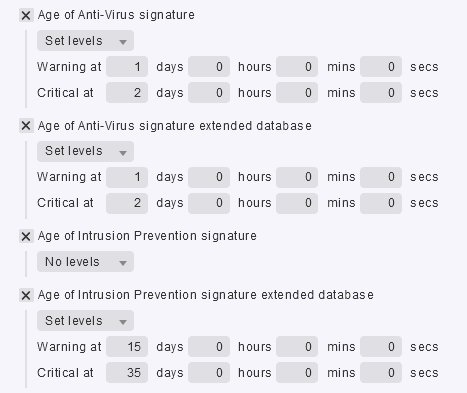
CMK version: 2.1.0p10
OS version: CentOS 7.9.2009
I’m monitoring a Fortigate Firewall 200F - v6.4.9 build1966 (GA)
I receive the following alert from the Signatures check plugin:
[90.05327] AV age: 10 h
[6.00741] IPS age: 6.7 y (warn/crit at 24 h/2 d)CRIT
[90.05327] AV extended age: 10 h
[22.00377] IPS extended age: 5.5 d
The problem is that IPS signature are actually updated whereas the plugin reports a critical condition for IPS (6.7 y old…)
I think that the plugin is checking the OID:
1.3.6.1.4.1.12356.101.4.2.2.0
which reports (in my case): STRING: “6.00741(2015-12-01 02:30)”
I think that the correct OID shoulld be:
.1.3.6.1.4.1.12356.101.4.2.4.0
which reports (in my case): STRING: “22.00377(2022-08-18 00:04)”
Output of “cmk --debug -vvn hostname”:
Checkmk version 2.1.0p10
Try license usage history update.
Trying to acquire lock on /omd/sites/Equita/var/check_mk/license_usage/next_run
Got lock on /omd/sites/Equita/var/check_mk/license_usage/next_run
Trying to acquire lock on /omd/sites/Equita/var/check_mk/license_usage/history.json
Got lock on /omd/sites/Equita/var/check_mk/license_usage/history.json
Next run time has not been reached yet. Abort.
Releasing lock on /omd/sites/Equita/var/check_mk/license_usage/history.json
Released lock on /omd/sites/Equita/var/check_mk/license_usage/history.json
Releasing lock on /omd/sites/Equita/var/check_mk/license_usage/next_run
Released lock on /omd/sites/Equita/var/check_mk/license_usage/next_run
Updating IPv4 DNS cache for wscapture: 170.1.7.168
Trying to acquire lock on /omd/sites/Equita/var/check_mk/ipaddresses.cache
Got lock on /omd/sites/Equita/var/check_mk/ipaddresses.cache
Releasing lock on /omd/sites/Equita/var/check_mk/ipaddresses.cache
Released lock on /omd/sites/Equita/var/check_mk/ipaddresses.cache
- FETCHING DATA
Source: SourceType.HOST/FetcherType.PIGGYBACK
[cpu_tracking] Start [7f45d44c7340]
[PiggybackFetcher] Fetch with cache settings: NoCache(wscapture, base_path=/omd/sites/Equita/tmp/check_mk/data_source_cache/piggyback, max_age=MaxAge(checking=0, discovery=120, inventory=120), disabled=True, use_outdated=False, simulation=False)
Not using cache (Cache usage disabled)
[PiggybackFetcher] Execute data source
No piggyback files for ‘wscapture’. Skip processing.
No piggyback files for ‘170.1.7.168’. Skip processing.
Not using cache (Cache usage disabled)
[cpu_tracking] Stop [7f45d44c7340 - Snapshot(process=posix.times_result(user=0.0, system=0.0, children_user=0.0, children_system=0.0, elapsed=0.0))] - PARSE FETCHER RESULTS
Source: SourceType.HOST/FetcherType.PIGGYBACK
No persisted sections
→ Add sections: []
Received no piggyback data
[cpu_tracking] Start [7f45d44c7d30]
value store: synchronizing
Trying to acquire lock on /omd/sites/Equita/tmp/check_mk/counters/wscapture
Got lock on /omd/sites/Equita/tmp/check_mk/counters/wscapture
value store: loading from disk
Releasing lock on /omd/sites/Equita/tmp/check_mk/counters/wscapture
Released lock on /omd/sites/Equita/tmp/check_mk/counters/wscapture
No piggyback files for ‘wscapture’. Skip processing.
No piggyback files for ‘170.1.7.168’. Skip processing.
[cpu_tracking] Stop [7f45d44c7d30 - Snapshot(process=posix.times_result(user=0.0, system=0.0, children_user=0.0, children_system=0.0, elapsed=0.0))]
execution time 0.0 sec | execution_time=0.000 user_time=0.000 system_time=0.000 children_user_time=0.000 children_system_time=0.000 cmk_time_agent=0.000