please check on the destionation host if the scanner and the shell script there, see the table on top of my “how to”., if yes are the executable? Are there any “left overs” vrom older versions (local checks/cache)?
This is what happens on one of the hosts, its a Windows Domain Controler:
WARNING: Parsing of section cve_2021_44228_log4j failed - please submit a crash report! (Crash-ID: 8cae3b92-617f-11ec-a85e-00163e0979ad)
And pretty interessting, the other 4 hosts where the agent fails totally (complete timeout) after copying the ps1 into the plugin are all MS SQL Server. I tested the log4j scan manually and it works pretty well, but the agent fails. I cant find any log on the client that gives me a hint whats the problem could be.
system has all rights on the whole checkmk-agent folder.
can you show the crash report here?
@all I pushed the latest version of the plugin so the “how to” and the plugin should now match again
1 Like
sure, can you please tell me were to find it? i am not that deep into the backend
You can look under Monitor > System > Crash reports, or if there a “bomb” on the warning message just click on that.
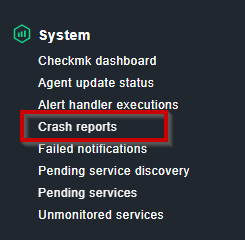
on the shell you find the crash reports in the “~/var/check_mk/crashes/” of your CMK site.
1 Like
This is the report of the mentioned ID
Exception:
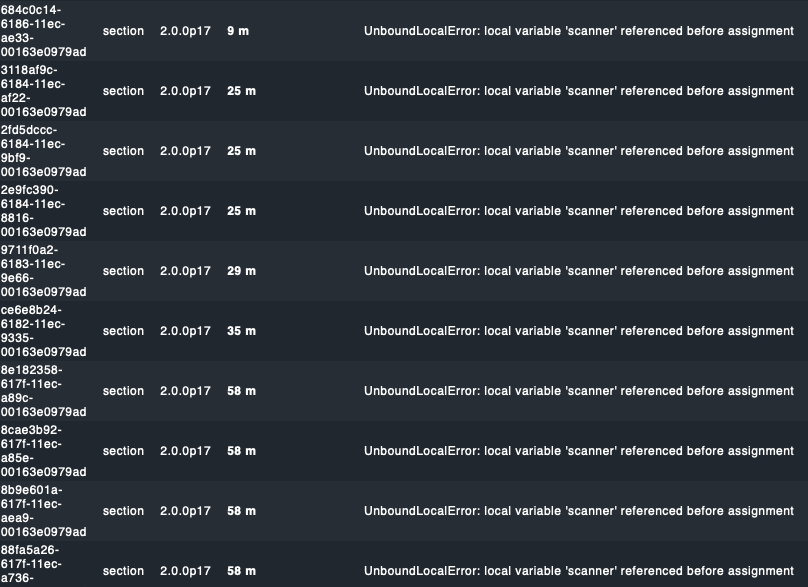
UnboundLocalError (local variable ‘scanner’ referenced before assignment)
Traceback:
File “/omd/sites/checkps/lib/python3/cmk/base/checkers/host_sections.py”, line 392, in _get_parsing_result
parsed_result = section.parse_function(data)
File “/omd/sites/checkps/local/lib/python3/cmk/base/plugins/agent_based/cve_2021_44228_log4j.py”, line 107, in parse_cve_2021_44228_log4j
scanner=scanner,
What also happens in the report overview:
THX @martin.hirschvogel @thl-cmk @Doc and all other contributors - great work and much appreciated!
Right now one question to filter out whats missing
We created a View and more details for all Hosts the service is rolled out (like still many, we can’t use the Bakery) - needed for exports and everything for escalation/management/and so on.
But what is missing is another View which will show us all the Hosts left behind where, for whatever reason, the script is not rolled out an so no new service will be discovered
Any idea how to create that in WATO?
As filtering service labels in views is not possible (still missing)
1 Like
If you are missing some options for the bakery plugin or need different output from the check plugin, let me know. I might extend the plugins for that.
no no - all good there. different policies like for others too - you cant solve that, but thanks!
looks like there is some expected output missing in the scanner output Logpresso CVE-2021-44228 Vulnerability Scanner. I have pushed a updated version, that sould be more forgiving.
im eventlog erhalte ich bei allen servern dessen checkmk komplett austimed folgenden fehler.
checkmk
Can’t load yaml file ‘C:\ProgramData\checkmk\agent\check_mk.user.yml’, exception: ‘yaml-cpp: error at line 13, column 5: end of sequence not found’
die zugehörige check_mk.user.yml:
# Converted to YML from the file 'C:\Program Files (x86)\check_mk\check_mk.ini'
# original INI file was managed by user

logwatch:
  enabled: true
  logfile:
    - security: all context

plugins:
  enabled: true
  execution:
   - async: true
    cache_age: 86400
    pattern: $CUSTOM_PLUGINS_PATH$\cve_2021_44228_log4j.ps1
    run: true
    timeout: 600
das system hat full access darauf. es ist exakt die gleiche datei wie auf den servern, bei denen es funktioniert, da ich die dateien manuell kopiert habe
It’s not found on linux even after updating the agent
Da fehlt ein Leerzeichen. Yaml benötigt die exakte Anzahl an Lehrzeichen zum Einrücken, bitte immer darauf achten.
1 Like
where exactly? can you please post the the fixed version here? THX
Before the list entry of the async statement. If the semantics are correct i don’t know, just the syntax caught me.
so it sould look like this?
plugins:
  enabled: true
  execution:
    - async: true
      cache_age: 86400
      pattern: $CUSTOM_PLUGINS_PATH$\cve_2021_44228_log4j.ps1
      run: true
      timeout: 600
Yes this is the correct syntax.
3 Likes
ok, ich habe es wie bei thl-cmk korrigiert.
der fehler beim agent start bleibt jetzt aus.
ebenso habe ich die 4 ms sql server nun mit dem service ohne check mk timeout zum laufen gebraucht.
jetzt aber eine total banale frage: warum macht das fehlende leerzeichen auf den anderen maschinen nichts aus? es sind wirklich ueberall exakt die gleichen scripte und sourcen im einsatz
Kleine Filesysteme welche der Scanner schafft bevor er vom Agent “getötet” wird.
Du kannst ja bei den Systemen schauen welche es schaffen, im Log des Agenten, wie lang das Powershell Script gebraucht hat bis es fertig war.
nice to hear it works.
1 Like