0.14.0 is out. Three additions and one fix. The additions all come from the same
place: the response has more in it than the body, and a field is rarely interesting on
its own.
 A value measured against another value
Almost no API returns a percentage. They return a pair — used and total,
current and limit, active and max_connections — and leave the division to you.
Until now the transform could only see the field it was attached to, so the only way to
alert on “the pool is 90% full” was to hard-code the capacity into the expression and
edit the rule whenever it changed.
A field can now name a second path, available to the transform as other:
JSON path     pools[*].used
Second path   total
Transform     value / other * 100      unit: %      upper levels 80 / 90
{"pools": [{"id": "sda", "used": 25, "total": 100},
           {"id": "sdb", "used": 180, "total": 200}]}
JSON Pool sda    OK     Value: 25.00%
JSON Pool sdb    CRIT   Value: 90.00%
The second path is resolved inside the same element as the value, so every element
is measured against its own total — not against the first one’s. That is the whole
reason it is resolved by the agent rather than the check: only the agent has the
document and knows which element it is looking at.
If the second path is missing for some element, that service reports the calculation as
failed rather than substituting a value. A missing total silently becoming 1 would
produce a number that looks entirely plausible and is entirely wrong.
 Monitor a response header, not just the body
An API tells you things outside the JSON. The most useful is how much of your quota is
left — which this plugin, whose entire job is calling APIs on a schedule, could not see.
Prefix a path with @header.:
@header.X-RateLimit-Remaining   lower levels 100 / 20   →  the budget, before it runs out
@header.Last-Modified           as a timestamp          →  how stale the data is
@header.Retry-After                                     →  how long the API wants you to back off
Header names are matched case-insensitively, and none of the body path syntax ([*],
aggregation, filters) applies to them — a header is a single scalar.
Last-Modified and a date-form Retry-After are HTTP-dates
(Wed, 21 Oct 2015 07:28:00 GMT), which is neither a number nor ISO 8601, so the
auto timestamp format learned to read them.  That widening is the one upgrade note
in this release — see below.
Both Explorers offer the headers for picking, so you are not typing a name from
memory. The in-site wizard has a Headers tab beside the field picker: the Checkmk
server made the request, so it already has them. The browser-only Explorer makes no
request at all, so it has a Response headers paste area instead — paste curl -sSi
output and it lists the names to click. The status line and the body below it are
ignored, so you can paste the whole dump.
 Label the hosts a
 [*] rule creates
Pointing a wildcard field at a piggyback host turns 50 array elements into 50 Checkmk
hosts. Those hosts arrived with no labels at all, so there was no way to target them with
a folder rule, a view or a filter — you got 50 hosts and no way to say anything about
them as a group.
An element’s own fields can now become host labels on the host it becomes:
JSON path              nodes[*].health
One host per element   name
Labels for that host   region,  role → key "tier"

  →  host node-01   json_api/region:eu-west   json_api/tier:worker
     host node-02   json_api/region:us-east   json_api/tier:leader
Each host is labelled from its own element. Several fields placed on the same host
contribute to one set of labels rather than fighting over it.
There are now three kinds of label in the rule, and it is worth knowing which is which:
|
attaches to |
resolved from |
| Labels for that host (new) |
the created piggyback host |
the [*] element |
| Service labels |
the individual service |
the [*] element |
| Host labels (on the endpoint) |
the polling host |
the response root |
The last one is unchanged and stays on the polling host — it describes the API, not any
element inside it.
 Fixed: the rule form crashed when a required field was emptied
Reported by @lasoe (#161) —
thank you, the crash report made this a five-minute diagnosis.
Clearing a required field (a service name or a JSON path) and clicking Save took out the
whole Setup page with TypeError: Unexpected extraction value: None instead of
highlighting the offending box. The rule was fine; you just could not edit it any more
without the form breaking.
The cause was ours: after a failed save Checkmk re-renders the form, and the emptied
entry arrives at the plugin’s migration hook as None, which it treated as a programming
error and raised on. A migration runs while the form is being drawn — there is nothing
there to catch an exception and tie it to a field, so raising costs you the entire form.
Both migration hooks now degrade to an empty row instead, which is the box that needs
your attention anyway.
If you saw the form appear twice below Fields to monitor after a failed save, that
was the same bug — the exception fired part-way through drawing it.
Upgrading
One note, and it is narrow:
A timestamp field with format auto now reads HTTP-dates. If you have a field
configured as a timestamp whose value is an HTTP-date, it was reporting UNKNOWN
(Not a valid timestamp) and will now resolve to a real age — so with upper levels set
it can go WARN or CRIT where it previously sat UNKNOWN. The explicit ISO 8601 format
is unchanged and stays strict. Full text in
UPGRADING.md.
Everything else is opt-in and nothing changes for an existing rule.
Get it
mkp add json_api-0.14.0.mkp
mkp enable json_api 0.14.0
On Checkmk 2.5+ the optional companion package Generic JSON API – Explorer (extra)
(json_api_explorer) is updated too — that is where the Headers tab lives. The
dependency-free browser version in the repo (explorer/index.html) covers all three
additions as well.
Feedback and bug reports welcome, and keep them coming — one of the four items above is
here because someone filed a good one.

 JSON API Explorer — checkmk-json-agent
 Will test this!


 The Setup UI now speaks every Checkmk-supported language — the rule form and help texts are fully localized, so the special agent configures just as cleanly in
 Tested on both Checkmk 2.4 and 2.5 in CI, so upgrades and mixed fleets are covered.
 Supply-chain hardening — the .mkp is now built with signed build provenance, GitHub Actions are pinned by SHA, and CodeQL + Dependabot run on every change.
 The JSON API Explorer can’t drift anymore — a CI guard keeps the standalone Explorer in lockstep with the plugin’s config schema, so the rules it generates
 Added a contributing guide and issue templates — bug reports and feature requests are very welcome.
 Refreshed the Exchange listing to cover object-map discovery and multi-endpoint rules.
 — instead of a value, monitor how many elements a path
 — either require a value to fully match a regex
 — an optional arithmetic expression over the
 New check-parameters ruleset — override thresholds per folder/host/service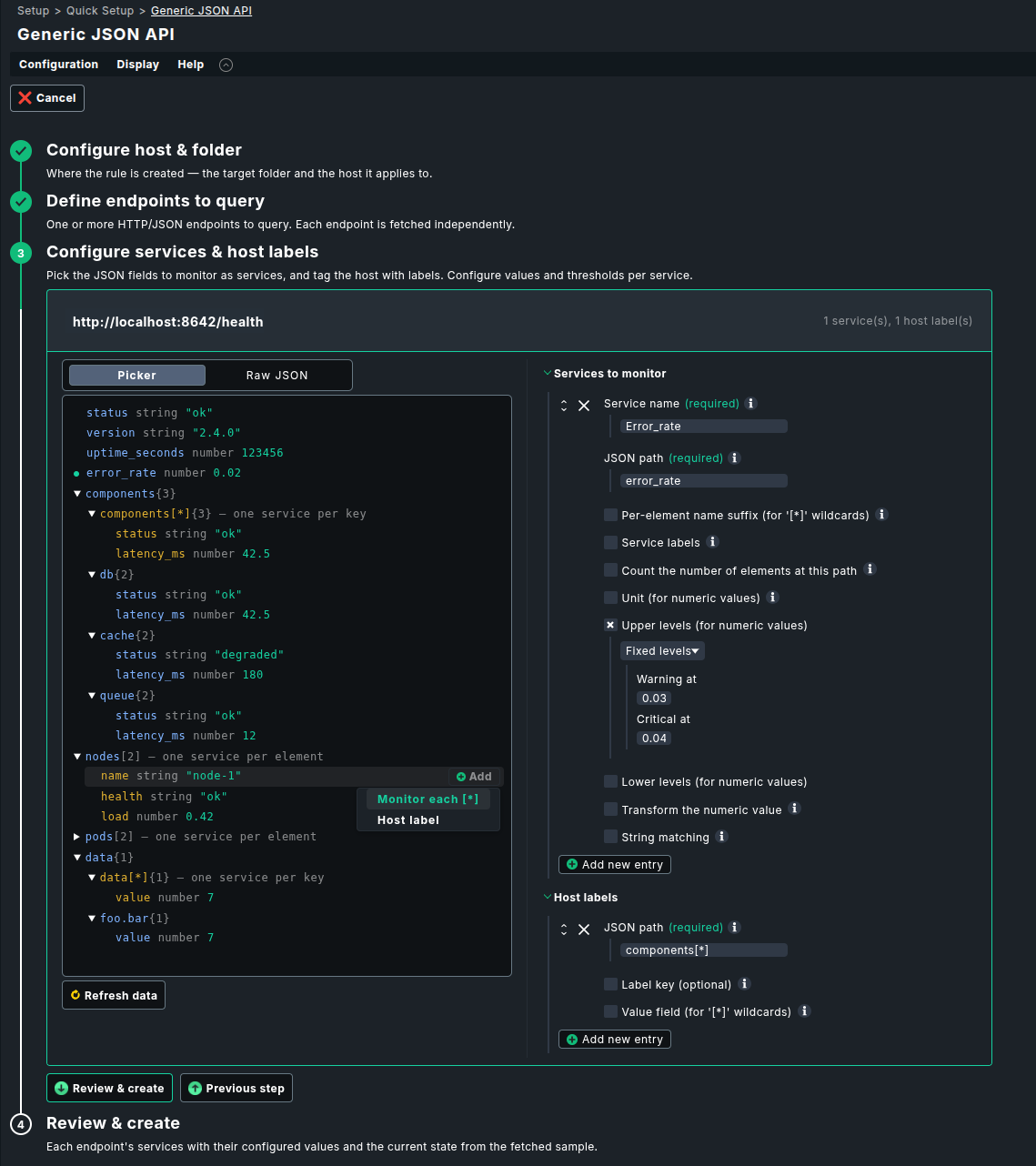
 New in 0.10.0
 Heads-up for existing users: after upgrading, the next service discovery will show one new
  TLS certificate expiry, for free
 Rate-limited or expensive API? Cache it
 A field can be a fact instead of a service
 API keys from the password store
 Retry a request instead of alerting on a blip
 Show the reason next to the value
 .
.