I’ve haproxy.py script configured on my VMs. It works good through command line
here is the output:
0 HAProxy_pxc-onenode-front/FRONTEND scur=0;250;500 OK - [status OPEN]
0 HAProxy_mysql-cluster/db01 scur=0;250;500|chkfail=6;15;25 OK - [status UP]
0 HAProxy_mysql-cluster/db02 scur=0;250;500|chkfail=3;15;25 OK - [status UP]
0 HAProxy_mysql-cluster/db03 scur=0;250;500|chkfail=6;15;25 OK - [status UP]
0 HAProxy_mysql-cluster/BACKEND scur=0;250;500 OK - [status UP]
But result not exist on the web interface, only works through command line.
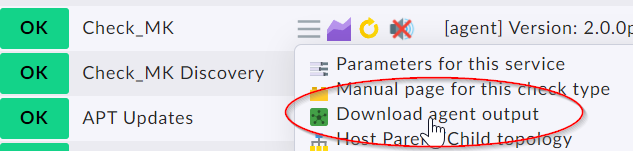
First check the agent output on your monitoring site.
You can do this with “cmk -d hostname” on the command line or inside the web interface with “download agent output”
Your output looks like a local check and should be visible inside the “<<>>” section.
Problem clear. The haproxy script is a local check. In your system it is in the wrong directory. Please move the script to the local folder and then it should work.
Local folder → local checks (scripts that already produce a valid check result)
Plugin folder → cmk plugins (scripts that produce raw data that must be processed on CMK side)
Local checks are the first step to write your own checks as you don’t need to produce code on the CMK server itself and it can be done in nearly all scripting language you know.
This topic was automatically closed 365 days after the last reply. New replies are no longer allowed. Contact an admin if you think this should be re-opened.