CMK version: 2.3 raw
**OS version: Debian Bookworm **
Error message: host is offline (100% package loss)
Hello all!
We have a webserver located in Azure. CheckMk is reporting that it’s offline with 100% package loss.
Obviously this is incorrect because:
The website is available as expected.
I can ping the Azure IP from the Debian server hosting our CheckMk with very steady reply time under 7 ms.
Host connection test from the CheckMk host properties works just fine. Ping test is successful with under 7 ms reply time.
The two service checks I have setup for this Azure host work fine. This are: https check (expecting certain text in html header) and ssl certificate validity check.
I cannot think of any reason why this should happen.
Does anyone know what is going on here?
For the host check you can select different ping commands. The default command in your RAW edition is “check_icmp”. I would first test manually if this is working as expected.
Go to
~/lib/nagios/plugins
inside your site and execute
./check_icmp --help
Read the needed command line options and insert some values.
If this is executed without problem then you need to look at the host check command of your problem host.
Thank you for your reply.
I have tested as you described. Whatever parameter I try for check_icmp, I get 100% packet loss. The default Debian ping command however has no packet loss. Do you have any additional advise?
[user]@[host]:/opt/omd/versions/2.3.0p20.cre/lib/nagios/plugins$ ./check_icmp [target]
CRITICAL - [target]: rta nan, lost 100%|rta=U;;;; rtmax=U;;;; rtmin=U;;;; pl=100%;40;80;0;100

[user]@[host]:/opt/omd/versions/2.3.0p20.cre/lib/nagios/plugins$ ping [target]
PING [target] ([target IP address]) 56(84) bytes of data.
64 bytes from [target IP address] (target IP address]): icmp_seq=1 ttl=118 time=7.03 ms
64 bytes from target IP address] (target IP address]: icmp_seq=2 ttl=118 time=6.92 ms
64 bytes from target IP address] (target IP address]): icmp_seq=3 ttl=118 time=6.96 ms
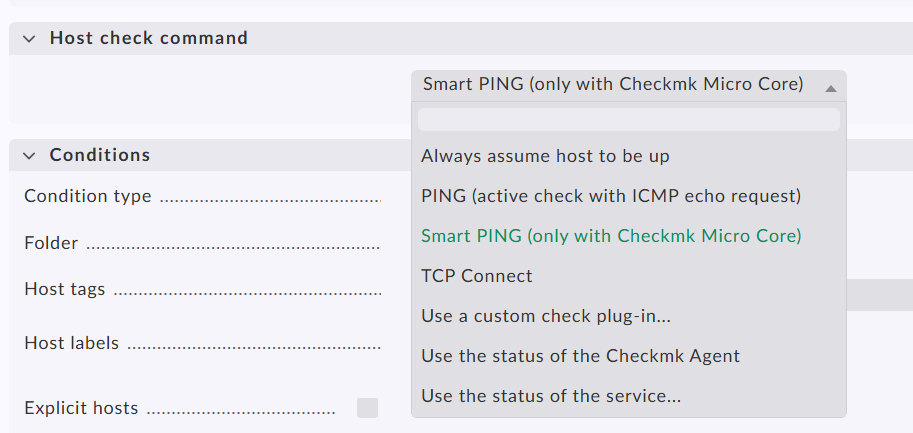
Thats the selection you have - in your case “PING (active check with ICMP echo request)” is the default selection. This uses the check_icmp command.
For the problem host you select “Use a custom check plug-in…”
At last you set the correct conditions and it should ping the host.
In your network there is a firewall device that has a problem with the burst ICMP packets sent from check_icmp. The single icmp packets from the normal ping are fine.
Thank you so much for your support, much appreciated! Creating a custom host check command as you described is the solution. The host is now correctly reported as online.