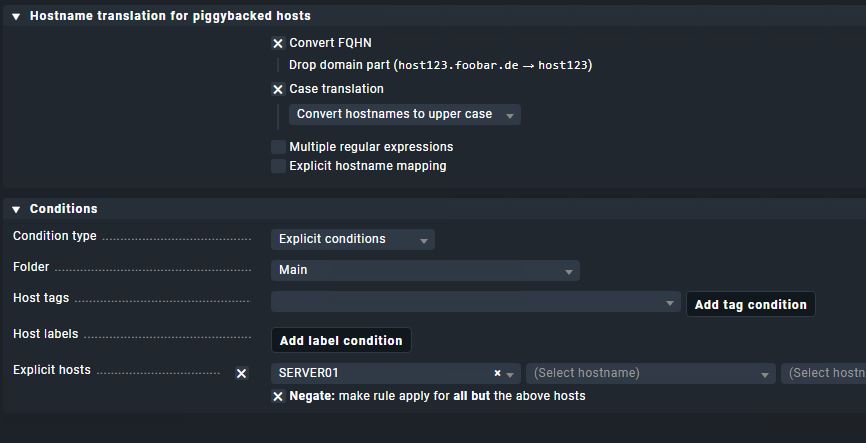
I’m trying to use the rule “hostname translation for piggybacked hosts” for a specific host that exist double in our vSphere enviroment with different domain names.
I’m trying to translate only Host2 into checkmk, but in our case it only translate Host1.
Can someone help me with this? I’ve tried with this rules, but still only tranlase Host1.
i don´t really understand, what the expected target naming in checkmk should be.
Could you create a table “source name in vCenter” → “target name” in checkmk ?
What are the conditions in the first rule?
Currently the second rule will not change anything in addition to the first rule, if there are no conditions set.
In our vCenter, we have various clients that are also named with their domains. Unfortunately, there are a few clients with the same name but a different domain.
On our CheckMK server, the clients are named only by their hostname without the domain, and we are only monitoring the productive systems (*.prod.com).
For Piggyback Translation, I would like to exclude specific clients or ideally all clients ending with the domain “*.test.com.” I have tried setting up several rules to do this, but I haven’t figured out the best way to implement it yet.
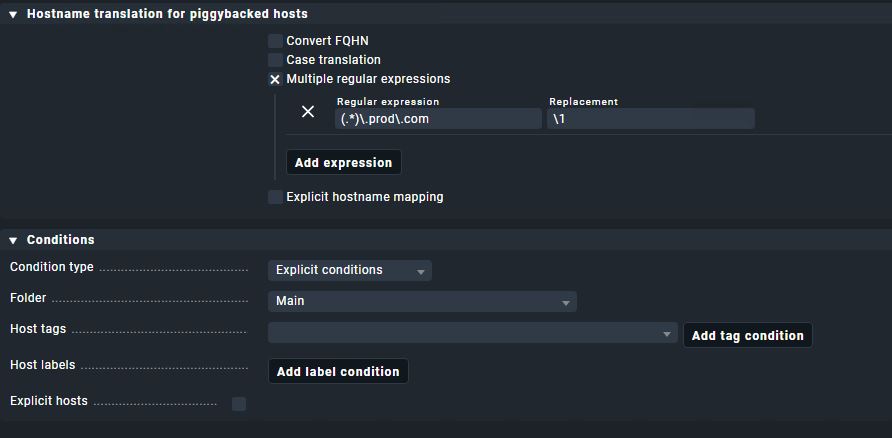
I think you could rewrite the prod hosts with regex match groups.
“Multiple regular expressions” - Add expression.
(.*)\.prod\.com -> \1
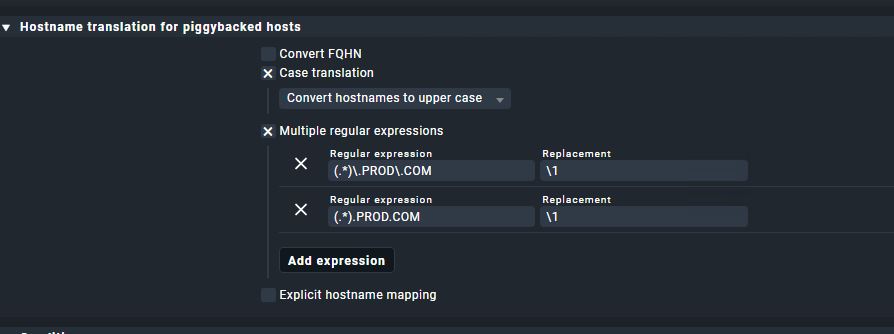
I can´t test, in which order the piggyback names are renamed, depending on the order, the hostname might already be upper case, when the regex rename is reached.
If so, you need to rename the Regex to uppercase.
You can see the resulting hostnames in ~/tmp/check_mk/piggyback to see, what happens.
You can just delete all folder combinations of one test host, the new folder will be recreated by the next run where piggyback data is being present.
Then you see, how the rewrite currently works.
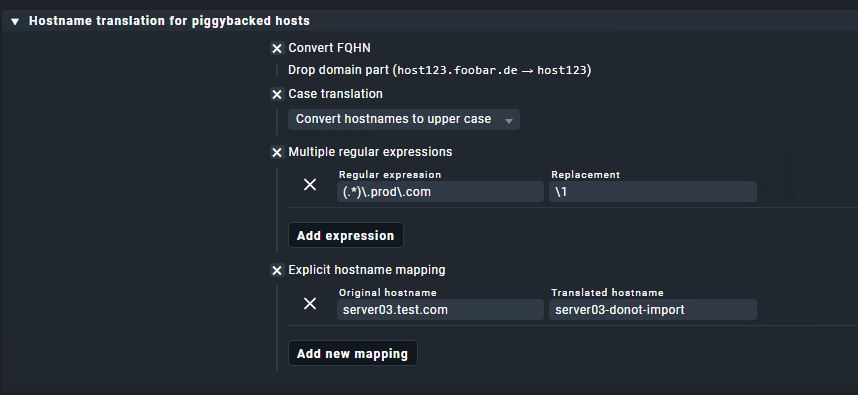
And i think I remember that only one rule matches the conditions, so you may need the UPPERCASE and Convert FQHN in one rule with the regex renaming.
In CheckMK, I see that the warnings have disappeared, but for server03, I still see that it is taking the wrong piggyback translation from “server03.test.com”.
The old folders dont get deleted automatically, everything seems to be correct and the lowercase server03 is a leftover.
Just clean up again with the new ruleset and everything should be fine
Before you do this you need a rule that renames your “server03.test.com” to something else if you don’t want to see it inside CMK.
In your first rule with the regular expression i would also add an explicit mapping for something like “server03.test.com” → “server03-dont-import” or some other name
Now your rule with capitalization and short name should give the correct result.
You can check if your first rule works if this is the only active one.
If you don’t see the renamed host inside the piggyback folder than something does not match in your rule.
Nice that it works now.
You don´t need the second regex shown in the screenshot, the only difference to the first is that the “.” dots are escaped to be compared as a character and not as their regex function “any single character”.
The second regex would for example also match the string serverXPRODYCOM
This topic was automatically closed 365 days after the last reply. New replies are no longer allowed. Contact an admin if you think this should be re-opened.