I am running 2.3.0p33cee.
I am migrating self-written plugins from the ancient API (was working from CMK 1.6 up to 2.2) to the last version (Werk #16259: New APIs for plugin development). I’ve migrated 3 SNMP-based plugins so far. What I would like to adjust are the color of the perfometers, because the one used for the perfometers of my plugins is dark-pink and hard to read. I unfortunately cannot see anything related in the CMK documentation neither in the API documentation. Have I missed anything? Could you point me out to it?
Hello Hermann,
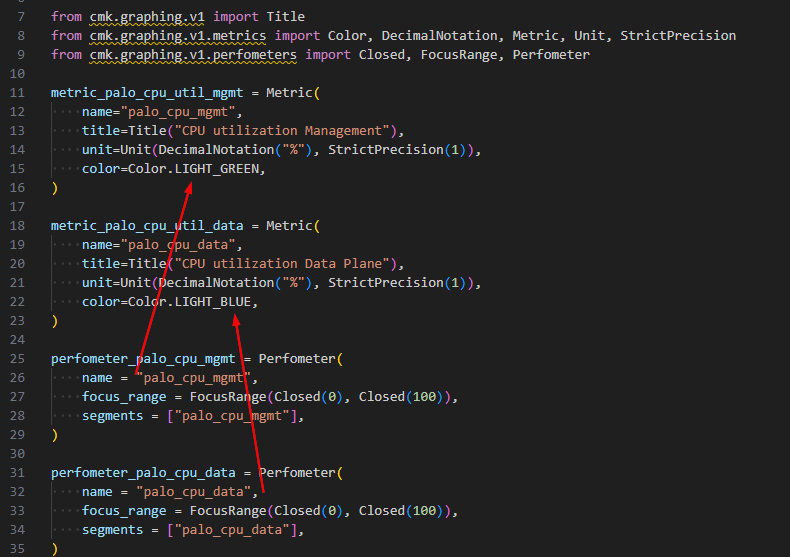
The perfometer takes the color from the metric of the same name in the graphing definition.
If a metric is called up in the check but no definition has been created in the plugin folder under ‘graphing’, then a random color is used.
Thank you, @MarcS, very appreciate your answer!
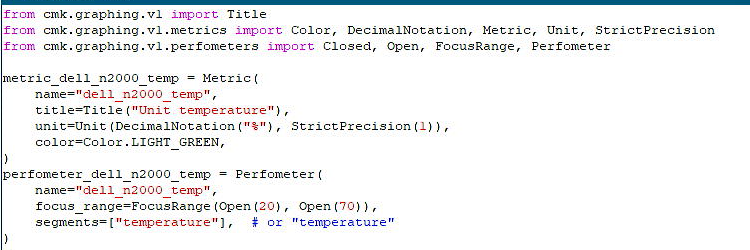
I have added a new metric as you suggested but it has not worked unfortunately. I cannot see any change in perfometer’s or graphs’s color nor in the title of the graph.
My graphing_dell_n2000_temp.py file is
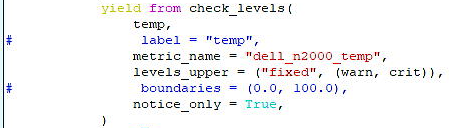
and I added the line to the check_levels call in the check’s file:
Deployed the new packages and restarted the Apache process on the master site too, but no luck. Any idea, what I could have missed?
thanks @MarcS !
You are right, the API documentation says: “A list of metric names or objects”.
Unfortunately it didn’t work. I have tried with segments=["dell_n2000_temp"],
and segments=["metric_dell_n2000_temp"],
but then the perfometer’s graph just vanishes.
The funny part is that only this shows the perfometer at all (with the not desired color, though, but better that then nothing), when it like this: segments=["temperature"],
Pretty weird.