We have one server that on SMART reports errors as critical
Powered on: 357 days 1 hour, Power cycles: 14, Critical warning: 0, Available spare: 100.00%, Percentage used: 1.00%, Media and data integrity errors: 121 (during discovery: 115 **CRIT**), Error information log entries: 121, Data units read: 27.1 TiB, Data units written: 10.7 TiB
These errors however are irrelvant for us as they have been unchanged for more than 30 days but keep generating reports. Is it possible to hide that - or better generate a rule that reports only when new errors appear over a certain threshold?
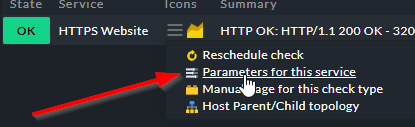
you should be able to create a rule that modifies the parameters of the service. To get there, click on the ‘hamburger menu’ next to the service name, and then on this
From there, find the parameter you want to modify, click on it and then go define the rule (decide where it should apply)
The number of errors is stored as a target state when the service was discovered. Whenever the current value differs from the target, the check state becomes CRIT.
As the discovery of this check is not configurable, the only thing you can do is to rediscover the check. Go to the service discovery, search for the check, move it to undecided by clicking the question mark, and then add it to monitored services again.
This topic was automatically closed 365 days after the last reply. New replies are no longer allowed. Contact an admin if you think this should be re-opened.