Hello ,
When i choose Monitor and enter in the Search Field the First Letters from, for example an Location to see all Hosts of this Location then the default Host Search View opens .
But in this View for me the IP Addresses was missing .
I create an Cloned View from this View with the IP Addresses inserted in the View.
But how is it possible to use now this View as default Host Search View with the IP Addresses. ?
have you given your cloned view the same ID as the existing view? I assume you are talking about the view searchhost.
It works like so: whenever checkmk wants to show a certain view with a certain ID, then it first looks if there is some custom (=cloned) view with that ID owned by you. If it exists, it is shown. If no such view exists, the built-in view with the same ID is shown.
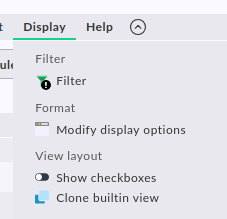
So to overwrite a built-in view, simply click Display → Clone builtin view and leave the suggested ID as is. (This is one of the rare situations where you can change the ID afterwards.)