Hi,
how is it possible to determine the host a check is currently running against?
I have found this thread here - but it does not contain the answer. 
Thanks & regards,
Simon
Hi,
how is it possible to determine the host a check is currently running against?
I have found this thread here - but it does not contain the answer.
Thanks & regards,
Simon
In checkmk 1.6 there is a global method host_name() available. I think you have to import it from somewhere in 2.0, because it is not in the official plugin API.
Hi Simon,
you can try to get this information by using the livestatus query.You can filter the check and get all hosts involved. Or ist this to simple?
Cheers,
Christian
Hi,
thanks for your replies.
@r.sander (Do you know from where the host_name function can be imported?)
@ChristianM I don’t think that a livestatus query can give me the host that a check is currently working on.
Perhaps I should explain what I want to achieve: access the HTML logs / error logs (red dot icon) of Robot Framework (stored on disk) from a custom action icon.
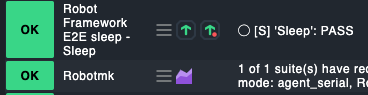
Robot logs must be stored in the context of the suite name and the host the suites run on:
OMD[cmk]:~/local/share/addons/robotmk/win10simdows$ ls
-rw-rw---- 1 cmk cmk    0 Aug  2 08:01  e2e_app_error_log.html
-rw-rw---- 1 cmk cmk    0 Aug  2 08:01  e2e_app_log.html
The connection between service names and the RF suite would be symlinked:
OMD[cmk]:~/local/share/addons/robotmk/win10simdows$ tree
.
├── Robot Framework E2E GetReport      # << cmk service
│   ├── last_suite_error_log.html -> ../e2e_app_error_log.html
│   └── last_suite_log.html -> ../e2e_app_log.html
├── Robot Framework E2E Login          # << cmk service
│   ├── last_suite_error_log.html -> ../e2e_app_error_log.html
│   └── last_suite_log.html -> ../e2e_app_log.html
├── Robot Framework E2E Logout         # << cmk service
│   ├── last_suite_error_log.html -> ../e2e_app_error_log.html
│   └── last_suite_log.html -> ../e2e_app_log.html
├── e2e_app_error_log.html          # << RF log
└── e2e_app_log.html                # << RF log
In the end, the links behind the log icons could look like this:
http://cmksrv/cmk/addons/robotmk/HOSTNAME/SERVICEDESC/last_suite_log.html
http://cmksrv/cmk/addons/robotmk/HOSTNAME/SERVICEDESC/last_suite_error_log.html
As said, the problem is that the discovery / check must know the current host name in order to descend into the correct host directory.
Any ideas?
Thanks a lot…
/Simon
Hi Simon,
We did something similar for a web/icon plugin. The function is defined like this:
def paint_my_link(what, row, tags, host_custom_vars ):
And the host finally like this:
HOST=row["host_name"]
Let me know in case of you want to see the complete code. I will send by mail.
BR
Michael
Hi Simon,
why did you store the results in local/share/addons? As an idea, you can also store this results directly in document_root of omd site. This makes it easy to point directly to the html results like custom notes.
In path ~/local/share/check_mk/web/htdocs you create your result files as you described before.
Then you can call the Results by "/$HOSTNAME$/$SERVICEDESC$/last_suite_log.html
I hope this idea is helpful.
Cheers,
Christian
Hi @ChristianM ,
thanks for the hint.
In general a good idea, were it not for the directive allow from all:
Alias /cmk/check_mk/local /omd/sites/cmk/local/share/check_mk/web/htdocs
<Directory /omd/sites/cmk/local/share/check_mk/web/htdocs>
      Order deny,allow
      allow from all
</Directory>
Even if Robot Framework masks (almost…) all secrets, the logs should not be available for non-authenticated users.
Regards,
Simon
Hi Simon,
This won’t help you, but it is the “official” answer to your question:
You cannot access the host name during the discovery or check execution. Calls to “host_name” and the like are left-overs of the old API and may stop working anytime.
Hi Moritz,
thanks for the info, even if it’s rather bad
I will add a hostname dropdown field to the HTML log option in WATO (similar to piggyback), where the log can be assigned to a host. If unchecked, the host machine name gets used.
Regards,
Simon
I have the need to know the name of the current host in one of my extensions.
I do this: from cmk.base.check_api import host_name in checkmk 2.0
The extension is this one: check_mk_extensions/updater_hostname at cmk2.0 · HeinleinSupport/check_mk_extensions · GitHub
I need to compare the name of the host with the name that was used when registering the agent updater to detect errors after cloning VMs. How would I implement such a check without host_name()?
There may be other use cases where the current host name is important for the check. Do we really have to fall back to active checks with $HOSTNAME$ as argument in these situations?
This topic was automatically closed 365 days after the last reply. New replies are no longer allowed. Contact an admin if you think this should be re-opened.