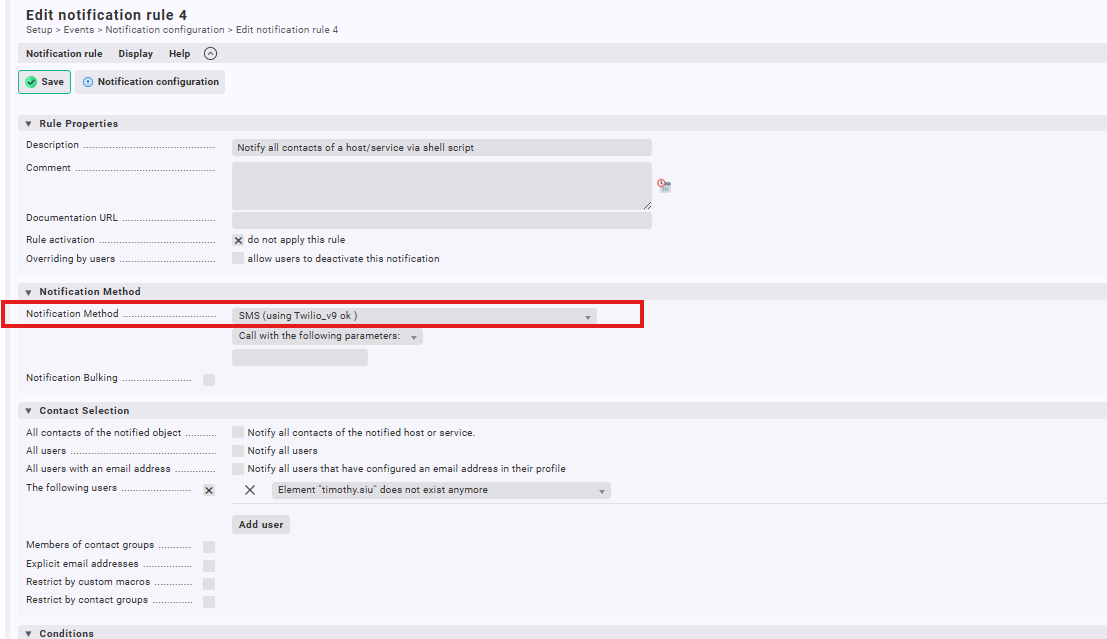
I want to know how to make the notification method to use script, or how to make the script to be displayed in the notification method drop downlist so i can select. I’ve put the python script in the /opt/omd/sites/xxxxx/local/share/check_mk/notifications folder, but I can’t see it in the Notification method drop down list. please advise.
#!/bin/bash
# YourNotificationName - placed here

# In order to use this script:
# - copy it into your site into ~/local/share/check_mk/notificaions
# - make sure it is executable
# - the 2. line is need for the dropdown
# - create a notification rule that makes use of the new plugin
thanks a lot Bernad, it works.
I have a further question, I am trying to setup voice call notification, so we can receive phone call when the monitoring device triggers the alert. But we don’t know how does the checkmk transfer the alert from words to voice, what should we put in the python script and what parameter should the script pass to checkmk ? There is drop down for “call with following parameter “, how can I make use of it ? Please help. Thanks
You probably don’t need the parameters to the script because all information is passed to the script via environment variables. The most important ones are explained in the documentation: Notification basics
For example:
#!/usr/bin/env python
# Example notification script

host=os.environ['NOTIFY_HOSTNAME']
if os.environ['NOTIFY_WHAT'] == 'HOST':
    print(f"this is a notification for a host problem on {host}")
elif os.environ['NOTIFY_WHAT'] == 'SERVICE':
    svc = os.environ['NOTIFY_SERVICEDESC']
    print(f"this is a notification for a service problem for the service {svc} on {host}")
else:
    print("this cannot happen")
I suggest you first use this simple script as a notification script to see what variables are automatically set by checkmk. There are about 100 variables and they all start with NOTIFY_