How to Monitor the MSSQL db instances , DB read/writes memory etc. in check-mk .
what are step to configure in check-mk and on server.please help me .
Hi,
First if you are using local system account you need to give it permissions to access master and dbs.
Then you need to copy the plugin to the desired machine and re-scan your host.
If you want to use another user, just create it in MSSQL and specify in config file.
It should be straight forward.
cheers
Thank you for your responses. May i know the exact path where i need to copy the agent . where i can get the agent . can you guide me step by step procedure.please help me .
Hi,
Yes I can. It would help if you specify your version.
First go into your Check_MK GUI and go to Monitoring Agents:
- Search for WINDOWS AGENT - PLUGINS
and copy - mssql.vbs
to agentpath/plugins.
Thank you .
My version RAW 1.6.0p7 .
I got it and i have copied the file in the location .
is anything i need to edit the file?
where i need to provide the db user credentials
1 Like
You have the info inside the plugin.
Create a mssql.ini file in your agent directory (Where the executable is).
if you run the agent via cli you’ll notice that it declares the paths for plugins/local checks/confdir.
’ Another option is to create a mssql.ini file in MK_CONFDIR and write the
’ credentials of a database user to it which shal be used for monitoring:
’
’ [auth]
’ type = db
’ username = monitoring
’ password = secret-pw
Thank you for help .
Even after copying the file and mssql.ini file in the location with db user id and password .still DB services are not discovering .please help me.please find the screen shot.
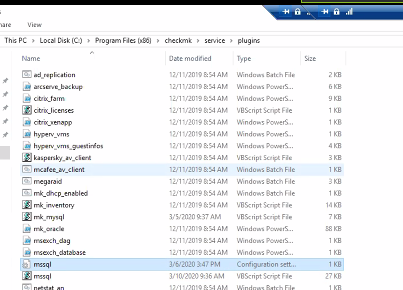
Hi,
Sorry not on plugins folder, but it should be a level or 2 up.
Run the agent locally and check which are the paths for config/plugins and local, then copy it to config.
My guess would be to paste it on checkmk folder.
even i pasted in the check-mk folder still same issue.
can you run the agent locally and paste here the output please
And make sure the mssql.ini is like this :
[auth]
type = db
username = monitoring
password = secret-pw
thank you for the response.
yes i have used the mssql.ini file in the same format.
here the output
PS C:\Program Files (x86)\checkmk\service\plugins> cscript “C:\Program Files (x86)\checkmk\service\plugins\mssql.vbs”
Microsoft ® Windows Script Host Version 5.812
Copyright © Microsoft Corporation. All rights reserved.
<<<mssql_instance:sep(124)>>>
<<<mssql_databases:sep(124)>>>
<<<mssql_counters:sep(124)>>>
<<<mssql_tablespaces>>>
<<<mssql_blocked_sessions:sep(124)>>>
<<<mssql_backup:sep(124)>>>
<<<mssql_transactionlogs:sep(124)>>>
<<<mssql_datafiles:sep(124)>>>
<<<mssql_cluster:sep(124)>>>
<<<mssql_versions:sep(124)>>>
<<<mssql_connections>>>
<<<mssql_instance:sep(124)>>>
<<<mssql_instance:sep(124)>>>
MSSQL_MSSQLSERVER|config|14.0.1000.169|Standard Edition|
<<<mssql_instance:sep(124)>>>
MSSQL_MSSQLSERVER|state|1|
MSSQL_MSSQLSERVER|details|14.0.2027.2|RTM|Standard Edition (64-bit)
<<<mssql_counters:sep(124)>>>
None|utc_time|None|3/10/2020 5:35:13 PM
SQLServer:Memory_Broker_Clerks|memory_broker_clerk_size|Buffer_Pool|1078960
SQLServer:Memory_Broker_Clerks|simulation_benefit|Buffer_Pool|0
SQLServer:Memory_Broker_Clerks|simulation_size|Buffer_Pool|269679
SQLServer:Memory_Broker_Clerks|internal_benefit|Buffer_Pool|0
SQLServer:Memory_Broker_Clerks|periodic_evictions_(pages)|Buffer_Pool|0
SQLServer:Memory_Broker_Clerks|pressure_evictions_(pages/sec)|Buffer_Pool|0
SQLServer:Memory_Broker_Clerks|memory_broker_clerk_size|Column_store_object_pool|4
SQLServer:Memory_Broker_Clerks|simulation_benefit|Column_store_object_pool|0
SQLServer:Memory_Broker_Clerks|simulation_size|Column_store_object_pool|0
SQLServer:Memory_Broker_Clerks|internal_benefit|Column_store_object_pool|0
SQLServer:Memory_Broker_Clerks|periodic_evictions_(pages)|Column_store_object_pool|0
SQLServer:Memory_Broker_Clerks|pressure_evictions_(pages/sec)|Column_store_object_pool|0
SQLServer:Buffer_Manager|buffer_cache_hit_ratio|None|112199
SQLServer:Buffer_Manager|buffer_cache_hit_ratio_base|None|112199
SQLServer:Buffer_Manager|page_lookups/sec|None|101109167009
SQLServer:Buffer_Manager|free_list_stalls/sec|None|1940046
SQLServer:Buffer_Manager|database_pages|None|1078960
SQLServer:Buffer_Manager|target_pages|None|31981568
SQLServer:Buffer_Manager|integral_controller_slope|None|0
SQLServer:Buffer_Manager|lazy_writes/sec|None|159954154
SQLServer:Buffer_Manager|readahead_pages/sec|None|8858340055
SQLServer:Buffer_Manager|readahead_time/sec|None|54192953108
SQLServer:Buffer_Manager|page_reads/sec|None|9060901325
SQLServer:Buffer_Manager|page_writes/sec|None|1129810574
SQLServer:Buffer_Manager|checkpoint_pages/sec|None|8163063
SQLServer:Buffer_Manager|background_writer_pages/sec|None|372205675
SQLServer:Buffer_Manager|page_life_expectancy|None|1332
SQLServer:Buffer_Manager|extension_page_writes/sec|None|0
SQLServer:Buffer_Manager|extension_page_reads/sec|None|0
SQLServer:Buffer_Manager|extension_outstanding_io_counter|None|0
SQLServer:Buffer_Manager|extension_page_evictions/sec|None|0
SQLServer:Buffer_Manager|extension_allocated_pages|None|0
SQLServer:Buffer_Manager|extension_free_pages|None|0
SQLServer:Buffer_Manager|extension_in_use_as_percentage|None|0
SQLServer:Buffer_Manager|extension_page_unreferenced_time|None|0
SQLServer:Buffer_Node|database_pages|000|1078960
SQLServer:Buffer_Node|page_life_expectancy|000|1332
SQLServer:Buffer_Node|local_node_page_lookups/sec|000|0
SQLServer:Buffer_Node|remote_node_page_lookups/sec|000|0
SQLServer:General_Statistics|active_temp_tables|None|51
SQLServer:General_Statistics|temp_tables_creation_rate|None|74581<<<mssql_cluster:sep(124)>>>
<<<mssql_connections>>>
MSSQLSERVER master 33
MSSQLSERVER tempdb 1
MSSQLSERVER model 0
MSSQLSERVER msdb 4
MSSQLSERVER SAMStorePortalSQL 13
MSSQLSERVER EDJCommon 2
MSSQLSERVER EDJESCAPE 0
1 Like
According to your output it should add some services, but the user specified isn’t able to get all databases/instances, can you review your users permissions ?
This topic was automatically closed 30 days after the last reply. New replies are no longer allowed.