We have a host whose web interface is being monitored via an active HTTP check.
However, the host is only powered on in the afternoon (at varying times).
I have configured that the host should appear as always up.
How can I configure an active HTTP check so that it only triggers an alert notification when the host is online (ping = OK)?
You could disable the option to make the Host as Always UP and replace it by using a TCP check agains the Web Server port (80 or 443 probably). If the TCP port is not accessible the Host State will be Down which will not trigger service notifications.
You could add an “Add/Cancel Downtime” task that uses the REST API to automatically create a host downtime when the server is shut down in a regular, controlled manner and remove that downtime once the server is started again.
Since the host downtime also applies to all services associated with the host, the HTTP check will not trigger any alerts during that period either.
This ensures that no false alerts are triggered during planned shutdowns, that the monitoring status consistently reflects the server’s actual state, and that any potential SLA calculation properly accounts for the scheduled downtime.
Thats a bit tricky: first, you add one or more notification rules to define for which events you want to receive an email (for example).
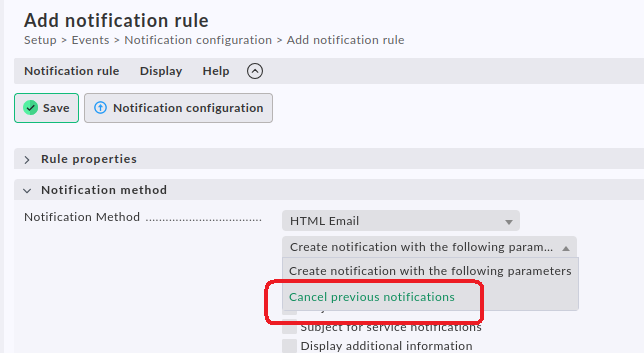
Then you define another rule for the email notification and instead of selecting “Create notification with the following parameters” you select “Cancel previous notifications”.
And in this “cancellation rule” you set the host/label/tag conditions for the hosts for which you don’t want emails:
So instead of creating one rule “Send emails for all hosts except X”, you create one rule “Send emails for all hosts” and another “Cancel for host(s) X”. Instead of hosts you can of course use any condition you like.
Note that the order of the rules is important. You might have to rearrange them so that the cancellation rule comes after the “send” rule.
Disclaimer: The above description is true for cmk 2.3. It might be different in 2.4 because they changed the notification system. But I doubt they dropped the possibility to cancel notifications.
In that case in your notification rule you can disable host notifications or disable host notifications for that host using “Enable/disable notifications for hosts”.