Hello - I feel like I’m missing something obvious here, so apologies ahead of time. We’re on CEE 2.3.0 and I’m looking to make combined graphs for windows services which have similar names - for instance, MyService1, MyService2, MyService3, etc.
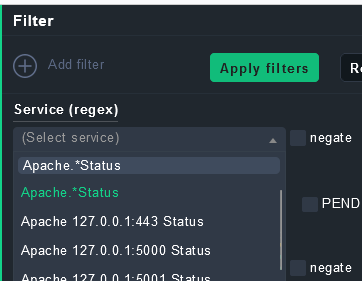
I can see how to use the combined graphs and but I can’t figure out how to actually enter the service name in the search panel. The filter says “Service (regex)” but under that “(Select Service)”:
So … even thou it says “regex” I can only select individual services and cannot type in something like MyService* as I was hoping to do. We have dozens of services like this so selecting them one by one is not feasible. It says “regex” so I’m assuming I can type somewhere, but I can’t see where - how would I go about doing this?
The “select service” drop down still allows you to enter text incl. regex, it then takes about a few 100ms (or if your environment is slow longer) before your entered regex shows up, so don’t hit enter too early.
But it will show up as the first and can be selected (with “enter”-key or mouse)
@theyken I think we talked about this delay killing user experience for fast typers
Note - for regex you'd need ".*" instead of just * although as checkmk automatically adds ".*" implicitly, your example "MyService*" would have worked
This topic was automatically closed 365 days after the last reply. New replies are no longer allowed. Contact an admin if you think this should be re-opened.