HTTP active check seems to have problems from web interface

CMK version: check-mk-raw-2.1.0p2
OS version: Debian GNU/Linux 11 (bullseye)

Error message: HTTP WARNING: HTTP/1.1 404 Not Found - 466 bytes in 0.003 second response time

What it seems it doesn’t work is the URI parameter.

From the command line it works:

root@lxorslog01:/omd/sites/ors/lib/nagios/plugins# ./check_http -H -u ‘’
HTTP OK: HTTP/1.1 200 OK - 11950 bytes in 0.062 second response time |time=0.061996s;;;0.000000;10.000000 size=11950B;;;0

Can it be a bug in the web interface?

Output of “cmk --debug -vvn hostname”: Check_MK can be used only as site user. (If it is a problem with checks or plugins)

Hi @mcalorio ,

you probably meant 2.1.0p20 ?
If you click on the service in the web interface and scroll down you can see what is executed in line Service check command - e.g:

check_mk_active-http!'-u' '/index.php/admin/' '--ssl' '--onredirect=follow' '--sni' '-p' '443' 'backend.magento.dev' 'backend.magento.dev'

Hi,

thanks, no, I should have “p2”:

$ sudo omd versions
2.0.0p22.cre
2.1.0p2.cre (default)

If I try with this site, for example:

check_mk_active-http!'--ssl' '--sni' '$_HOSTADDRESS_4$' 'forum.checkmk.com'

it works, but not with the URI:

check_mk_active-http!'-u' '/t/http-active-check-seems-to-have-problems-from-web-interface/36634/2' '--ssl' '--sni' '$_HOSTADDRESS_4$' 'forum.checkmk.com'

I get a WARN:

HTTP WARNING: HTTP/1.1 404 Not Found - 460 bytes in 0.005 second response time

Matteo

1 Like

Hi,

because there is already the 2.1.0p20 available so maybe there really have been fixed something. I don’t remember that version. :slight_smile:

Hi,

I checked right now with v.2.1.0p25 and the problem is still the same.

Matteo

2.1.0p20 is already available so maybe they really have fixed something.

@mcalorio what is the value of the macro “$_HOSTADDRESS_4$” ? Maybe try to set the IP manually there for a test.

But yeah… still doesn’t make sense if the same works but without the URI… that’s weird.

Thanks, but how can I get the value of the macro “$_HOSTADDRESS_4$”?

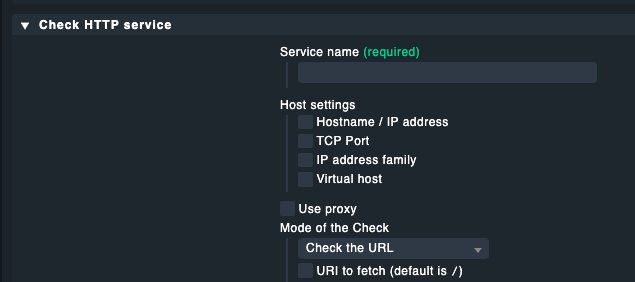
Could you please put a screenshot of your http check?
That part:
image

I guess the settings below “URI to fetch” aren’t set by you or not that important at least.

@mcalorio and to be sure you have used the same http-rule? So the conditions are the same?

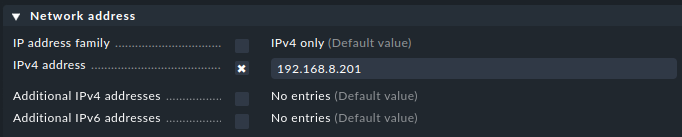
I am not sure if $_ is telling that it must be a custom host attribute but if not I would say it is the IPv4 Address of the Host you have in you conditions.
If you click on the host details where that http check is configured then you can see there the host attributes.

image

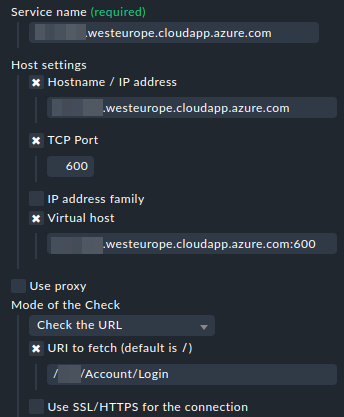
Sorry, I’m not sure I understood… this info?

“{‘host’: {‘address’: ‘xxx.westeurope.cloudapp.azure.com’,\n ‘port’: 600,\n ‘virthost’: ‘xxx.westeurope.cloudapp.azure.com:600’},\n ‘mode’: (‘url’, {‘uri’: ‘/xxx/Account/Login’}),\n ‘name’: ‘xxx.westeurope.cloudapp.azure.com’}”

Hi @mcalorio :slight_smile:
I thought we are talking about forum.checkmk.com what you have configured for testing? Can you show please the host detail page where the not working http check is configured?

image

and the same for the service… if you click on the HTTP service in the monitoring status you get on the detail page and down there is the Check defined which is executed.

About the host on which the service runs:

image

About the Service check command:

check_mk_active-http!‘-u’ ‘/xxx/Account/Login’ ‘–sni’ ‘-p’ ‘600’ ‘xxx.westeurope.cloudapp.azure.com’ ‘xxx.westeurope.cloudapp.azure.com:600

No that is not what I mean. You are in the setup page. And I talk about the monitoring status page.

But why there is a port in your vhost? Never saw a vhost with port. That should just be the server_name in your nginx config or what webserver you are using…

This topic was automatically closed 365 days after the last reply. New replies are no longer allowed. Contact an admin if you think this should be re-opened.