CMK version: 2.0.0p19 (CRE) OS version: Ubuntu 20.04LTS
Hey guys it looks like Checkmk is messing up http requests when a proxy is configured… If I configure a simple http check with a proxy on port 8080, CheckMK will add that port to the host header, which is should not do.
curl works fine:
$curl -v http://www.google.com -x proxy.company.local:8080
*   Trying 10.250.65.43:8080...
* TCP_NODELAY set
* Connected to proxy.company.local (10.123.123.43) port 8080 (#0)
> GET http://www.google.com/ HTTP/1.1
> Host: www.google.com
> User-Agent: curl/7.68.0
> Accept: */*
> Proxy-Connection: Keep-Alive
>
* Mark bundle as not supporting multiuse
< HTTP/1.1 200 OK
< Date: Tue, 15 Feb 2022 13:46:57 GMT
Can you please show the complete configuration of your HTTP check and the check command how it is shown like here. You command will look different but only with the command we can see what is really missing.
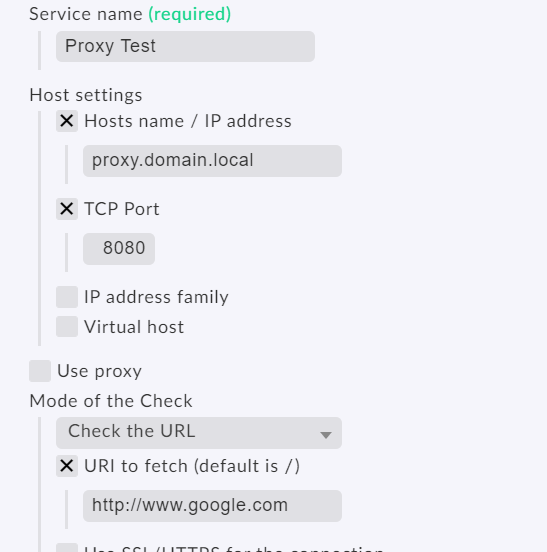
Service name: Proxy Check (google.com)
Host settings:
  Hosts name / IP address: www.google.com
  TCP Port: 80
Use proxy:
  Proxy server address: proxy.domain.local
  TCP Port: 8080
Mode of the Check:
  Check the URL,
    URI to fetch (default is /): /
    Seconds before connection times out: 10 sec
Advanced: Disable SSL/TLS hostname extension support (SNI):
The “-I” is not needed if the proxy host is the last argument. The generated config line has the proxy name at the end without the “-I” and it is working.
This is how it looks inside the setup.
Result: '-u' 'http://www.google.com' '-4' '--sni' '-p' '8080' 'proxy.domain.local'
I would say that the “Use proxy” option is not only a little bit broken, it is useless
Yeah thanks, this works! At least for http it does. For https it doesn’t, even though i use the CONNECT method. But hey, even plain http helps me to test my proxy cluster’s connectivity.
It looks like there might be an issue with how Checkmk is handling HTTP requests when a proxy is configured, specifically with the Host header. The problem you described suggests that Checkmk is incorrectly appending the proxy port to the Host header. While I can provide general advice on troubleshooting and potential workarounds, keep in mind that specific issues with software like Checkmk may require assistance from the Checkmk community or support channels.
The check itself is not done by CMK. All the check_http is an external check binary from here.
→ https://www.monitoring-plugins.org/
One of the problems that can be CMK related is the building of the command line to check_http.
It looks like there might be an issue with how Checkmk is handling HTTP requests when a proxy is configured, specifically with the Host header. The problem you described suggests that Checkmk is incorrectly appending the proxy port to the Host header. Be aware of the security of your data when using and when you want to buy proxies. While I can provide general advice on troubleshooting and potential workarounds, keep in mind that specific issues with software like Checkmk may require assistance from the Checkmk community or support channels.