I am trying to set a http check. It always gives back 200 OK in server response, even if I have a 404. On my check_mk server:
# ./check_http --expect=200 --ssl my.host.com
HTTP OK: Status line output matched "200" - 75414 bytes in 0.268 second response time |time=0.267687s;;;0.000000;10.000000 size=75414B;;;0
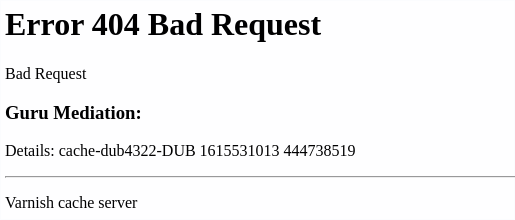
The active http check in WATO behaves the same of course, at the same time the web host gives 404:
$ curl https://my.host.com

<?xml version="1.0" encoding="utf-8"?>
<!DOCTYPE html PUBLIC "-//W3C//DTD XHTML 1.0 Strict//EN"
 "http://www.w3.org/TR/xhtml1/DTD/xhtml1-strict.dtd">
<html>
  <head>
    <title>404 Bad Request</title>
  </head>
  <body>
    <h1>Error 404 Bad Request</h1>
    <p>Bad Request</p>
    <h3>Guru Mediation:</h3>
    <p>Details: cache-hhn4059-HHN 1615531030 2040292555</p>
    <hr>
    <p>Varnish cache server</p>
  </body>
</html>
Can you make your curl command with an “-v” to see the real header.
That is what your check looks for.
*   Trying 192.168.1.1:80...
* TCP_NODELAY set
* Connected to www.my-server.com (192.168.1.1) port 80 (#0)
> GET /fake HTTP/1.1
> Host: www.my-server.com
> User-Agent: curl/7.68.0
> Accept: */*
>
* Mark bundle as not supporting multiuse
< HTTP/1.1 404 Not Found
< Server: nginx/1.19.0
< Date: Fri, 12 Mar 2021 06:56:33 GMT
< Content-Type: text/html; charset=iso-8859-1
< Content-Length: 196
< Connection: keep-alive
If you don’t see the 404 there in the response than it is clear that the check will not work.
In this case you can search for 404 in the content of the page.
This topic was automatically closed 365 days after the last reply. New replies are no longer allowed. Contact @fayepal if you think this should be re-opened.