CMK version:2.4.0p5 raw
OS version:Ubuntu 22.04
Error message:
Output of “cmk --debug -vvn hostname”: (If it is a problem with checks or plugins)
OMD[inar]:~$ cmk --debug -vvn HUATEST
value store: loading from disk
Checkmk version 2.4.0p5

FETCHING DATA
Source: SourceInfo(hostname=‘HUATEST’, ipaddress=‘192.168.16.28’, ident=‘snmp’, fetcher_type=<FetcherType.SNMP: 7>, source_type=<SourceType.HOST: 1>)
[cpu_tracking] Start [7f80a3e48ef0]
Read from cache: SNMPFileCache(path_template=/omd/sites/inar/tmp/check_mk/data_source_cache/snmp/{mode}/HUATEST, max_age=MaxAge(checking=0, discovery=90.0, inventory=90.0), simulation=False, use_only_cache=False, file_cache_mode=6)
Not using cache (Too old. Age is 7 sec, allowed is 0 sec)
huawei_switch_fan: Fetching data (SNMP walk cache is enabled: Use any locally cached information)
Running ‘snmpbulkwalk -Cr10 -v3 -l authPriv -a SHA-256 -u huaswitch -A P@ssword1 -x AES-256 -X P@ssword1 -m “” -M “” -t 10.00 -r 3 -Cc -OQ -OU -On -Ot 192.168.16.28 .1.3.6.1.4.1.2011.5.25.31.1.1.10.1.5’
Running ‘snmpbulkwalk -Cr10 -v3 -l authPriv -a SHA-256 -u huaswitch -A P@ssword1 -x AES-256 -X P@ssword1 -m “” -M “” -t 10.00 -r 3 -Cc -OQ -OU -On -Ot 192.168.16.28 .1.3.6.1.4.1.2011.5.25.31.1.1.10.1.6’
if64: Fetching data (SNMP walk cache is enabled: Use any locally cached information)
Running ‘snmpbulkwalk -Cr10 -v3 -l authPriv -a SHA-256 -u huaswitch -A P@ssword1 -x AES-256 -X P@ssword1 -m “” -M “” -t 10.00 -r 3 -Cc -OQ -OU -On -Ot 192.168.16.28 .1.3.6.1.2.1.1.3’
Running ‘snmpbulkwalk -Cr10 -v3 -l authPriv -a SHA-256 -u huaswitch -A P@ssword1 -x AES-256 -X P@ssword1 -m “” -M “” -t 10.00 -r 3 -Cc -OQ -OU -On -Ot 192.168.16.28 .1.3.6.1.2.1.25.1.1’
Running ‘snmpbulkwalk -Cr10 -v3 -l authPriv -a SHA-256 -u huaswitch -A P@ssword1 -x AES-256 -X P@ssword1 -m “” -M “” -t 10.00 -r 3 -Cc -OQ -OU -On -Ot 192.168.16.28 .1.3.6.1.2.1.2.2.1.1’
Running ‘snmpbulkwalk -Cr10 -v3 -l authPriv -a SHA-256 -u huaswitch -A P@ssword1 -x AES-256 -X P@ssword1 -m “” -M “” -t 10.00 -r 3 -Cc -OQ -OU -On -Ot 192.168.16.28 .1.3.6.1.2.1.2.2.1.2’
Running ‘snmpbulkwalk -Cr10 -v3 -l authPriv -a SHA-256 -u huaswitch -A P@ssword1 -x AES-256 -X P@ssword1 -m “” -M “” -t 10.00 -r 3 -Cc -OQ -OU -On -Ot 192.168.16.28 .1.3.6.1.2.1.2.2.1.3’
Running ‘snmpbulkwalk -Cr10 -v3 -l authPriv -a SHA-256 -u huaswitch -A P@ssword1 -x AES-256 -X P@ssword1 -m “” -M “” -t 10.00 -r 3 -Cc -OQ -OU -On -Ot 192.168.16.28 .1.3.6.1.2.1.2.2.1.5’
Running ‘snmpbulkwalk -Cr10 -v3 -l authPriv -a SHA-256 -u huaswitch -A P@ssword1 -x AES-256 -X P@ssword1 -m “” -M “” -t 10.00 -r 3 -Cc -OQ -OU -On -Ot 192.168.16.28 .1.3.6.1.2.1.2.2.1.8’
Running ‘snmpbulkwalk -Cr10 -v3 -l authPriv -a SHA-256 -u huaswitch -A P@ssword1 -x AES-256 -X P@ssword1 -m “” -M “” -t 10.00 -r 3 -Cc -OQ -OU -On -Ot 192.168.16.28 .1.3.6.1.2.1.31.1.1.1.6’
Running ‘snmpbulkwalk -Cr10 -v3 -l authPriv -a SHA-256 -u huaswitch -A P@ssword1 -x AES-256 -X P@ssword1 -m “” -M “” -t 10.00 -r 3 -Cc -OQ -OU -On -Ot 192.168.16.28 .1.3.6.1.2.1.31.1.1.1.7’
Running ‘snmpbulkwalk -Cr10 -v3 -l authPriv -a SHA-256 -u huaswitch -A P@ssword1 -x AES-256 -X P@ssword1 -m “” -M “” -t 10.00 -r 3 -Cc -OQ -OU -On -Ot 192.168.16.28 .1.3.6.1.2.1.31.1.1.1.8’
Running ‘snmpbulkwalk -Cr10 -v3 -l authPriv -a SHA-256 -u huaswitch -A P@ssword1 -x AES-256 -X P@ssword1 -m “” -M “” -t 10.00 -r 3 -Cc -OQ -OU -On -Ot 192.168.16.28 .1.3.6.1.2.1.31.1.1.1.9’
Running ‘snmpbulkwalk -Cr10 -v3 -l authPriv -a SHA-256 -u huaswitch -A P@ssword1 -x AES-256 -X P@ssword1 -m “” -M “” -t 10.00 -r 3 -Cc -OQ -OU -On -Ot 192.168.16.28 .1.3.6.1.2.1.2.2.1.13’
Running ‘snmpbulkwalk -Cr10 -v3 -l authPriv -a SHA-256 -u huaswitch -A P@ssword1 -x AES-256 -X P@ssword1 -m “” -M “” -t 10.00 -r 3 -Cc -OQ -OU -On -Ot 192.168.16.28 .1.3.6.1.2.1.2.2.1.14’
Running ‘snmpbulkwalk -Cr10 -v3 -l authPriv -a SHA-256 -u huaswitch -A P@ssword1 -x AES-256 -X P@ssword1 -m “” -M “” -t 10.00 -r 3 -Cc -OQ -OU -On -Ot 192.168.16.28 .1.3.6.1.2.1.31.1.1.1.10’
Running ‘snmpbulkwalk -Cr10 -v3 -l authPriv -a SHA-256 -u huaswitch -A P@ssword1 -x AES-256 -X P@ssword1 -m “” -M “” -t 10.00 -r 3 -Cc -OQ -OU -On -Ot 192.168.16.28 .1.3.6.1.2.1.31.1.1.1.11’
Running ‘snmpbulkwalk -Cr10 -v3 -l authPriv -a SHA-256 -u huaswitch -A P@ssword1 -x AES-256 -X P@ssword1 -m “” -M “” -t 10.00 -r 3 -Cc -OQ -OU -On -Ot 192.168.16.28 .1.3.6.1.2.1.31.1.1.1.12’
Running ‘snmpbulkwalk -Cr10 -v3 -l authPriv -a SHA-256 -u huaswitch -A P@ssword1 -x AES-256 -X P@ssword1 -m “” -M “” -t 10.00 -r 3 -Cc -OQ -OU -On -Ot 192.168.16.28 .1.3.6.1.2.1.31.1.1.1.13’
Running ‘snmpbulkwalk -Cr10 -v3 -l authPriv -a SHA-256 -u huaswitch -A P@ssword1 -x AES-256 -X P@ssword1 -m “” -M “” -t 10.00 -r 3 -Cc -OQ -OU -On -Ot 192.168.16.28 .1.3.6.1.2.1.2.2.1.19’
Running ‘snmpbulkwalk -Cr10 -v3 -l authPriv -a SHA-256 -u huaswitch -A P@ssword1 -x AES-256 -X P@ssword1 -m “” -M “” -t 10.00 -r 3 -Cc -OQ -OU -On -Ot 192.168.16.28 .1.3.6.1.2.1.2.2.1.20’
Running ‘snmpbulkwalk -Cr10 -v3 -l authPriv -a SHA-256 -u huaswitch -A P@ssword1 -x AES-256 -X P@ssword1 -m “” -M “” -t 10.00 -r 3 -Cc -OQ -OU -On -Ot 192.168.16.28 .1.3.6.1.2.1.2.2.1.21’
Running ‘snmpbulkwalk -Cr10 -v3 -l authPriv -a SHA-256 -u huaswitch -A P@ssword1 -x AES-256 -X P@ssword1 -m “” -M “” -t 10.00 -r 3 -Cc -OQ -OU -On -Ot 192.168.16.28 .1.3.6.1.2.1.31.1.1.1.18’
Running ‘snmpbulkwalk -Cr10 -v3 -l authPriv -a SHA-256 -u huaswitch -A P@ssword1 -x AES-256 -X P@ssword1 -m “” -M “” -t 10.00 -r 3 -Cc -OQ -OU -On -Ot 192.168.16.28 .1.3.6.1.2.1.2.2.1.6’
Running ‘snmpbulkwalk -Cr10 -v3 -l authPriv -a SHA-256 -u huaswitch -A P@ssword1 -x AES-256 -X P@ssword1 -m “” -M “” -t 10.00 -r 3 -Cc -OQ -OU -On -Ot 192.168.16.28 .1.3.6.1.2.1.31.1.1.1.15’
snmp_info: Fetching data (SNMP walk cache is enabled: Use any locally cached information)
Running ‘snmpbulkwalk -Cr10 -v3 -l authPriv -a SHA-256 -u huaswitch -A P@ssword1 -x AES-256 -X P@ssword1 -m “” -M “” -t 10.00 -r 3 -Cc -OQ -OU -On -Ot 192.168.16.28 .1.3.6.1.2.1.1.1’
Running ‘snmpbulkwalk -Cr10 -v3 -l authPriv -a SHA-256 -u huaswitch -A P@ssword1 -x AES-256 -X P@ssword1 -m “” -M “” -t 10.00 -r 3 -Cc -OQ -OU -On -Ot 192.168.16.28 .1.3.6.1.2.1.1.2’
Running ‘snmpbulkwalk -Cr10 -v3 -l authPriv -a SHA-256 -u huaswitch -A P@ssword1 -x AES-256 -X P@ssword1 -m “” -M “” -t 10.00 -r 3 -Cc -OQ -OU -On -Ot 192.168.16.28 .1.3.6.1.2.1.1.4’
Running ‘snmpbulkwalk -Cr10 -v3 -l authPriv -a SHA-256 -u huaswitch -A P@ssword1 -x AES-256 -X P@ssword1 -m “” -M “” -t 10.00 -r 3 -Cc -OQ -OU -On -Ot 192.168.16.28 .1.3.6.1.2.1.1.5’
Running ‘snmpbulkwalk -Cr10 -v3 -l authPriv -a SHA-256 -u huaswitch -A P@ssword1 -x AES-256 -X P@ssword1 -m “” -M “” -t 10.00 -r 3 -Cc -OQ -OU -On -Ot 192.168.16.28 .1.3.6.1.2.1.1.6’
snmp_uptime: Fetching data (SNMP walk cache is enabled: Use any locally cached information)
Already fetched OID: .1.3.6.1.2.1.1.3
Already fetched OID: .1.3.6.1.2.1.25.1.1
Write data to cache file /omd/sites/inar/tmp/check_mk/data_source_cache/snmp/checking/HUATEST
Trying to acquire lock on /omd/sites/inar/tmp/check_mk/data_source_cache/snmp/checking/HUATEST
Got lock on /omd/sites/inar/tmp/check_mk/data_source_cache/snmp/checking/HUATEST
Releasing lock on /omd/sites/inar/tmp/check_mk/data_source_cache/snmp/checking/HUATEST
Released lock on /omd/sites/inar/tmp/check_mk/data_source_cache/snmp/checking/HUATEST
[cpu_tracking] Stop [7f80a3e48ef0 - Snapshot(process=posix.times_result(user=0.020000000000000018, system=0.009999999999999981, children_user=0.71, children_system=0.05, elapsed=3.0299999974668026))]
Source: SourceInfo(hostname=‘HUATEST’, ipaddress=‘192.168.16.28’, ident=‘piggyback’, fetcher_type=<FetcherType.PIGGYBACK: 4>, source_type=<SourceType.HOST: 1>)
[cpu_tracking] Start [7f80a3e2fa70]
Read from cache: NoCache(path_template=/dev/null, max_age=MaxAge(checking=0.0, discovery=0.0, inventory=0.0), simulation=False, use_only_cache=False, file_cache_mode=1)
0 piggyback files for ‘HUATEST’.
0 piggyback files for ‘192.168.16.28’.
Get piggybacked data
[cpu_tracking] Stop [7f80a3e2fa70 - Snapshot(process=posix.times_result(user=0.0, system=0.0, children_user=0.0, children_system=0.0, elapsed=0.0))]
[cpu_tracking] Start [7f80a3e2fa70]

PARSE FETCHER RESULTS
HostKey(hostname=‘HUATEST’, source_type=<SourceType.HOST: 1>)  → Add sections: [‘huawei_switch_fan’, ‘if64’, ‘snmp_info’, ‘snmp_uptime’]
HostKey(hostname=‘HUATEST’, source_type=<SourceType.HOST: 1>)  → Add sections:

Received no piggyback data
Fan 1/1              32.00%
Fan 1/2              32.00%
Interface 01         [GE1/0/1], (up), MAC: FC:11:93:80:9D:E5, Speed: 1 GBit/s, In: 1.40 kB/s (<0.01%), Out: 25.2 kB/s (0.02%)
SNMP Info            Huawei YunShan OS Version 1.24.0.1 (S5700 V600R024C00SPC500) Copyright (C) 2021-2024 Huawei Technologies Co., Ltd. HUAWEI CloudEngine S5735-L-V2, S5732-V2-BASICA-CFG, CR ROOM, R&D Beijing, Huawei Technologies co.,Ltd.
Uptime               Up since 2026-02-25 11:19:01, Uptime: 7 hours 20 minutes
0 piggyback files for ‘HUATEST’.
[cpu_tracking] Stop [7f80a3e2fa70 - Snapshot(process=posix.times_result(user=0.0, system=0.0, children_user=0.0, children_system=0.0, elapsed=0.010000001639127731))]
[snmp] Success, [piggyback] Success (but no data found for this host), execution time 3.0 sec | execution_time=3.040 user_time=0.020 system_time=0.010 children_user_time=0.710 children_system_time=0.050 cmk_time_snmp=2.240 cmk_time_agent=0.000
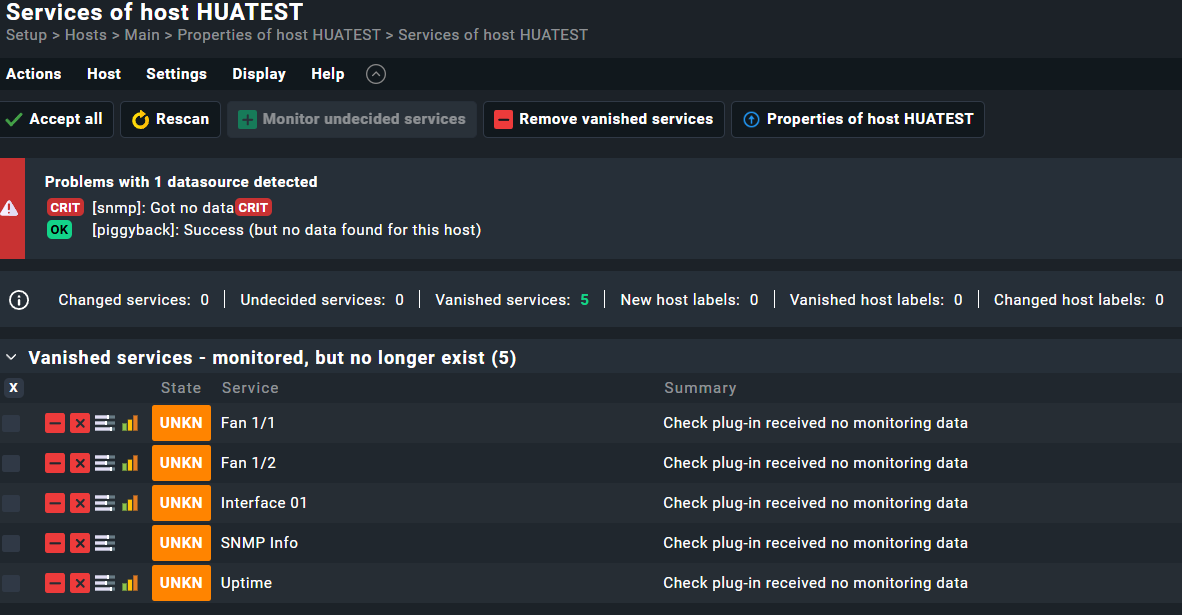
After running this command and run scan of services in GUI i get these services as vanished!
Before running the command on cli, rescan didn’t find any services at all..