Checkmk Enterprise Edition 2.1.0p13
Debian 11
in the hardware tree under “Hardware / Memory / Array 1 / Devices” is only one memory module visible. the servers have multiple memory modules in use, I see the correct memory device output from dmidecode and mk_inventory but the GUI only shows the memory module information for the last block in the output.
here you can see the hardware tree:
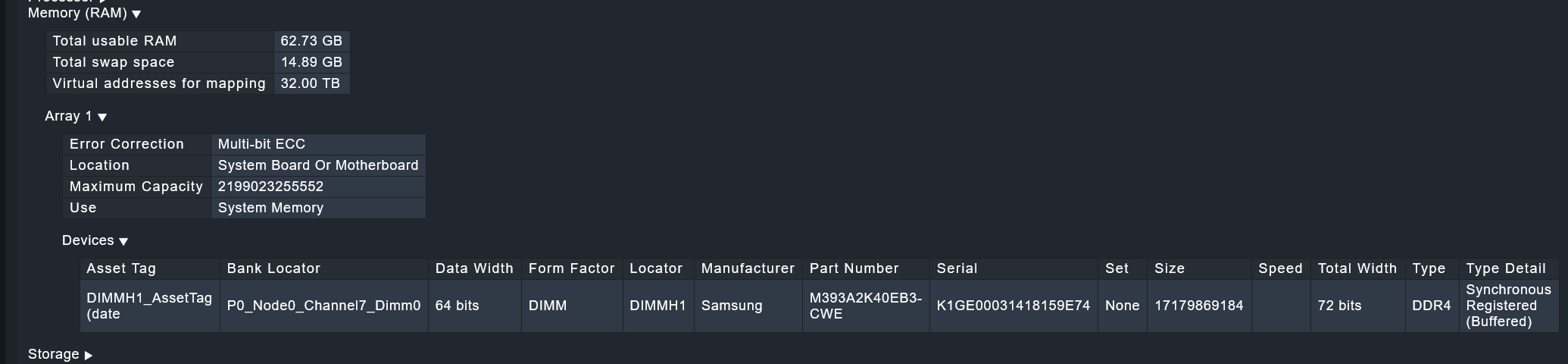
and the output of dmidecode -q | sed ‘s/\t/:/g’ for the memory array and devices:
Physical Memory Array
:Location: System Board Or Motherboard
:Use: System Memory
:Error Correction Type: Multi-bit ECC
:Maximum Capacity: 2 TB
:Number Of Devices: 8

Memory Device
:Total Width: 72 bits
:Data Width: 64 bits
:Size: 16 GB
:Form Factor: DIMM
:Set: None
:Locator: DIMMC1
:Bank Locator: P0_Node0_Channel2_Dimm0
:Type: DDR4
:Type Detail: Synchronous Registered (Buffered)
:Speed: 3200 MT/s
:Manufacturer: Samsung
:Serial Number: K1GE00031418159E6B
:Asset Tag: DIMMC1_AssetTag (date:23/14)
:Part Number: M393A2K40EB3-CWE
:Rank: 1
:Configured Memory Speed: 3200 MT/s
:Minimum Voltage: 1.2 V
:Maximum Voltage: 1.2 V
:Configured Voltage: 1.2 V
:Memory Technology: DRAM
:Memory Operating Mode Capability: Volatile memory
:Firmware Version: M393A2K40EB3-CWE
:Module Manufacturer ID: Bank 1, Hex 0xCE
:Module Product ID: Unknown
:Memory Subsystem Controller Manufacturer ID: Unknown
:Memory Subsystem Controller Product ID: Unknown
:Non-Volatile Size: None
:Volatile Size: 16 GB
:Cache Size: None
:Logical Size: None

Memory Device
:Total Width: 72 bits
:Data Width: 64 bits
:Size: 16 GB
:Form Factor: DIMM
:Set: None
:Locator: DIMMH1
:Bank Locator: P0_Node0_Channel7_Dimm0
:Type: DDR4
:Type Detail: Synchronous Registered (Buffered)
:Speed: 3200 MT/s
:Manufacturer: Samsung
:Serial Number: K1GE00031418159E74
:Asset Tag: DIMMH1_AssetTag (date:23/14)
:Part Number: M393A2K40EB3-CWE
:Rank: 1
:Configured Memory Speed: 3200 MT/s
:Minimum Voltage: 1.2 V
:Maximum Voltage: 1.2 V
:Configured Voltage: 1.2 V
:Memory Technology: DRAM
:Memory Operating Mode Capability: Volatile memory
:Firmware Version: M393A2K40EB3-CWE
:Module Manufacturer ID: Bank 1, Hex 0xCE
:Module Product ID: Unknown
:Memory Subsystem Controller Manufacturer ID: Unknown
:Memory Subsystem Controller Product ID: Unknown
:Non-Volatile Size: None
:Volatile Size: 16 GB
:Cache Size: None
:Logical Size: None