I have the following problem, we’ve used the agent bakery to add the HW/SW Inventory plugin to our CheckMK Agent. We’ve deployed it successfully on a number of machines, so far the plugin seems to work with nearly no issues, we are being alerted when changes are happening and we can see the list of Hardware/Networking/Software entries.
Problem is that we cant comprehend what changes have occured because we dont seem to have a history or other data that would be needed to see a difference (for example installation date).
I dug a little deeper and tried to find out what the plugin does, essentially its a bash script that just pulls the required information via the rpm command (see command down below)
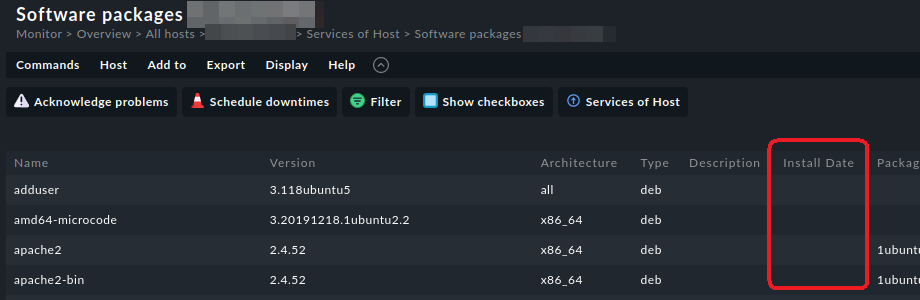
What I’m definitely missing here, and what’s also not shown in the tabular view of our CheckMK GUI, is for example the installation date. Maybe there’s something that I have forgot to add/misconfigured, but why isn’t the installation date shown in the list?
The output of the check_mk_agent command shows that he pulls exactly the data mentioned in the command above, so apparently everything works as designed. I’ve read through the documentation but didn’t find anything to point me in the right direction.
Suggestion: change command so installation date is part of the summary?
A while ago I added UBR info in Windows mk_inventory.vbs, this feels like something similar, although different OS and what not.
Would assume following change should work, although completely untested:
Change \t%{SUMMARY}\t into \t%{INSTALLTIME:date}: %{SUMMARY}\t to have install date in front of the summary.
But besides that, I also wonder why the installation date isn’t shown in the regular inventory table. I mean, rpm can figure it out and there is even a column for it:
I did know that you can just get the right data you need from the rpm command, altough I haven’t tried yet. I would need to test it and see what happens on the CMK server when I change the plugins code on the agent side, I’m not sure if the server can just parse the unix timestamp out of the box without any changes to the cmk server.
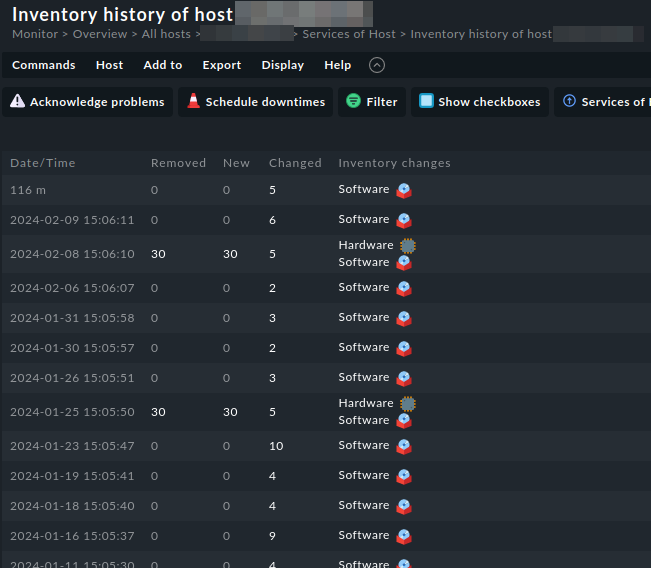
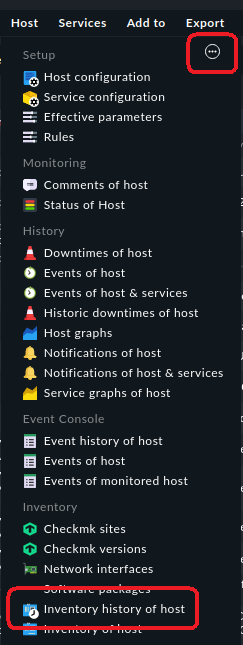
Thank you also for the suggestion with the inventory history, the three dots in the corner were my problem, I did read in the documentation that supposedly there’s supposed to be an option for that, I just couldn’t find it because it was hidden!
I’ll try changing the rpm command in the bash script and will keep you updated on what happens.
This topic was automatically closed 365 days after the last reply. New replies are no longer allowed. Contact an admin if you think this should be re-opened.