CMK version:
2.2.0p23 MSP
OS version:
Windows Server 2012R2 - Windows Server 2022
Error message:
We have bakery in use. But for several Windows servers (multiple OS versions) where the agent can not be upgraded/updated and we get the error “Update error: inconsistent pending update”.
If I try to manually uninstall the CheckMK Agent via Programs and Features I can not go further in the process because it tries to point to the check_mk_agent.msi file located in C:\Windows\Temp. Because it can’t find the necessary file with the message “The feature you are trying to use is on a network resource that is unavailable”.
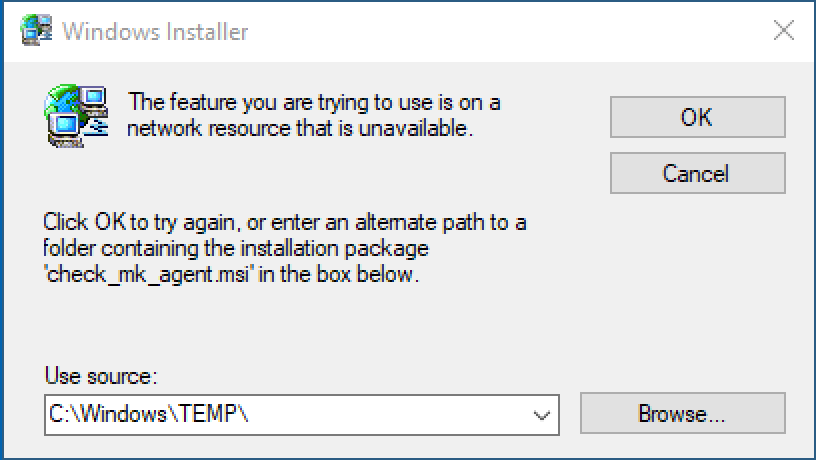
I get the option to manually point the msi file which IS existent under the given path C:\Windows\Temp. But then I get the following message
The file 'C:\Windows\Temp\check_mk_agent.msi' is not a valid installation package for the product Check MK Agent 2.2. Try to find the installation package 'check_mk_agent.msi' in a folder from which you can install Check MK Agent 2.2.
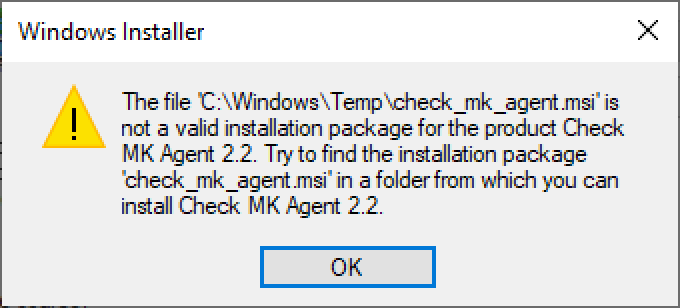
I already tried to install the manually downloaded target version which gave to me by the bakery on the wato. Same result here.
When I go to the agent_msi.log It says me the local cached package under C:\Windows\Installer\xyz.msi is missing… so it want to fallback to the source list:
MSI (s) (C4:88) [15:14:01:379]: Warning: Local cached package 'C:\Windows\Installer\86baf70.msi' is missing.
MSI (s) (C4:88) [15:14:01:379]: User policy value 'SearchOrder' is 'nmu'
MSI (s) (C4:88) [15:14:01:379]: User policy value 'DisableMedia' is 0
MSI (s) (C4:88) [15:14:01:379]: Machine policy value 'AllowLockdownMedia' is 0
MSI (s) (C4:88) [15:14:01:379]: SOURCEMGMT: Media enabled only if package is safe.
MSI (s) (C4:88) [15:14:01:379]: SOURCEMGMT: Looking for sourcelist for product {F7A726FE-EB77-11EE-9B29-8BE7E091CB3F}
MSI (s) (C4:88) [15:14:01:379]: SOURCEMGMT: Adding {F7A726FE-EB77-11EE-9B29-8BE7E091CB3F}; to potential sourcelist list (pcode;disk;relpath).
MSI (s) (C4:88) [15:14:01:380]: SOURCEMGMT: Now checking product {F7A726FE-EB77-11EE-9B29-8BE7E091CB3F}
MSI (s) (C4:88) [15:14:01:380]: SOURCEMGMT: Media is enabled for product.
MSI (s) (C4:88) [15:14:01:380]: SOURCEMGMT: Attempting to use LastUsedSource from source list.
MSI (s) (C4:88) [15:14:01:380]: SOURCEMGMT: Trying source C:\Windows\TEMP\.
MSI (s) (C4:88) [15:14:01:382]: SOURCEMGMT: Source is invalid due to invalid package code (product code doesn't match).
MSI (s) (C4:88) [15:14:01:382]: Note: 1: 1706 2: -2147483646 3: check_mk_agent.msi
MSI (s) (C4:88) [15:14:01:382]: SOURCEMGMT: Processing net source list.
MSI (s) (C4:88) [15:14:01:382]: Note: 1: 1706 2: -2147483647 3: check_mk_agent.msi
MSI (s) (C4:88) [15:14:01:382]: SOURCEMGMT: Processing media source list.
MSI (s) (C4:88) [15:14:01:383]: Note: 1: 2203 2:  3: -2147287037
MSI (s) (C4:88) [15:14:01:383]: SOURCEMGMT: Source is invalid due to missing/inaccessible package.
MSI (s) (C4:88) [15:14:01:383]: Note: 1: 1706 2: -2147483647 3: check_mk_agent.msi
MSI (s) (C4:88) [15:14:01:383]: SOURCEMGMT: Processing URL source list.
MSI (s) (C4:88) [15:14:01:383]: Note: 1: 1402 2: UNKNOWN\URL 3: 2
MSI (s) (C4:88) [15:14:01:383]: Note: 1: 1706 2: -2147483647 3: check_mk_agent.msi
MSI (s) (C4:88) [15:14:01:383]: Note: 1: 1706 2:  3: check_mk_agent.msi
MSI (s) (C4:88) [15:14:01:383]: SOURCEMGMT: Failed to resolve source
MSI (s) (C4:B8) [15:14:01:384]: Note: 1: 1714 2: Check MK Agent 2.2 3: 1612
MSI (s) (C4:B8) [15:14:01:384]: Note: 1: 2205 2:  3: Error
MSI (s) (C4:B8) [15:14:01:384]: Note: 1: 2228 2:  3: Error 4: SELECT `Message` FROM `Error` WHERE `Error` = 1714
CustomAction  returned actual error code 1612 (note this may not be 100% accurate if translation happened inside sandbox)
MSI (s) (C4:B8) [15:14:01:384]: Note: 1: 2205 2:  3: Error
MSI (s) (C4:B8) [15:14:01:384]: Note: 1: 2228 2:  3: Error 4: SELECT `Message` FROM `Error` WHERE `Error` = 1709
MSI (s) (C4:B8) [15:14:01:384]: Product: Check MK Agent 2.2 -- Error 1714. The older version of Check MK Agent 2.2 cannot be removed.  Contact your technical support group.  System Error 1612.

Error 1714. The older version of Check MK Agent 2.2 cannot be removed.  Contact your technical support group.  System Error 1612.
I am able to uninstall the current agent with the help of the troubleshooter from Microsoft for Installation/Uninstallation (Fix problems that block programs from being installed or removed - Microsoft Support). Unfortunately without more helpful information…
Because I had to fix this manually for around 30 machines and it seems not to be fixed for all, I hope you have me some helpful hints or a solution to fix this definitive.
Best regards and many thanks
Patrick
