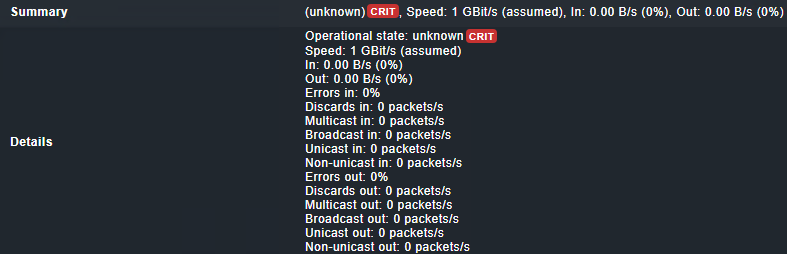
Interface problem "interface in crit (unknown)crit, speed: 1 gbit/s (assumed), in: 0.00 b/s (0%), out: 0.00 b/s (0%)"

CMK version: Checkmk Enterprise Edition 2.3.0p36

Error message:

Interface (unknown)CRIT, Speed: 1 GBit/s (assumed), In: 0.00 B/s (0%), Out: 0.00 B/s (0%)

Has already anybody facing this issue?

A lot of interfaces (but not all of them …) on different hosts goes to CRIT state and the output of the check in “unknown“ (I will expect that if the output is unknown status the check should goes also to Unknown )

When I try to perform “tabula rasa” on one of the hosts, affected interface check goes to OK status but the output stays the same (so basically “unknown” ) which isn’t right in my opinion.

Is there anything what can cause this issue? How should I fix-it?

For your privacy maybe edit your post and remove the link to your Checkmk server?
If you can no longer edit, @Sara can help you out.

Regarding issue, I assume the interfaces were in use when initially discovered and now no longer in use? If so, any of the following suggested in the link might help you out.

The problem here is the state of you interface with “unknown”.

What says the HW/SW inventory of this port? What type of device is this?

Thank you for tagging me!

@Kojsovman I went ahead and removed the links to your URLs from the post for security reasons. If you would like to add something to the post to add some details (for example partial URL that does not contain the project name and so on), please let me know.

2 Likes

Output form HW/SW inventory seems to be normal

image

Device type should be switch.

What i mean is this data inside the HW/SW inventory

How does it look like on your system?

Yes I understand, but as we do not have any “name/summary“ for affected Interface I cannot identify which Interface is it in “HW/SW inventory” view. :confused:

a.k.a.

“summary“ of the interface is “unknown“ therefore we cannot link-it to Interface “description“ name in HW/SW inventory view.

If your interface has the number 382 as shown in your screenshot then you need to have a look at the HW/SW table with this interface id.

Nothing found based on Service/Interlace name (382) in HW/SW view

but fur example Interface 381 work properly and also cannot found based on Service/Interlace name, can be found based on service summary output :

image

image

The shown “unrouted VLAN 668” has the number 381 in front of its name in the HW/SW table.

If you have no ID 382 inside your table then someone has removed the VLAN definition.
I would strongly recommend to not monitor l2vlan interfaces as they don’t produce traffic data.