Hi, quick reply: Didn’t get time to check this, but thanks for the hint, that seems to be in the direction of the problem. Will update once I get to check on it.
Alright, so now I got the chance to check the situation in more depth, but I can’t fix this issue.
What I have done so far:
Created a new CSR with the -utf8 Switch, as I have the German Umlaut “ö” in the certificate
Uploaded the procured certificate along with the key and the CA certificate to the webconf and enabled the certificate for the web interface
Imported the certificate into the OS CA certificate store (checkmk Appliance Debian 9)
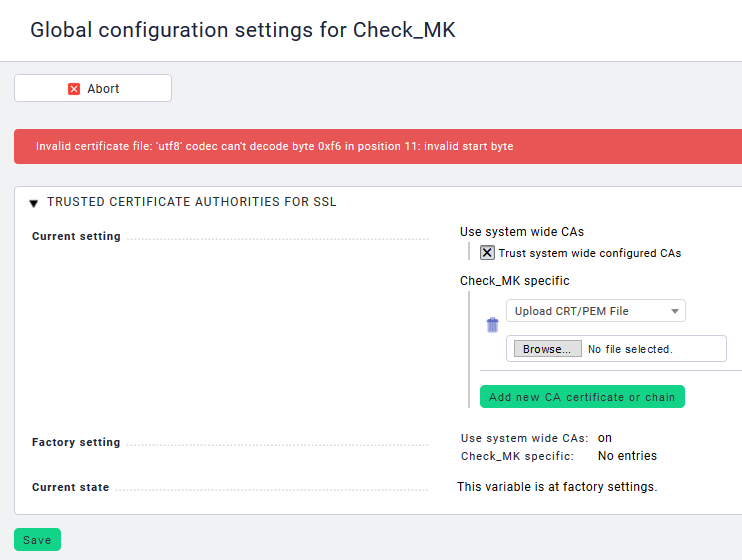
The outcome is unchanged: Neither can I upload the CA certificate or the certificate itself to the checkmk web interface (not webconf, that works), nor can I connect to the server via HTTPS (for e.g. BI aggregation check etc).
I am currently investigating the possibility that the CA certificate itself causes this problem, although the person responsible for the CA told me, that there were no issues with the CA certificate with any other use case. Maybe this is something checkmk can not handle properly (yet)?
Sometimes the files are in wrong encoding if you copy them around between windows an linux. In this case there is a problem on importing this file to checkmk because it expect it as utf8 encoded file. I had a similar problem on mass import of hosts and window (iso-8859-15) encoded file.
Just check the file on linux system with file command for encoding.
Hi guys and thanks for your support. Excuse my late answer, but during the holidays I had to focus on other topics.
I currently work around this issue with another certificate I can use, that has no Umlauts in it. As that works, this might be actually a bug in the software. If some dev wants to look into it, I am here to help.
I will anyway check your suggestions @tosch and @rprengel once I get some time and update this thread with my findings.
I agree, German Umlauts are not that good of an idea, but as far as I know they are supported as long as you use the -utf8 flag when generating the CSR. I know, you are better off without them, but I did not create the root CA used and replacing it with a Umlauts-free version might be a little hassle.