We have currently upgraded our checkmk master server to Checkmk Raw Edition 2.1.0p18, one of the team in our Unit wants to monitor their 1.6 version checkmk agents in our Checkmk Gui.
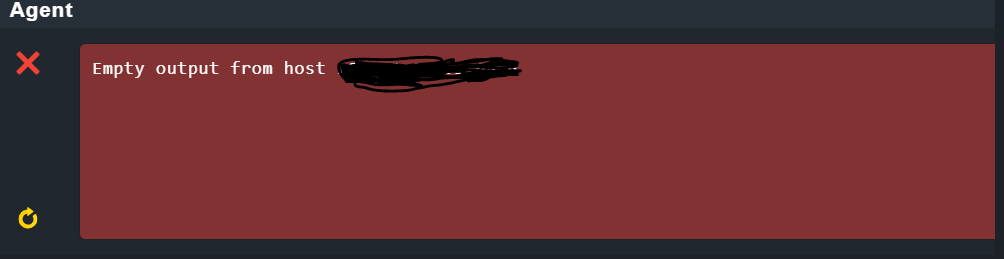
So when we run the connection tests to add their agents, it gives below error:
I have few points going in my mind:
Firstly there is a big difference between our master server version(CRE 2.1.0p18) and their agent version(1.6), we use cmk-agent-ctl and in 1.6 I think xinetd is used.
If 1.6 is compatible with CRE 2.1.0p18?
What should we do, so to add their agents in our checkmk GUI? Please advise /suggest.
This i can answer with yes. Yesterday i had some clients with 1.2.8 agent and they are working fine with 2.1 CMK server.
From server side you only define that you want to use the agent connection to port 6556. On agent side then it is decided if you want to use a TLS connection or the legacy type.
Thank you for the quick response,this means we can add their agents running with checkmk 1.6 to our GUI.
So they already have a dashboard with these agents running and now they want to add these agents parallely on our checkmk 2.1.0p18 also… which is possible you mean?
what should be our first step to troubleshoot as when we try to do connection tests of their servers on our checkmk GUI , we get the below error
Yeah exactly, did some few troubleshooting steps and found the checkmk.socket is inactive
OMD[checkmk]:~$ telnet xx.xx.xx.xx 6556
Trying xx.xx.xx.xx…
Connected to xx.xx.xx.xx.
Escape character is ‘^]’.
Connection closed by foreign host.
1.On the client machine side: our checkmk IP is pinging.
2.ss -tulpn | grep 6556
tcp LISTEN 0 64 [::]:6556 [::]:*
3.systemctl restart check-mk-agent.socket
Job for check-mk-agent.socket failed. See “systemctl status check-mk-agent.socket” and “journalctl -xe” for details.
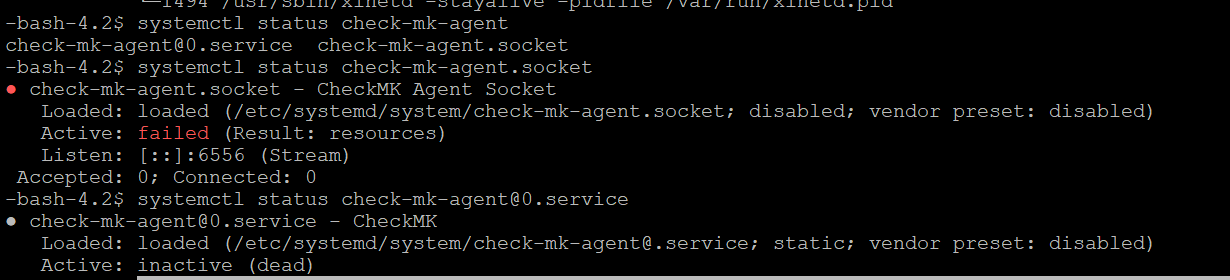
systemctl status check-mk-agent.socket
● check-mk-agent.socket - CheckMK Agent Socket
Loaded: loaded (/etc/systemd/system/check-mk-agent.socket; disabled; vendor preset: disabled)
Active: failed (Result: resources)
Listen: [::]:6556 (Stream)
Accepted: 0; Connected: 0
systemd[1]: [/etc/systemd/system/check-mk-agent.socket:13] Unknown lvalue ‘IPAddressDeny’ in section ‘Socket’
systemd[1]: [/etc/systemd/system/check-mk-agent.socket:14] Unknown lvalue ‘IPAddressAllow’ in section ‘Socket’
systemd[1]: check-mk-agent.socket failed to listen on sockets: Address already in use
systemd[1]: Failed to listen on CheckMK Agent Socket.
systemd[1]: check-mk-agent.socket failed to listen on sockets: Address already in use
systemd[1]: Failed to listen on CheckMK Agent Socket.
systemd[1]: check-mk-agent.socket failed to listen on sockets: Address already in use
systemd[1]: Failed to listen on CheckMK Agent Socket.
systemd[1]: check-mk-agent.socket failed to listen on sockets: Address already in use
systemd[1]: Failed to listen on CheckMK Agent Socket.
Note :
we´ve added our checkmk IP to /etc/systemd/system/check-mk-agent.socket, but still same output
The agent just sets up the system to be monitored, making directories, installing scripts and tying the main monitoring script, (/usr/bin/check_mk_agent) into the mechanism to invoke it. (xinetd or systemd)
Most of which can be replicated with a configuration automation mechanism.
I use Ansible to setup my Solaris systems, a could easily do the same for my RedHat systems.
The bulk of my Linux environment is RedHat derivates, running from EL4 though EL9. I keep 1.4, 1.6, 2.0 agent to cover all of these platforms, but replace the /usr/bin/check_mk_agent with the latest from release I update to. (With minor tweaks, for issues I’ve encountered)
(Due to the needs of 2.1, I haven’t made the leap using the 2.1 agent on my EL8 or EL9 systems)
Thank you for the solutions.
Finally, we fixed it by uninstalling the agent and reinstalling it again.
I first thought of fixing the old 1.6 agent but then lot of time is taken as we don’t which is the corrupted file causing issue.
So just went with uninstalling and reinstalling the agent.
Just one more question if the agent version is higher than the master server checkmk version, then will the agent `be discovered in a checkmk dashboard with lower version?
It depends. If you have activated the TLS transport on the 2.1 agent it cannot speak with older CMK servers. If your 2.1 agent runs in legacy mode the it should work with older CMK servers. But be aware that it is very likely that some checks are not working in the older system as the agent output was changed over time a little bit.
This topic was automatically closed 365 days after the last reply. New replies are no longer allowed. Contact an admin if you think this should be re-opened.