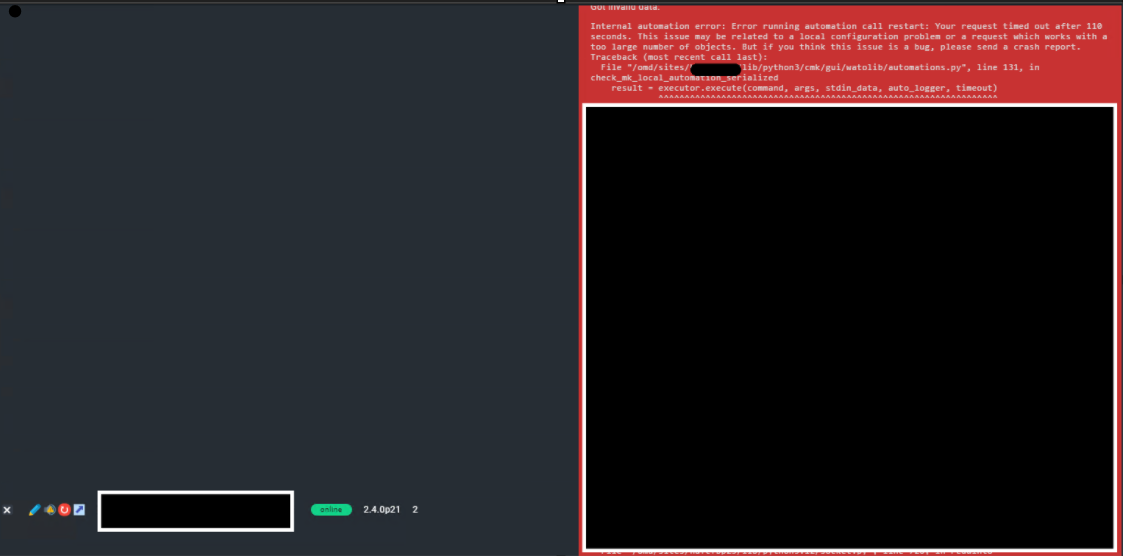
I want to write topic/help on my application forum, Where i wanted to highlight activate changes get 110 timeout, event though there is only 1-2 modification is only going on this change.
Earlier i would to upload 1000+ host and it was functional perfect however from last couple of days i started to face this issue.
Further i tried to put the error and senario in AI chat and suggested changing config files.
- increase timeout on /opt/omd/sites/*/lib/python3/cmk/gui/http.py
- increase timeout on etc/apache/apache.conf
- added mod_proxy on etc/apache/apache.conf
- added beow mod_proxy block on /etc/apache2/conf-available/omd-timeout-override.conf
Override OMD proxy timeouts for long-running operations like “push changes”
ProxyPass http://127.0.0.1:5015/xxxxx retry=0 disablereuse=On timeout=600 Keepalive=On ProxyPassReverse http://127.0.0.1:5015/xxxxxx SetEnv proxy-sendcl 1 SetEnv proxy-sendchunks 1From above 1-2-3 changes, timeout issue got fix, But now it started to get proxy error, Earlier timeout=600 use to work on old check-mk1.6 version but in current updated 2.4.0p21.cre i do not find “proxy-port.conf” so made new omd-timeout-override file and applied the changes but still getting proxy error. After multiple like 30-40 retry it get success
CMK version:OS version: 2.4.0p21.cre
Error message:
Started at: 23:42:33. Finished at: 23:44:38.
Got invalid data:
Internal automation error: Error running automation call restart: Your request timed out after 110 seconds. This issue may be related to a local configuration problem or a request which works with a too large number of objects. But if you think this issue is a bug, please send a crash report.
Traceback (most recent call last):
File “/omd/sites/site_name/lib/python3/cmk/gui/watolib/automations.py”, line 131, in check_mk_local_automation_serialized
result = executor.execute(command, args, stdin_data, auto_logger, timeout)
^^^^^^^^^^^^^^^^^^^^^^^^^^^^^^^^^^^^^^^^^^^^^^^^^^^^^^^^^^^^^^^^^
File “/omd/sites/site_name/lib/python3/cmk/gui/watolib/automation_helper.py”, line 50, in execute
response = session.post(AUTOMATION_HELPER_ENDPOINT, json=payload)
^^^^^^^^^^^^^^^^^^^^^^^^^^^^^^^^^^^^^^^^^^^^^^^^^^^^^^
File “/omd/sites/site_name/lib/python3.12/site-packages/requests/sessions.py”, line 637, in post
return self.request(“POST”, url, data=data, json=json, **kwargs)
^^^^^^^^^^^^^^^^^^^^^^^^^^^^^^^^^^^^^^^^^^^^^^^^^^^^^^^^^
File “/omd/sites/site_name/lib/python3.12/site-packages/requests/sessions.py”, line 589, in request
resp = self.send(prep, **send_kwargs)
^^^^^^^^^^^^^^^^^^^^^^^^^^^^^^
File “/omd/sites/site_name/lib/python3.12/site-packages/opentelemetry/instrumentation/requests/_init_.py”, line 333, in instrumented_send
raise exception.with_traceback(exception._traceback_)
File “/omd/sites/site_name/lib/python3.12/site-packages/opentelemetry/instrumentation/requests/_init_.py”, line 255, in instrumented_send
result = wrapped_send(
^^^^^^^^^^^^^
File “/omd/sites/site_name/lib/python3.12/site-packages/requests/sessions.py”, line 703, in send
r = adapter.send(request, **kwargs)
^^^^^^^^^^^^^^^^^^^^^^^^^^^^^^^
File “/omd/sites/site_name/lib/python3.12/site-packages/requests/adapters.py”, line 667, in send
resp = conn.urlopen(
^^^^^^^^^^^^^
File “/omd/sites/site_name/lib/python3.12/site-packages/urllib3/connectionpool.py”, line 787, in urlopen
response = self._make_request(
^^^^^^^^^^^^^^^^^^^
File “/omd/sites/site_name/lib/python3.12/site-packages/urllib3/connectionpool.py”, line 534, in _make_request
response = conn.getresponse()
^^^^^^^^^^^^^^^^^^
File “/omd/sites/site_name/lib/python3.12/site-packages/urllib3/connection.py”, line 571, in getresponse
httplib_response = super().getresponse()
^^^^^^^^^^^^^^^^^^^^^
File “/omd/sites/site_name/lib/python3.12/http/client.py”, line 1430, in getresponse
response.begin()
File “/omd/sites/site_name/lib/python3.12/http/client.py”, line 331, in begin
version, status, reason = self._read_status()
^^^^^^^^^^^^^^^^^^^
File “/omd/sites/site_name/lib/python3.12/http/client.py”, line 292, in _read_status
line = str(self.fp.readline(_MAXLINE + 1), “iso-8859-1”)
^^^^^^^^^^^^^^^^^^^^^^^^^^^^^^
File “/omd/sites/site_name/lib/python3.12/socket.py”, line 720, in readinto
return self._sock.recv_into(b)
^^^^^^^^^^^^^^^^^^^^^^^
File “/omd/sites/site_name/lib/python3/cmk/gui/utils/timeout_manager.py”, line 36, in handle_request_timeout
raise RequestTimeout(
cmk.gui.exceptions.RequestTimeout: Your request timed out after 110 seconds. This issue may be related to a local configuration problem or a request which works with a too large number of objects. But if you think this issue is a bug, please send a crash report.
During handling of the above exception, another exception occurred:
Traceback (most recent call last):
File “/omd/sites/site_name/lib/python3/cmk/gui/wato/pages/automation.py”, line 271, in _execute_automation_command
response.set_data(repr(automation.execute(automation.get_request())))
^^^^^^^^^^^^^^^^^^^^^^^^^^^^^^^^^^^^^^^^^^^^
File “/omd/sites/site_name/lib/python3/cmk/gui/wato/pages/activate_changes.py”, line 1056, in execute
return activate_changes.execute_activate_changes(api_request)
^^^^^^^^^^^^^^^^^^^^^^^^^^^^^^^^^^^^^^^^^^^^^^^^^^^^^^
File “/omd/sites/site_name/lib/python3.12/contextlib.py”, line 81, in inner
return func(*args, **kwds)
^^^^^^^^^^^^^^^^^^^
File “/omd/sites/site_name/lib/python3/cmk/gui/watolib/activate_changes.py”, line 2525, in execute_activate_changes
warnings = get_config_domain(domain_request.name).activate(domain_request.settings)
^^^^^^^^^^^^^^^^^^^^^^^^^^^^^^^^^^^^^^^^^^^^^^^^^^^^^^^^^^^^^^^^^^^^^^^^
File “/omd/sites/site_name/lib/python3/cmk/gui/watolib/config_domains.py”, line 116, in activate
return {“restart”: restart, “reload”: reload}[active_config.wato_activation_method](
^^^^^^^^^^^^^^^^^^^^^^^^^^^^^^^^^^^^^^^^^^^^^^^^^^^^^^^^^^^^^^^^^^^^^^^^^^^^^
File “/omd/sites/site_name/lib/python3/cmk/gui/watolib/check_mk_automations.py”, line 347, in restart
_automation_serialized(“restart”, args=hosts_to_update),
^^^^^^^^^^^^^^^^^^^^^^^^^^^^^^^^^^^^^^^^^^^^^^^^^^^^^^^
File “/omd/sites/site_name/lib/python3/cmk/gui/watolib/check_mk_automations.py”, line 61, in _automation_serialized
cmdline, serialized_result = check_mk_local_automation_serialized(
^^^^^^^^^^^^^^^^^^^^^^^^^^^^^^^^^^^^^
File “/omd/sites/site_name/lib/python3/cmk/gui/watolib/automations.py”, line 156, in check_mk_local_automation_serialized
raise MKAutomationException(msg)
cmk.gui.watolib.automations.MKAutomationException: Error running automation call restart: Your request timed out after 110 seconds. This issue may be related to a local configuration problem or a request which works with a too large number of objects. But if you think this issue is a bug, please send a crash report.