Forgive me if these are silly questions but I am fairly new to Kubernetes in general. I have been asked to monitor a cluster and following the guide for 2.4 managed to get it setup and monitoring.
Recently I updated to the latest release of CheckMK 2.4 and now the CheckMK agent for the nodes in the kubernetes cluster are warning about the CheckMK Agent version mismatch even though the dynamic host setting says no checkmk agent.
We use CMK Enterprise/Ultimate and the agent bakery but how does one go about updating the CheckMK agent for the dynamic nodes? Another helm command? Manual registration?
I should clarify. I setup the kubernetes plugin monitoring on CheckMK 2.4.0p19 and later updated to 2.4.0p27.
The dynamic node(s) started warning about the CheckMK agent being 2.4.0p19 instead of 2.4.0p27.
I’ve created a rule to ignore it on these particular explicit hosts short term. What I would prefer to do is after an upgrade, know what command to run to let the nodes also update their CheckMK agent version. Or will the agent inside these nodes only match on initial deployment?
I think it depends on how you monitor Kubernetes nodes.
I assume you use Helm and the Checkmk Kubernetes collectors. To monitor the nodes, they run a DaemonSet which runs a modified Checkmk agent. This is why you also get the Check_MK Agent service. It should look like this.
The version of this agent is maintained by us and managed via the Helm deployment. It is updated whenever necessary.
What you did ‘short-term’ is right and also the path 'long-term.
I assume you have this option active in ‘Checkmk agent installation auditing’, right?
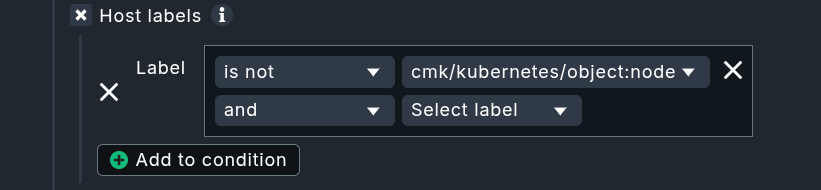
My recommended option in the conditions for that rule would be:
Thanks Martin and that is it exactly. I used the agent mismatch check to make sure the automatic update is working after site updates or if new deployments pull the older client.
I will modify my exception from explicit to the host label method you mention and consider it the normal approach.