CMK version: 2.1.0p24 (central server) and 2.1.0p25 (remote server)
OS version: Ubuntu 20.04
Hi,
We have a distributed setup where all config is pushed from the central server to the remote servers.
We added new LDAP connection for one of the remote servers using the domain controllers on that site (other domain than we use on the central site)
The LDAP test shows all green and says it found 2 users and 1 group.
But the new LDAP users are not showing up under Setup - Users on the central server.
We temporarily enabled the option to configure settings on the remote server and when we logon to the remote server as omdadmin, I do see the 2 LDAP users under Setup -Users on that server.
The LDAP users can also logon to the remote server without problems, but they don’t see any devices because they are not yet linked to a contact group.
The two servers are connected over VPN, the firewalls are not reporting any blocked traffic and we see LDAP traffic from both the central server and the remote server to the domain controllers located on the remote site.
Anyone has any ideas or tips on how to get the LDAP users in the central server so we can add them to a contact group?
I am sorry to say, but this works as designed. You will not see the users from a remote site’s LDAP connection on the central site.
Think about it like this: You are a managed services provider and have dozens of customers. If all their users were synchronized to your central site, it would get cluttered fast for one thing. The next thing is, that you suddenly have sensitive data from several customers on your central site.
So for most users the state you are in now is desired.
Hi Robin, thank you for your answer.
Does that mean we cannot use the option “Push config to this site” (since that would overwrite settings on the remote server) and that we need to de-select “Disable configuration via WATO”?
Because we would need to assign theLDAP users to a contact group before they can see any devices or services, but those settings would be overwritten when we sync from the central server.
And if we cannot sync from central to remote, then we would need to do all changes on the remote servers?
What you would do is to enable contact group synchronization for that connection and manage the contact groups in LDAP as well. No need to sever the configuration replication.
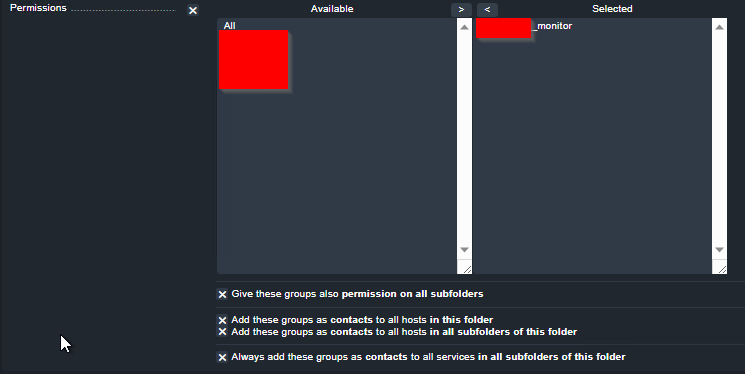
Hi Robin, I created a contact group on the central server with the same name as the AD group, Then set contact group on the folder that holds the systems on the remote site with these options.
Then pushed these changes to remote site. After that, I can see on the remote server that the AD accounts are found as members of that group and I can log on with an AD account on the remote server GUI, but don’t see any devices/services.
When I set the option “Only show hosts and services the user is a contact for” in the user settings on the remote server, do I see the hosts/services. But that option is overwritten during the next update from the central server. I could not find an option to set that option on the contact group on the central server?
I think we are using this, or at least have tested it but my memory Is vague.
First you create a LDAP/AD connection for your specific remote site using your local AD servers.
Then In your distributed monitoring you target that specific connection for LDAP sync
You still need to be careful how you handle your slave sites when it comes to contact groups and permissions. We do not allow users to login locally on our poller sites and there is only ONE WATO so whatever you configure on your folders for permissions that will be replicated to all sites.
Hi Anders, we have configured that setting on the connection to the remote site and that part seems to be working. When I enable WATO on the remote server and log on as omdadmin I see the replicated LDAP connection and that resolves the AD users. I also see that the permissions on the folder for that site were replicated successfully and propagated to the subfolders, hosts and services.
Only issue at this point is that the LDAP users don’t see any hosts/services unless I go to the user settings in WATO on the remote server and enable the option “Only show hosts and services the user is a contact for” under Personal settings. After that, the LDAP users do see the hosts and services for that site.
Caveat, I can only do that on the remote server because I don’t see the LDAP users on the central server. But that setting is overwritten whenever there is a sync from the central server.
@hkoetsier if you create users on login, then it needs a restart of the core for the permissions to be applied. Is it possible that your workaround includes a core restart? Maybe that is the underlying reason here.
Hi Robin, I enabled to option “Create user om first login” in the LDAP settings, pushed that to the remote servers and restarted both the central and remote sites with “omd restart”.
The LDAP test is successful, on both on the central and remote servers, but now the LDAP user cannot login, gets “invalid login”.
Reverted the change after 10 minutes, restarted checkmk on both servers. The LDAP users can login, but don’t see the hosts/services.
Why do you not see them on your main site? I guess you only create users at login? If you change that (on main site) and you have the same LDAP domain on main and slave sites, and use the same groups and bind DN you should see users on main site.
Not sure I understand the workaround, a user will always see its own hosts/services if he/she is a contact, unless you have some weird WATO folder config/setup.
Hi Anders, I disabled the option to create users at login and only use a contact group with the same name as the AD security group name. That contact group has permission set on the folder whee all systems for that site are stored. The AD domains are different for all sites.
Update, in preparation to an upgrade to 2.2, I updated the central servers and the remote servers to 2.1p32. After updating to p32, the LDAP users now see the hosts/services, but we don’t see the users on the central server. As Robin mentioned above, this could be “by design”.
Not sure what triggered this change, I could not find anything in the Werks for this version that seems related. But it seems to be working for now. Many thanks for everyone for your help and assistance.
Unfortunately, it does not work. When we push a change from the central server to the remote server, the LDAP users can log in, but see 0 hosts and 0 services.
For the rest I recommend a support ticket, as it might be a lot of reasons causing your issue. Probably misconfiguration, but one would need to look into that in more depth than is possible here.
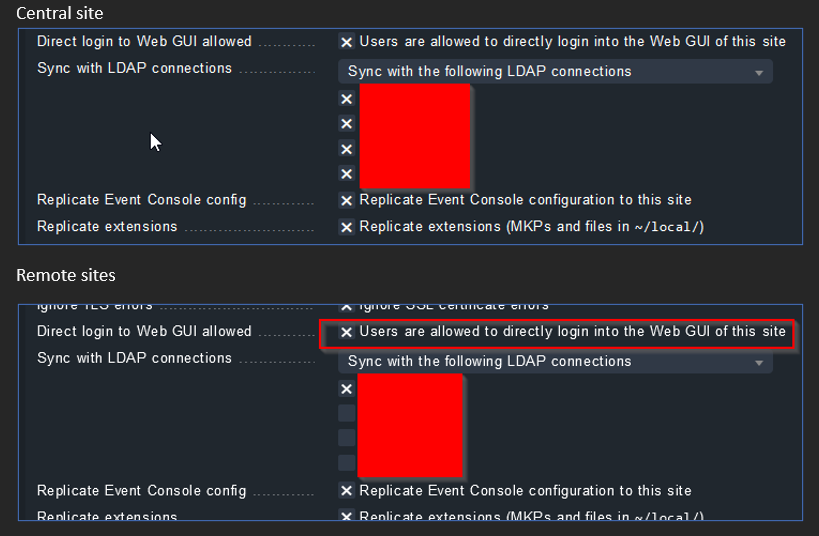
I think we fixed the issue, it turned out that the distributed monitoring for the remote sites only synched with their local LDAP servers. But when we checked the config for the central site, we saw that not all LDAP entries were selected.
After selecting all LDAP entries and pushing the config, we saw the remote LDAP users showing up in user mgmt on the central site. Stupid misconfiguration on our end.
Many thanks to all who helped troubleshooting for their helpful suggestions.
We seem to have the same issue where LDAP connection is working on the remote site and users are able to login, but we do not see anything in central site.
Also we have an error regarding user synchronisation because our central site, for some reason, tries to reach the remote LDAP which is not possible.
@guardian users from connections, that are applied to a specific site, are only available on that very site. You will never see users from a remote site on the central site.
We have different domains on the central and remote sites. The LDAP config is pushed from the central site to the remote sites via distributed monitoring. The central server has LDAP access to all remote domains.
In distributed monitoring, we checked the sync to all LDAP connections
On the remote sites, we only selected the LDAP connection for that site
We enabled the option to allow direct login to the web UI of the remote site on all sites.
We can see all LDAP users on the central site, set permssions or contact groups on the central site and push them to the relevant remote sites.
Local site admins can access the CheckMK web UI directly and they only see the systems that are managed on that site (if they have permissions)
Consider any security implications if you want to allow the central server to access the domain controllers on the remote sites, it could be considered a security risk if the domains are managed by different orgs.
Quick addition, if your central server cannot connect to the remote LDAP servers then the above will not work.
The central server needs the LDAP access or it will not see the users (and then you can’t push permissions for those users to the remote sites)
This topic was automatically closed 365 days after the last reply. New replies are no longer allowed. Contact an admin if you think this should be re-opened.