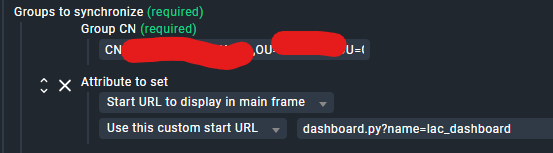
Hi - I have a group of users that gets imported via LDAP. As part of the LDAP config I have used the custom attribute option to set a specific start URL to display:
But when a user logs in they just get the default dashboard.
When I view the user settings the Start URL option is blank and not configurable:
I have tested the start URL with a non LDAP user and it works perfectly.
It is working for the setting ‘Roles’ where I set them to be a normal monitoring user using the same group. But for the custom user attributes it just doesnt work.
For the Roles, the field is asking for a Group DN - something like “CN=Group Name I Want,OU=Group Container,DC=corp,DC=test,DC=local”
For the Groups to custom user attribute it is asking for a Group CN - so for that DN, the CN would be “Group Name I Want”. Don’t even include the leading CN - only the actual group name.
I see in your screenshot you have a Group DN in that field, not a CN. Changing it to a CN should fix it.
Additionally, after you save & test, the changes don’t happen until the next scheduled LDAP sync interval (default is 5 minutes), so wait after you apply your changes to see if they’re working.
This topic was automatically closed 365 days after the last reply. New replies are no longer allowed. Contact an admin if you think this should be re-opened.