Libcrypto.so.2 error in 2.1.0p14.cfe - cannot upgrade or create a new site

Hi All,

I have an existing check_mk installation on AlmaLinux release 8.6 (Sky Tiger) which is fully updated.

Its a relatively recent installation which has been running fine on 2.1.0p10.cfe. I only have a single site, named “monitor”.

I installed 2.1.0p14.cfe and attempted to upgrade my site “monitor” but receive the below error:

OMD[monitor]:~$ omd status
agent-receiver: stopped
mkeventd: stopped
liveproxyd: stopped
mknotifyd: stopped
rrdcached: stopped
cmc: stopped
apache: stopped
dcd: stopped
redis: stopped
crontab: stopped

Overall state: stopped
OMD[monitor]:~$ omd version
OMD - Open Monitoring Distribution Version 2.1.0p10.cfe
OMD[monitor]:~$ omd versions
2.1.0p10.cfe
2.1.0p14.cfe (default)
OMD[monitor]:~$ omd update
Saving temporary filesystem contents…OK
Cleaning up tmp directory…OK
/omd/versions/2.1.0p14.cfe/bin/python3: error while loading shared libraries: libcrypt.so.2: cannot open shared object file: No such file or directory

i can confirm that there is no libcrypt.so.2 in the aforementioned path, only libcrypto.so.1

ls -la /omd/versions/2.1.0p14.cfe/lib/libcrypto.*

-rw-r–r-- 1 root root 5510792 Oct 13 14:54 /omd/versions/2.1.0p14.cfe/lib/libcrypto.a
lrwxrwxrwx 1 root root 16 Sep 21 08:36 /omd/versions/2.1.0p14.cfe/lib/libcrypto.so → libcrypto.so.1.1
-rwxr-xr-x 1 root root 3049544 Oct 13 14:54 /omd/versions/2.1.0p14.cfe/lib/libcrypto.so.1.1

I also cannot create a clean new site, i get the same error…

omd create testsite

/omd/versions/2.1.0p14.cfe/bin/python3: error while loading shared libraries: libcrypt.so.2: cannot open shared object file: No such file or directory

Has anyone seen this behaviour with 2.1.0p14?

Thanks in advance,

Regards,

Les
This library should be included in libxcrypt. Please install this package and report whether it works. I’ll inform the package maintainers to add the dependency if this was the issue.

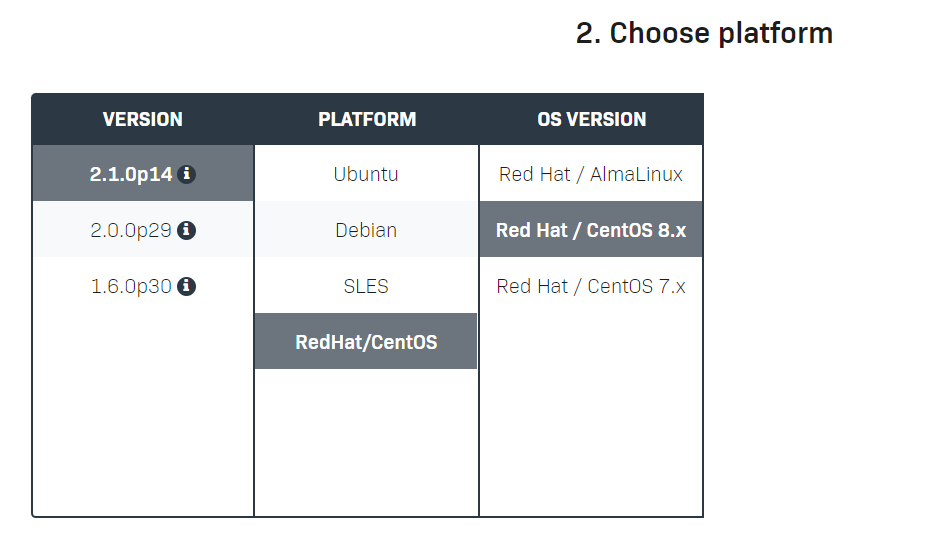
Oh, i just realised - i downloaded the wrong package by mistake. I grabbed the one that said AlmaLinux in the diagram below, but its for version 9. I should have grabbed the Redhat/CentOS 8.x.

Would be good if the table included the 9.x version number for Redhat/AlmaLinux.

All sorted.

Thanks for the quick response.

Regards,

Les

To add to the options for download presented …
Where is RockyLinux ?
i am using RockyLinux 8 ( and looking at 9) , for now i’ve been ok with the Redhat/Centos 8.x download option.
But it would be a ‘nice-to-have’ to also reference RockyLinux in this ?

How can I install this library? I am running through same issue.

Thanks

Please double check first: Does the Checkmk package you downloaded exactly match the distribution you are running? We currently do not support CentOS Stream, Fedora and OpenSUSE.

This is the version that I am running, is this supported. If not what would be the correct version for Rocky Linux version 8.8

CMK version:
check-mk-free-2.1.0p26-el9-38.x86_64

OS version:
Rocky Linux release 8.8 (Green Obsidian)

Error message:
/omd/versions/2.1.0p26.cfe/bin/python3: error while loading shared libraries: libcrypt.so.2: cannot open shared object file: No such file or directory

the version you downloaded is the el9 version. or Redhat 9 equivalent.

you will need to download the Redhat 8 version to work with Rocky Linux 8.

2 Likes

This topic was automatically closed 365 days after the last reply. New replies are no longer allowed. Contact an admin if you think this should be re-opened.