Hi,
We are trying to monitor specific linux processess in check_mk. something like this:
Service Name :- cisco-amp.service
Service Display Name :- Cisco AMP for Endpoints daemon
How can i enable this
Hi,
We are trying to monitor specific linux processess in check_mk. something like this:
Service Name :- cisco-amp.service
Service Display Name :- Cisco AMP for Endpoints daemon
How can i enable this
Hi,
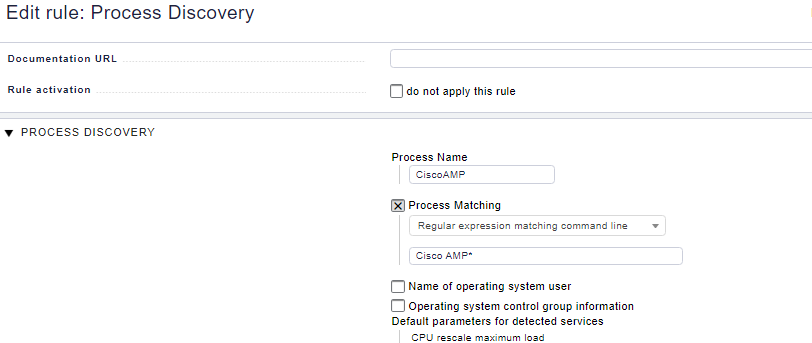
you can use Process disvery rule plus “state and count of process” rule or Enforced/Manual Services “state and count of processes” rule.
Cheers,
Christian
Looks good. Now do a discovery. If you get no new service, please check if process name is correct.
Cheers,
Christian
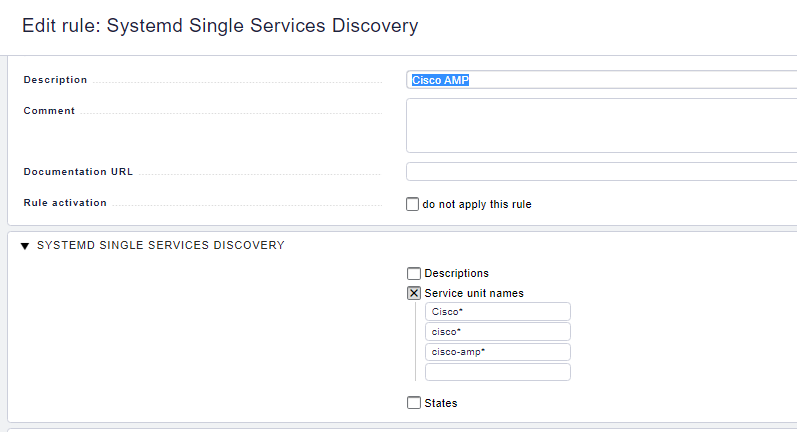
This is not a process but a systemd service unit.
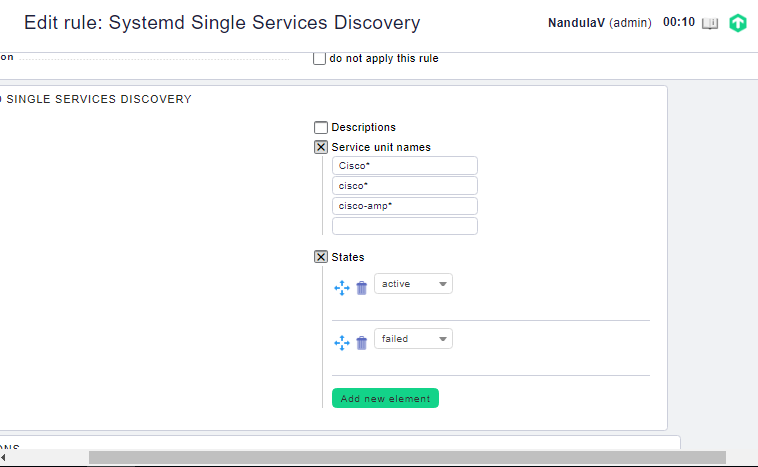
If you want to monitor this you need to use the ruleset Systemd Single Service Discocery.
You also need to check states and enable at least one (probably active & failed - possibly inactive) for the systemd services to be discoverable, IIRC
Are you getting systemd reporting at all? Download the agent output (under the burger menu on the Check_MK service) and search through it for your service name? Do you have a 1.6 version of the agent on this host?
And actually now that I think about it, I’m not sure that service unit name supports wildcards or regexes, try just “cisco-amp” (I have multiple versions of software-12, software-13, etc in mine, and I’m pretty sure I would’ve wildcarded it if it worked).
Thanks after giving the exact name it is working without any wildcards.
I have a requirement to monitor tanium process i have created the same rule without wild cards but for some reason it is not working
This topic was automatically closed 365 days after the last reply. New replies are no longer allowed. Contact an admin if you think this should be re-opened.