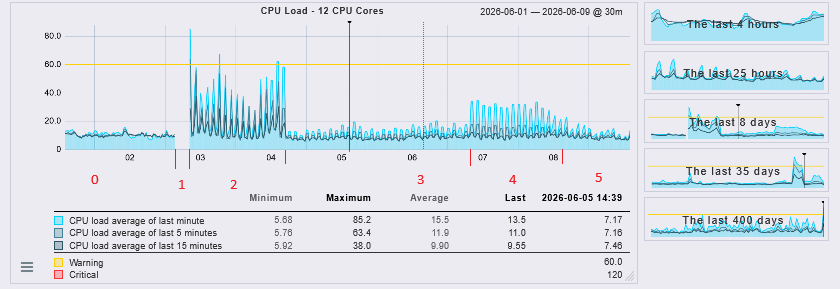
(2) After restarting the check_mk service, the load spikes to 50 every two hours. Every two hours, the following command is executed: RRDCached tuning → Disk flush interval of old data: 2 hours
(3) We increased the number of CPUs on the server—from 8 to 12—and the load decreased.
(4) Then the load increased on its own.
(5) I scheduled the checks to run every 20 minutes instead of every 2 hours, and the load decreased again. It spikes less frequently, but consequently, it occurs more often.
Do you have any idea why I didn’t have any loading problems before, but I’ve had problems since the crash?
After you edited the file you only need to do a “cmk -R”
The reason for the problem is not so easy to describe. After your crash the core detected some check the he needed to check and tried to check all at the same time (caused by the 0 seeing) this leads to an overload state on the machine and you get the very high CPU load. This again leads to timeouts and so on. Sometimes the problems gets worse and you get higher spikes.
With the limit of concurrent checks you prevent the overload state and the timeout problematic.
If 12, 16 or 20 is a good value you need to test for your system. I had only the experience that it should not be much more than the double number of cores available.