CMK version: OMD - Open Monitoring Distribution Version 2.0.0-2021.12.14.cre
OS version: Ubuntu 20.04.3 LTS
Error message: check_icmp: Failed to obtain ICMP socket: Operation not permitted
Hi,
i am trying to setup checkmk2 in a LXC container and get permission issues that I cant fully solve.
The sites are setup by following the documentation
root# omd create bzd_cmk2
omd start bzd_cmk2
gives the first error:
Creating temporary filesystem /omd/sites/bzd_cmk2/tmp...mount: /opt/omd/sites/bzd_cmk2/tmp: must be superuser to use mount.
WARNING: You may continue without tmpfs, but the performance of Check_MK may be degraded.
I can get arround this by disabling tmpfs for the site. I do however not understand why it fails. As root I can mount a tmpfs file system.
mount -t tmpfs -o noauto,user,mode=755,uid=bzd_cmk2,gid=bzd_cmk2 tmpfs /opt/omd/sites/bzd_cmk2/tmp
just works
Another error is
Initializing Crontab.../var/spool/cron/: mkstemp: Permission denied
Exception ignored in: <_io.TextIOWrapper name='<stdout>' mode='w' encoding='utf-8'>
BrokenPipeError: [Errno 32] Broken pipe
ERROR
This seems to be caused by bzd_cmk2 being not part of the group crontab. Adding it solves it.
This leaves me with one Issue:
check_icmp: Failed to obtain ICMP socket: Operation not permitted
This is shown for all hosts. Adding them and doing the Ping test works, but the regular
background check fails.
I found a thread about checking for capabilities.
running gives the following output
#find /opt/omd/ -name check_icmp
/opt/omd/sites/bzd_cmk2/var/check_mk/precompiled_checks/builtin/check_icmp
/opt/omd/versions/2.0.0-2021.12.14.cre/share/check_mk/checkman/check_icmp
/opt/omd/versions/2.0.0-2021.12.14.cre/share/check_mk/checks/check_icmp
/opt/omd/versions/2.0.0-2021.12.14.cre/lib/nagios/plugins/check_icmp
and checking for capabilities shows that the capability is missing
# find / -name check_icmp -exec getcap {} \;
/opt/omd/versions/2.0.0-2021.12.14.cre/share/check_mk/checkman/check_icmp = cap_net_raw+ep
/opt/omd/versions/2.0.0-2021.12.14.cre/share/check_mk/checks/check_icmp = cap_net_raw+ep
/opt/omd/versions/2.0.0-2021.12.14.cre/lib/nagios/plugins/check_icmp = cap_net_raw+ep
adding it can be done but makes no difference and need to be done manually for every new site
# setcap cap_net_raw+ep /opt/omd/sites/bzd_cmk2/var/check_mk/precompiled_checks/builtin/check_icmp
# find / -name check_icmp -exec getcap {} \;
/opt/omd/sites/bzd_cmk2/var/check_mk/precompiled_checks/builtin/check_icmp = cap_net_raw+ep
/opt/omd/versions/2.0.0-2021.12.14.cre/share/check_mk/checkman/check_icmp = cap_net_raw+ep
/opt/omd/versions/2.0.0-2021.12.14.cre/share/check_mk/checks/check_icmp = cap_net_raw+ep
/opt/omd/versions/2.0.0-2021.12.14.cre/lib/nagios/plugins/check_icmp = cap_net_raw+ep
stating the site now works without error
# omd start
Doing 'start' on site bzd_cmk2:
Temporary filesystem already mounted
Starting mkeventd...OK
Starting rrdcached...OK
Starting npcd...OK
Starting nagios...OK
Starting apache...OK
Starting redis...OK
Initializing Crontab...OK
I can also add hosts and services are discovered. They are however shown as down. The connection test shows working Ping
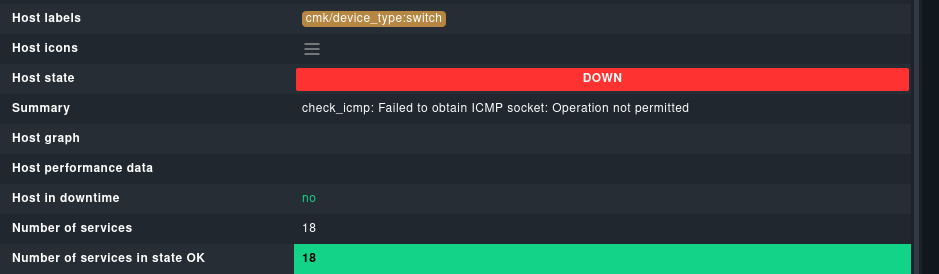
this a switch I monitored via snmp.
I also reinstalled checkmk2 multiple times and removed/added different sites.
thank you for your help.