I can’t find the right rule, “Map data relating to VMs option, select the Map data to the VM itself setting.” Is it actually described here - Monitoring Microsoft Azure
I’ve switched to the new azurev2, but now I have the hosts listed twice: once as a regular host with the CheckMK agent installed, and once from the Azure plugin. I’d like to map them together now.
With the new azurev2, VMs are always created as their own piggyback hosts. As a result, the configuration to ‘Map data relating to VMs’ is no longer available.
To avoid getting two separate hosts for the same VM (one from azurev2 and one from the CheckMK agent), the hosts created by azurev2 must have the same name as the ones monitored by the agent.
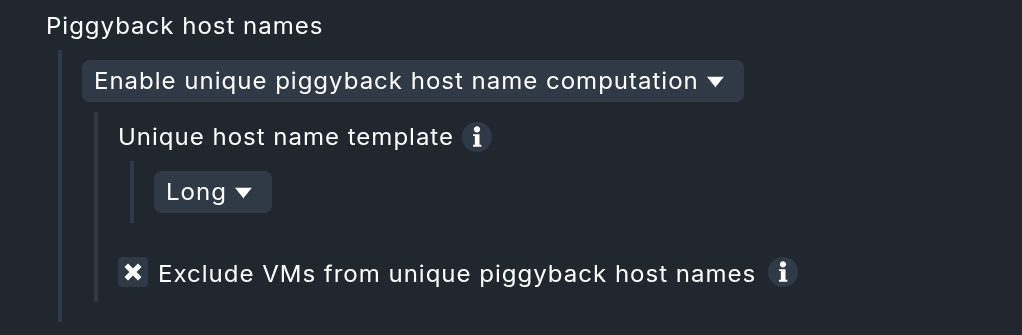
To achieve this, please keep the ‘Exclude VMs from unique piggyback host names’ checkbox enabled. This tells azurev2 to use the VM’s original Azure name, which matches what the CheckMK agent uses. This provides the exact behavior you had with the previous special agent when ‘Map data to the VM itself’ was selected. With the names matching, data from both the agent and the special agent will successfully map to a single host.
Thanks for the info, but now I have the hosts listed twice: once as a “short name” (just HOSTNAME—that’s how they’re called in Azure, since it comes from Azure v2) and once as an FQDN (which was already there before). How can I merge them now? It doesn’t make sense to have them both.
I’d like to get more details about your setup. Can you confirm, which Checkmk edition you are using and whether you had this previously working with the old special agent? In theory it should work the same way, and finding out the differences can help us pin down the culprit.
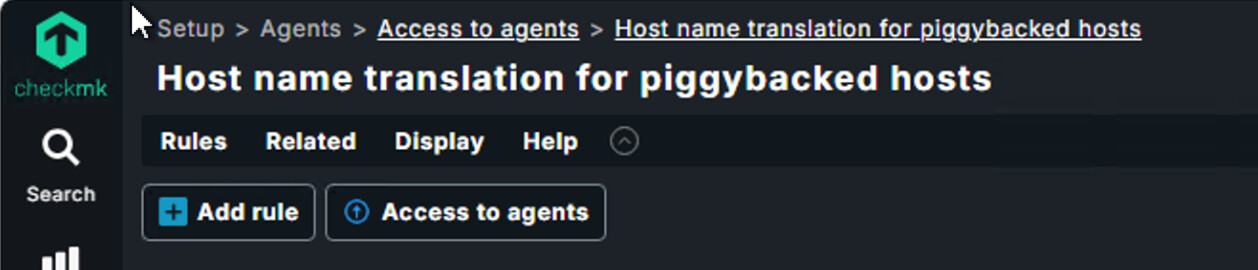
The rule ‘Host name translation for piggybacked hosts’ would be the one you want. That will let you append the domain name to the piggybacked hosts coming from Azure: