CMK version: 2.1.0p33.cee
OS version: SLES 15.1
Hi,
in our environment we observed what we consider a memory leak in checkmk or the liveproxyd:
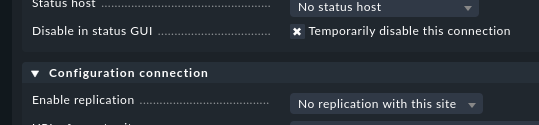
We have a master and 14 remote sites. All these remote sites are already configured in the master, but the connections to 8 of them are still disabled because the servers will be installed later.
Now we can observe this memory behaviour on the master site:
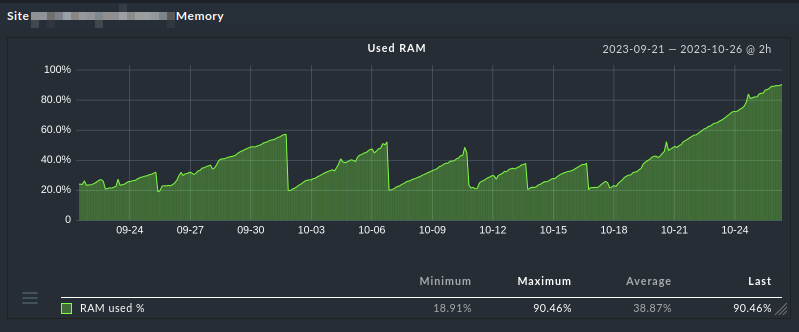
Whenever we did a omd restart on the master site, the memory usage dropped.
We also checked on the shell:
Before a restart. The lines with the big numbers correspond to the not-yet-enabled remotes sites:
master:~> ps -aux | grep liveproxy
USER       PID %CPU %MEM    VSZ   RSS TTY      STAT START   TIME COMMAND
master   11283  0.1  0.1  49972 19312 ?        S    Aug09  21:16 python3 /omd/sites/master/bin/liveproxyd
master   11284  0.1  0.2 559280 35860 ?        Sl   Aug09  20:08 python3 /omd/sites/master/bin/liveproxyd
master   11285  0.1  0.2 494784 35736 ?        Sl   Aug09  20:20 python3 /omd/sites/master/bin/liveproxyd
master   11287  0.1  0.2 708596 40412 ?        Sl   Aug09  20:07 python3 /omd/sites/master/bin/liveproxyd
master   11289  0.0  0.2 494316 32604 ?        Sl   Aug09  20:00 python3 /omd/sites/master/bin/liveproxyd
master   11291  0.0  0.2 494348 34688 ?        Sl   Aug09  20:02 python3 /omd/sites/master/bin/liveproxyd
master   11294  0.8  8.0 1672132 1292404 ?     S    Aug09 174:02 python3 /omd/sites/master/bin/liveproxyd
master   11297  0.8  8.0 1671896 1292444 ?     S    Aug09 174:09 python3 /omd/sites/master/bin/liveproxyd
master   11311  0.8  8.0 1672176 1292228 ?     S    Aug09 173:59 python3 /omd/sites/master/bin/liveproxyd
master   11316  0.8  8.0 1671936 1292312 ?     S    Aug09 173:55 python3 /omd/sites/master/bin/liveproxyd
master   11322  0.8  8.0 1680436 1292380 ?     Sl   Aug09 173:55 python3 /omd/sites/master/bin/liveproxyd
master   11326  0.8  8.0 1680440 1292372 ?     Sl   Aug09 173:56 python3 /omd/sites/master/bin/liveproxyd
master   11332  0.8  8.0 1672552 1292692 ?     S    Aug09 174:00 python3 /omd/sites/master/bin/liveproxyd
master   11348  0.8  8.0 1672060 1292272 ?     S    Aug09 173:46 python3 /omd/sites/master/bin/liveproxyd
master   11350  0.0  0.2 492804 33948 ?        Sl   Aug09  19:57 python3 /omd/sites/master/bin/liveproxyd
After omd restart. Nothing special. All processes use approx. the same amount of memory.
  PID USER      PR  NI    VIRT    RES    SHR S  %CPU  %MEM     TIME+ COMMAND
12723 master    20   0  489796  26300   7416 S 0.000 0.164   0:00.10 liveproxy+
12724 master    20   0  492120  29532   7596 S 0.332 0.184   0:00.27 liveproxy+
12726 master    20   0  491116  27784   7148 S 0.000 0.173   0:00.16 liveproxy+
12728 master    20   0  489856  26024   7312 S 0.000 0.162   0:00.09 liveproxy+
12733 master    20   0  489876  26036   7312 S 0.000 0.162   0:00.09 liveproxy+
12735 master    20   0  407968  26192   7312 S 0.000 0.163   0:00.32 liveproxy+
12739 master    20   0  407988  26752   7312 S 0.000 0.166   0:00.31 liveproxy+
12742 master    20   0  408008  26068   7312 S 0.332 0.162   0:00.31 liveproxy+
12746 master    20   0  408028  26012   7312 S 0.000 0.162   0:00.32 liveproxy+
12751 master    20   0  408048  25296   7312 S 0.332 0.157   0:00.32 liveproxy+
12755 master    20   0  408068  26020   7312 S 0.332 0.162   0:00.32 liveproxy+
12758 master    20   0  408088  26028   7312 S 0.332 0.162   0:00.33 liveproxy+
12771 master    20   0  408108  25444   7312 S 0.332 0.158   0:00.33 liveproxy+
12776 master    20   0  490056  26060   7312 S 0.000 0.162   0:00.10 liveproxy+
Three days later. Again, eight processes keep consuming memory. And time.
  PID USER      PR  NI    VIRT    RES    SHR S  %CPU  %MEM     TIME+ COMMAND
12723 master    20   0  491672  29364   7660 S 0.000 0.183   6:28.93 liveproxy+
12724 master    20   0  493240  32292   7596 S 0.000 0.201   6:33.28 liveproxy+
12726 master    20   0  492748  32816   7660 S 0.000 0.204   6:29.56 liveproxy+
12728 master    20   0  491752  31492   7544 S 0.000 0.196   6:27.23 liveproxy+
12733 master    20   0  493320  32556   7660 S 0.000 0.202   6:31.74 liveproxy+
12735 master    20   0  824756 445028   7440 S 0.000 2.767  58:34.69 liveproxy+
12739 master    20   0  824784 445184   7440 S 0.000 2.768  58:36.27 liveproxy+
12742 master    20   0  833008 445124   7440 S 0.000 2.768  58:30.76 liveproxy+
12746 master    20   0  824840 445200   7440 S 0.000 2.768  58:32.30 liveproxy+
12751 master    20   0  824868 445328   7440 S 0.000 2.769  58:43.16 liveproxy+
12755 master    20   0  833088 445268   7440 S 0.000 2.769  58:34.47 liveproxy+
12758 master    20   0  824920 445400   7440 S 0.000 2.770  58:39.29 liveproxy+
12771 master    20   0  824936 445380   7440 S 0.000 2.770  58:36.20 liveproxy+
12776 master    20   0  492780  30940   7544 S 0.000 0.192   6:26.97 liveproxy+
Funny thing is, that the disabled connections – at least to my mind – shoudn’t even result in a liveproxyd process. Let alone gobble up memory.
Has anybody else observed this behaviour?


 )
)