Mikrotik 3.0.3 with Checkmk 2.4.0

Hello,
after upgrading Checkmk RAW to Version 2.4.0 I have a problem with the mikrotik integration from Exchange.

Getting the following error:

Problems with 1 datasource detected

CRIT [API/agent]: host configuration requires a datasource but none configuredCRIT

I reconfigured the agent integration because of the changes, but it still doesnt work.

@DevilOfHell wrote:

!!! WARNING: After the installation of this version you have to reconfigure the datasource rule configurazione into CheckMk or the plugin doesn’t work !!!

Is this meaning something else then reconfiguring the integration?

Screenshots of the configuration:

Hi,

actually the plugin is incompatible with checkmk 2.4.0 because they have changed the API.

When did you have make the upgrade the upgrade procedure sad that the plugin is incompatible and all the agent_based files stop working if you upgrade to that version.

I suggest you to downgrade to the latest 2.3.0 version.

Actually i have not ETA to make the plugin compatible with the new version because i have to rewrite all the agents and test it.

Best regards

2 Likes

Oh, sorry, I didnt know this. Before I downgrade a major version I will live without the mikrotik plugin. Take your time and thanks for the effort.

1 Like

Ah man. I wish I knew that this morning. Is there a way you could warn newcomers on the checkmk exchange?
Also, is there a GitHub where people can contribute? Is there a document showing what’s been deprecated and what needs to be done?

1 Like

Hello how are u? I wanted to ask if u solved the problem with this problem with the new versions of the mikrotik plugin.

Best regards.

HI, this plugin is not able to get bandwidth from the interfaces? Because generic SNMP is not getting any data.

Hi,

i have rewrite the plugin to support the newest version of checkmk.

Actually still in review.

I add the new plugin here so you can download it directly.

mikrotik-3.2.0.mkp (20.3 KB)

Thanks

Hi,

you can get the usage bandwidth directly from snmp.

Hi,

sorry for the delay but now the versione 3.2.0 resolve the problem with the new version.

You have to delete previous the actual version and install the new one.

1 Like

Hi Andrea,

Thank you for the new version. I was looking forward to this version for a while now because I’m on CheckMK version 2.4.0p8

However, when I install and enable the package, there are no “Mikrotik” configuration pages available in the setup menu. I’ve tried installing the package in the CheckMK Enterprse version and also in the RAW version. Both with the same result.

Can you double check and confirm that this should work on version 2.4.0 please?

Thanks

Hi @Hugo,

thanks i have resolved the issue on the version 3.2.2.

mikrotik-3.2.2.mkp (20.5 KB)

Now the plugin still in review state, i added the new one to this post.

Best regards

Hi @DevilOfHell ,

thanks for keeping the plugin alive.

A request:

Would you mind to re-add / restore the mikrotik_ppp functionality? I’m pretty certain PPP sessions have been part of an earlier version of the plugin but at some point got lost.

As it is relevant for our use cases we’ve re-added it locally again and again (last time to 3.0.5 version I believe), but obviously it would make more sense if it was already included with “upstream”?

I’m going to attach the two patch files (for agent and WATO ruleset) and the API v1 compatible agent_based plugin and the man page (unmodified from the original as far as I’m aware) to minimize any effort on your side.

Thanks, Patrick
agent_based_mikrotik_ppp.py (2.5 KB)
checkman_mikrotik_ppp.txt (592 Bytes)
mikrotik_register.patch.txt (647 Bytes)
agent_mikrotik.patch.txt (1.2 KB)

1 Like

Hi,

you can monitor the status of the PPP interface directly from the SNMP functionality of mikrotik.

Each pppoe o ppp interface will appear as an element on the SNMP tree.

Have you just tried to use the SNMP for that interfaces?

Yes I have. SSTP interfaces (at least) increment in their SNMP index and name/description after every disconnect/reconnect cycle, so useless to try and track it via SNMP. PPP output also supplies me with the uptime and the IP address of the remote side, something that IF-MIB is not going to do. Or are you talking about PPP specific Mikrotik OIDs?

Hi,

I’m having an issue with the Mikrotik plugin on Checkmk 2.4.
The plugin is installed and active:

OMD[cmk]:~$ mkp list
Name      Version Title      Author                           Req. Version Until Version Files State
--------- ------- ---------- -------------------------------- ------------ ------------- ----- -------------------------------
mikrotik  3.2.2   Mikrotik   Andrea Fadda (a.fadda@gmail.com) 2.3.0        -             28    Enabled (active on this site)

In CMK I’ve added credentials:

Setup > Agents > Other integrations > MikroTik RouterOS

Rule:
- Hostname: _
- Username: _
- Password: _

On the host configuration I set:
Checkmk agent / API integrations → Configured API integrations, no Checkmk agent

Still, I get the following error:

Problems with 1 datasource detected
CRIT    [API/agent]: host configuration requires a datasource but none configured CRIT
OK      [snmp]: Success
OK      [piggyback]: Success (but no data found for this host)
  • CMK: 2.4
  • Plugin: latest (3.2.2)
  • After installing the plugin I added the RouterOS configuration

Has anyone faced this problem?
It looks like CMK doesn’t see the datasource from the plugin even though the rule is there.

Thanks in advance for any hints!

Have you managed to take a look at this problem?

I feel like I’ve done everything I can to debug the problem myself.

Hi Widmo,

did you ever find a solution for your problem? I’ve the same problem and couldn’t find any hints exept this forum entry :man_shrugging:.

@fossie @Widmo

Let’s try to debug where things go wrong.

What does cmk -D <hostname> output as “Type of agent”?

Example output from one of my working hosts:

Type of agent:
SNMPv2c (Community: ‘public’, Bulkwalk: yes, Port: 161, Backend: Inline)
Program: /omd/sites/cmk/local/lib/python3/cmk_addons/plugins/mikrotik/libexec/agent_mikrotik --user admin --pass passw0rd --no-ssl --rest --connect 80 --modules bgp,ospf,vrrp,health,board,ipsec,firewall,license 10.11.12.79
Process piggyback data from /omd/sites/cmk/tmp/check_mk/piggyback/myhost

The relevant line would be the “Program:” line, I assume it’s missing in your cases?

Let’s check what (if anything) WATO (“Config”) wrote into the Checkmk config files, again here’s how it should look:

special_agents.setdefault('mikrotik', [])

special_agents['mikrotik'] = [
{'id': '9855ac9a-c594-4251-a506-c51b140690a6', 'value': {'user': 'admin', 'password': 'passw0rd', 'rest': True, 'no-ssl': True, 'connect': 80, 'infos': ['bgp', 'ospf', 'vrrp', 'health', 'board', 'ipsec', 'firewall', 'license']}, 'condition': {'host_name': ['myhost']}, 'options': {'disabled': False}},
] + special_agents['mikrotik']

The relevant path and file would be ~/etc/check_mk/conf.d/wato/rules.mk if you added the Other Integrations rule in the “Main” folder (root of the tree), or in a subdirectory if you added the Mikrotik agent rule within a folder (filename would remain rules.mk).

What does it look like for you? Do you even have a “special_agents[‘mikrotik’]“ line anywhere below ~/etc/check_mk/conf.d/wato/, and what’s the content?
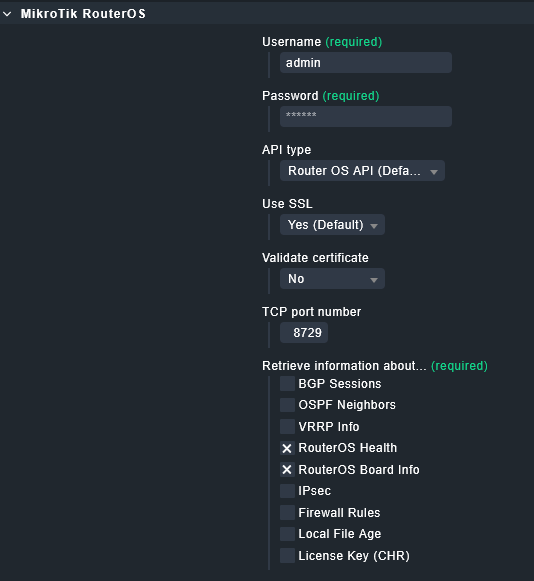
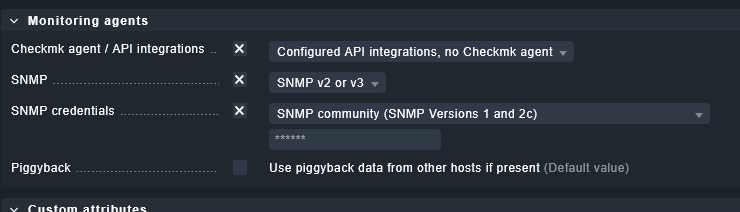
I think the problem is very easy to fix.

If you don’t explicitly select information to fetch. Then the special agent command build up crashes with an error message like this.

ontact groups:         all

WARNING: Config creation for special agent mikrotik failed on MIKRO: 'infos'
Agent mode:             No Checkmk agent, all configured special agents

Only if you select the “Retrieve information” checkbox then the special agent command can be build.

@bitwiz @andreas-doehler

You were both absolutely right. I just had to select a few checks in the “other integration rule” for MikroTik and then the plugin worked :slight_smile: . Many thanks for your fast answers!