FYI
CMK version: 2.2
OS version: Windows Server 2019
Error message:
ORA <SID> Instance - CRIT - Exception ‘Failed to compare two elements in the array.’ during check ‘c:\oracle\product\19.0.0.0\dbhome_1\bin\sqlplus.exe’ - Execution is blocked because you try to run unsafe binary as an administrator. Please, disable ‘Write’, ‘Modify’ and ‘Full control’ access to the the file by non-admin users. Alternatively, you can try to adjust the settings in ‘ORACLE databases (Linux, Solaris, AIX, Windows)’.
However, neither was there any change to the permissions of the binary nor did the mk_oracle.ps1 config change.
On further inspection/google research we stumbled over https://www.reddit.com/r/PowerShell/comments/1b1kj0h/getlocalgroupmember_on_entra_joined_device/ as the error ‘Failed to compare two elements in the array.’ seems to be pretty specific to the powershell cmd-let Get-LocalGroupMember.
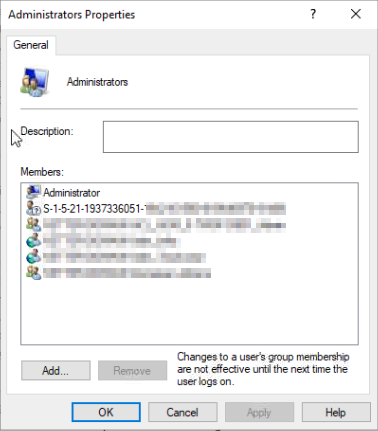
And it turns out, that indeed, there was a local Admin group on the windows server that had a member user who was deleted but remained an orphaned entry in the group member list:
the entry is pretty much ineffective and only shown with the S-ID and mk_oracle.ps1 continued to work right after removing the orphaned user.
already solved, so this is just in case someone else stumbles over this 
@marcel.arentz or @SergejKipnis FYI - when mk_oracle is moved to Rust, this is probably irrelevant, but just in case you guys ever run into this.